 Easy Tech Tuts
How to Get Instant Payment on ebay, get Paid Daily, Weekly, Monthly in Bank 2026 Easily
By Impran M NLast checked against official docs
How often eBay pays you is a setting most sellers never touch, sitting on the default schedule since the day they opened their account. You can switch between daily, biweekly, weekly, or monthly payouts, and the choice has a real effect on cash flow whether you're running a side account or a full store. This guide covers where the setting lives, what each option changes, and the tradeoff eBay itself flags before you save your choice.
Before you start
- An eBay seller account with a linked, verified bank account or debit card for payouts
01Open Payments from Seller Hub
From Seller Hub, go to the Payments area, sometimes labeled 'Manage payments and taxes.' This is the hub for everything related to how eBay pays you: payout method, payout schedule, tax documents like your Form 1099-K, and quick access to Tax invoices. It's separate from the Selling section you use to manage listings and orders. Payments is specifically about the money side.
02Open the Payouts settings
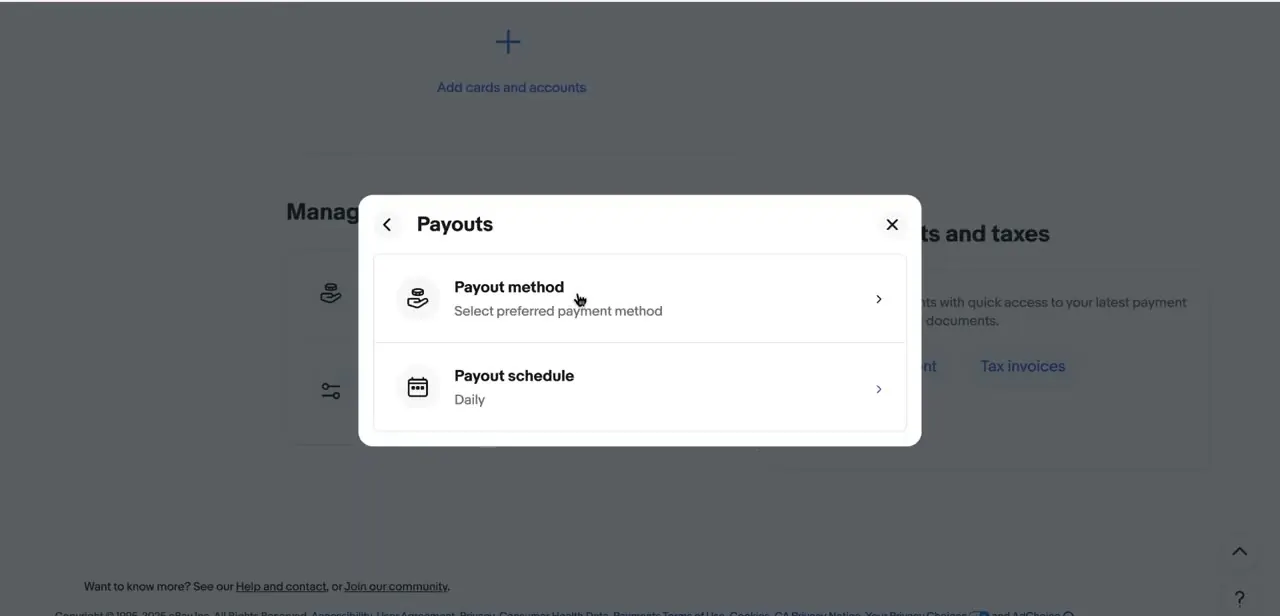
Inside the Payments area, look for the Payouts panel. It lists two settings side by side: Payout method, which controls where the money goes (your linked bank account or card), and Payout schedule, showing your current setting, Daily in this example. Click into Payout schedule to change how often eBay sends funds.
03Choose a schedule and weigh the tradeoff
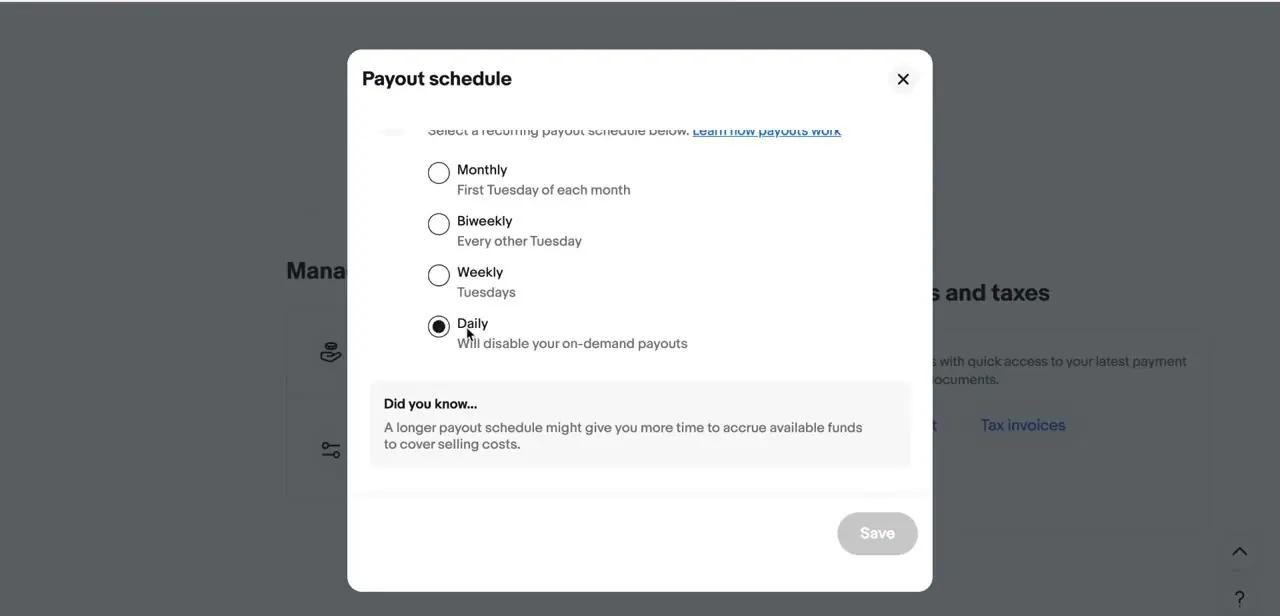
The Payout schedule screen lists four options: Daily; Weekly, initiated Tuesdays for the previous Monday-through-Sunday; Biweekly, initiated every second Tuesday; and Monthly, initiated the first Tuesday of the month. Selecting Daily comes with a specific note: it turns off on-demand payouts, since eBay only offers on-demand withdrawals to sellers on Weekly, Biweekly, or Monthly schedules, not to sellers already being paid daily. eBay flags the actual tradeoff on the same screen, under 'Did you know...': a longer schedule gives you more time to accrue funds before fees, refunds, and returns get deducted.
Daily gets cash into your account fastest, but it draws from a smaller, faster-moving balance instead of the cushion a Weekly or Monthly schedule builds up. Pick a radio button and save; the change takes effect from your next full payout cycle, not the one already in progress.
04Confirm your payout method is set correctly
Payout schedule only matters if the destination is right, so check Payout method in the same Payouts panel and confirm your linked bank account is current and verified. To switch banks or add a new account, use 'Add cards and accounts' in the broader Payments settings page instead of the schedule screen; these are two separate settings that happen to sit next to each other.
05Track pending payouts and processing times
When funds become 'Available for payout' depends on your seller history, not only your schedule. Sellers with an established track record (eBay's threshold is 10 or more completed sales totaling $150 or more in the last 5 years, with no more than 2 open cases in the last 12 months) typically see funds available about 48 hours after the buyer pays.
Newer or unproven sellers usually wait for delivery confirmation instead: roughly 2 days after delivery on an eBay shipping label, about 7 days after delivery on a third-party label, or up to 31 days from the order date if the item shipped without tracking. Check the Payments dashboard for pending payouts and any holds. A hold delays a payout even if your schedule says Daily, so a schedule change alone doesn't guarantee same-day money.
When it doesn't work
Funds show as "On hold" instead of available for payout
Why: eBay ties release to delivery confirmation for newer sellers and untracked shipments, not to the payment date.
Fix: Ship with tracking through an eBay label to get the shortest hold, and check the specific hold reason listed next to the transaction in the Payments dashboard.
There's no "Request payout" or on-demand option
Why: On-demand withdrawals only exist for Weekly, Biweekly, and Monthly schedules. Daily already pays out continuously, so eBay doesn't offer it there.
Fix: Switch to a non-daily schedule if occasional early access matters more than daily payouts, or wait for the next scheduled daily payout.
The schedule was changed but the very next payout still followed the old timing
Why: A schedule change applies from the next full payout cycle. A payout already in progress under the old schedule isn't affected retroactively.
Fix: Check the Payout schedule setting to confirm the new choice saved, then give it one full cycle before assuming it didn't take.
Frequently asked questions
How do I change how often I get paid on eBay?
Go to Seller Hub > Payments > Payouts > Payout schedule, and choose Daily, Weekly, Biweekly, or Monthly. The change applies from your next payout cycle after you save.
Does choosing Daily payouts mean I lose on-demand payouts?
Yes. eBay's Payout schedule screen notes directly that selecting Daily disables on-demand payouts, since that option exists only for sellers on Weekly, Biweekly, or Monthly schedules.
How fast are funds processed after a sale?
It depends on your seller history and shipping method more than on the sale date alone. Established sellers (10+ sales and $150+ total over the last 5 years) generally see funds available about 48 hours after the buyer pays. Newer sellers typically wait for delivery confirmation: about 2 days after delivery with an eBay label, about 7 days with a third-party label, or up to 31 days from the order date without tracking.
Can I track pending payouts?
Yes. The Payments dashboard in Seller Hub shows pending payouts and any active holds, along with the reason for a hold, so you can see what's coming and when.
What can cause payment delays even on a Daily schedule?
A hold on the transaction. Holds are more common for newer sellers, untracked shipments, or certain buyer disputes, and they delay a payout regardless of schedule.
Sources and last check
Click path and screens come from a recorded walkthrough. Payout schedule options, on-demand payout rules, and fund-availability timing were checked in September 2026 against eBay's official help pages on getting paid and transaction holds. That check corrected the original draft, which said funds become available after delivery or a return window for every seller; eBay's own documentation ties the standard timeline to seller history and tracking method, with established sellers seeing funds in about 48 hours regardless of delivery.
About the author

Impran M N
I've been hooked on technology for as long as I can remember — especially the new tools and AI apps that seem to land every other week. Easy Tech Tuts is where I write up whatever I've just worked out: I do the task in the real product, record the screen, and turn it into the guide I wish I'd found first.



