 Easy Tech Tuts
How to Delete Purchase History on Ebay, Hide & Unhide Easily 2026
By Impran M NLast checked against official docs
eBay doesn't let you permanently delete purchase history. That record stays with your account no matter what you do in the interface.
What you can do is hide individual orders from your default view within 60 days of buying them, which keeps a shared account tidy, keeps gift purchases from being noticed, and cleans up clutter without erasing anything eBay itself keeps on file. That 60-day window is the part most guides skip. This one covers where the hide action lives, what happens once an order falls outside that window, and how to bring a hidden order back.
01Open Purchase History from the My eBay menu
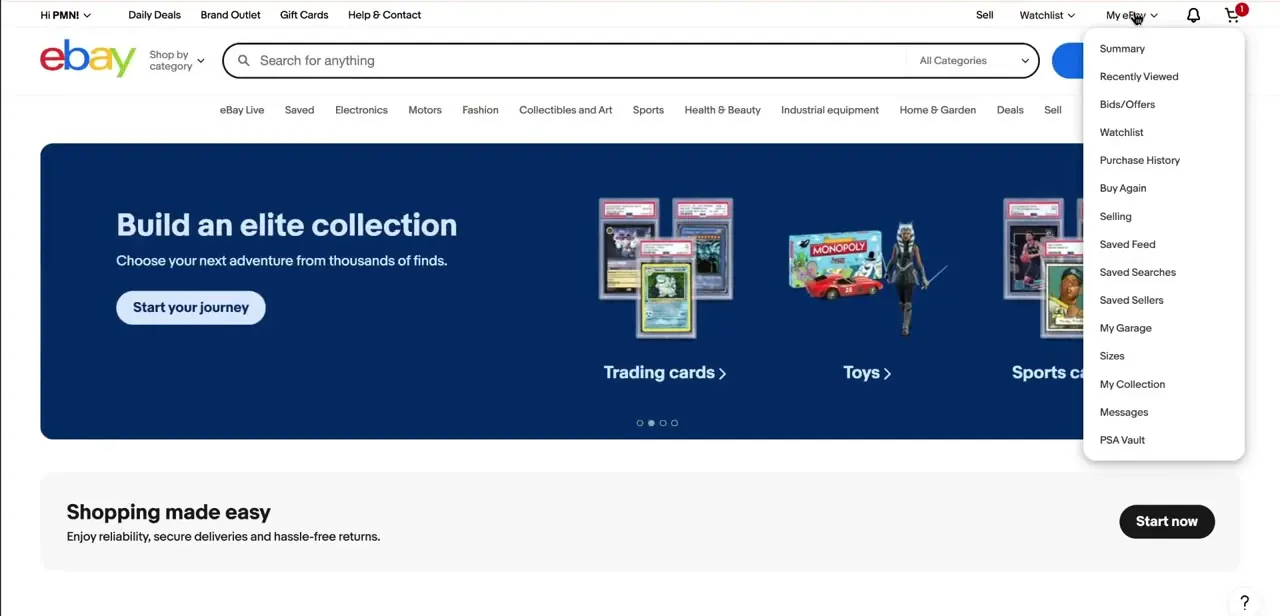
From any page on eBay, click My eBay in the top right to open the dropdown, which lists Summary, Recently Viewed, Bids/Offers, Watchlist, Purchase History, Buy Again, Selling, and several other account sections. Purchase History is the one that matters here. It's a separate page from Selling or Bids/Offers, and every order you've placed shows up there by default before any hiding happens.
02Hide an order, but only if you bought it in the last 60 days
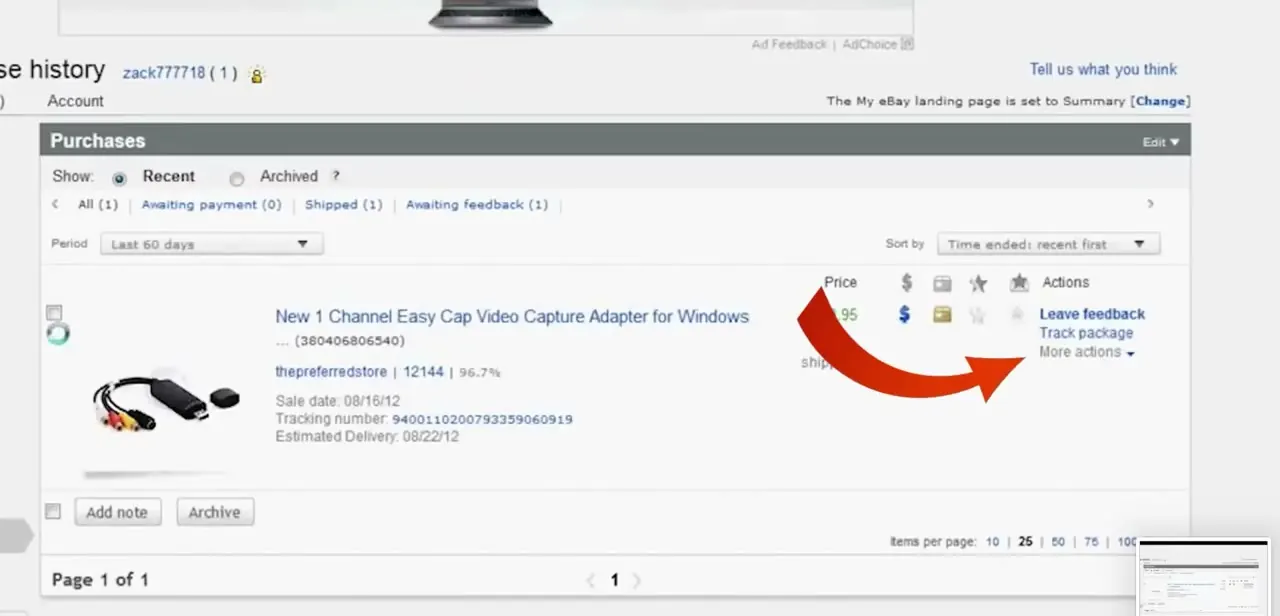
Inside Purchase History, each order row has an Actions column with options like Leave feedback and Track package, plus checkboxes for selecting one or more orders at once. eBay's own help pages describe the hide action as Hide order, reached from a More actions menu next to the order; some account views instead show an Archive button once an order is checked. Either way, the constraint is the same and it's the part most guides leave out entirely: eBay only lets you hide items bought in the last 60 days. There's no hide option on anything older.
03Understand what hiding actually does
Hiding or archiving an order doesn't touch eBay's own copy of the transaction. It changes what shows up when you look at your own account, nothing more. Sellers, buyers, and eBay's systems still keep the full record for returns, disputes, and tax purposes, so this is a privacy and organization tool for your view, not a way to make a purchase disappear from eBay's servers.
04Find a hidden order, or a purchase older than 60 days
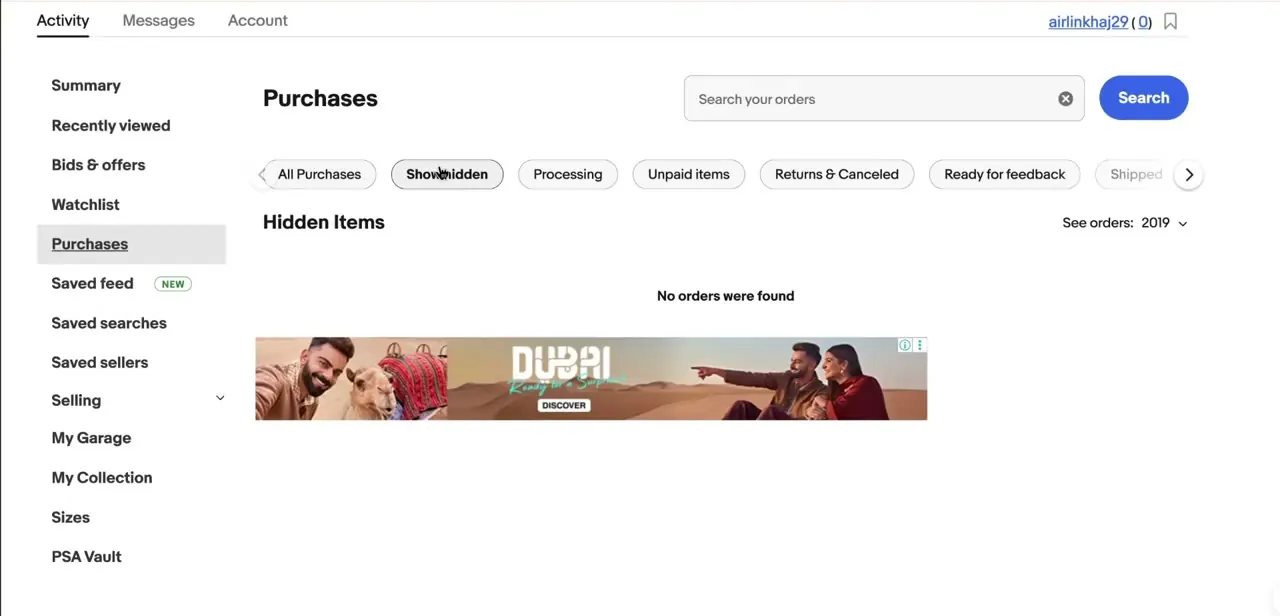
These are two different things. To see what you've hidden, switch to the hidden-orders view; on some account layouts that's a Show hidden tab that opens a Hidden Items section. To see a purchase from further back than the recent window, that's not the hidden-items view at all: use the "See orders from" control near the top of Purchase History and pick a year, which pulls up everything from that period regardless of whether it was ever hidden.
05Unhide an order when you need it back
From the hidden-orders view, select the order and choose Undo Hide (labeled Unhide on some layouts) to move it back into your main Purchase History view. Nothing about the order itself changes; tracking info, seller messages, and order details all come back with it.
06Use the same process on the mobile app
The eBay app mirrors this: open Purchases from the Account or Activity tab, tap the three-dot menu on an order, and choose Hide order. The same 60-day limit applies there too, and some users report the option missing on orders bought together with others from one seller, so it's not perfectly consistent order to order.
When it doesn't work
There's no Archive or Hide option on an old purchase
Why: Hiding only works for orders bought in the last 60 days. Anything older falls outside that window and can't be hidden this way.
Fix: Use the "See orders from" year filter to locate old purchases instead. They'll show up there even though they can't be hidden.
A hidden order is nowhere to be found
Why: Hidden orders move to a separate hidden-orders view rather than disappearing from the account.
Fix: Switch to the hidden-orders filter and use Undo Hide on the order to bring it back into the main list.
The seller or eBay support still references a purchase you hid
Why: Hiding only changes what you see in your own account. eBay, the seller, and eBay's systems keep the full record for returns, disputes, and tax purposes.
Fix: None needed; that's expected. Hiding is a personal-view tool, not deletion.
Frequently asked questions
Can I permanently delete purchase history on eBay?
No. eBay doesn't allow permanent deletion, but you can hide orders from the last 60 days so they no longer appear in your main Purchase History view.
Why can't I hide an order I bought a few months ago?
Hiding only applies to orders from the last 60 days. Once that window passes, the hide option isn't available for that order.
How do I unhide a purchase I archived?
Switch to the hidden-orders view in Purchase History and select Undo Hide (or Unhide) on the order to move it back to your main list.
Does hiding an order delete it from eBay's records?
No. Hiding only changes what's visible to you. The order stays on file for the seller, for returns, and for eBay's own records.
Does this work the same on the mobile app?
Yes, the eBay app has the same Hide order action and the same 60-day limit, reached from the three-dot menu on an order in Purchases.
Sources and last check
Click path and screens come from a walkthrough recorded in 2025. Re-checked against eBay's official help page in September 2026, which surfaced a constraint this guide previously left out entirely: hiding an order only works within 60 days of the purchase. Older orders can't be hidden at all, only located through the year filter. The official page describes the action as Hide order / Undo Hide; the recorded screens show it labeled Archive / Show hidden, which this version notes as a possible layout difference rather than picking one label as wrong.
About the author

Impran M N
I've been hooked on technology for as long as I can remember — especially the new tools and AI apps that seem to land every other week. Easy Tech Tuts is where I write up whatever I've just worked out: I do the task in the real product, record the screen, and turn it into the guide I wish I'd found first.



