 Easy Tech Tuts
How to Delete a Listing on Ebay, Remove Unsold or Draft Easily 2026
By Impran M NLast checked against official docs
Keeping an eBay seller account tidy sometimes means clearing out unsold items, saved drafts, or old listings you never finished, but eBay doesn't put a single "delete" button in one obvious place. Unsold, draft, and active listings each live in their own section of Seller Hub, and the option available to you depends on which one you're looking at: a live listing, for instance, can't be deleted at all until it's been ended. This guide starts from a signed-in eBay account and walks through where each listing type actually lives, what happens when you delete a draft versus an unsold item versus an active one, and the eBay rule that catches people trying to remove a listing that's still running.
Before you start
- An eBay seller account with the listing you want to remove already showing in Seller Hub
01Start from your signed-in eBay account
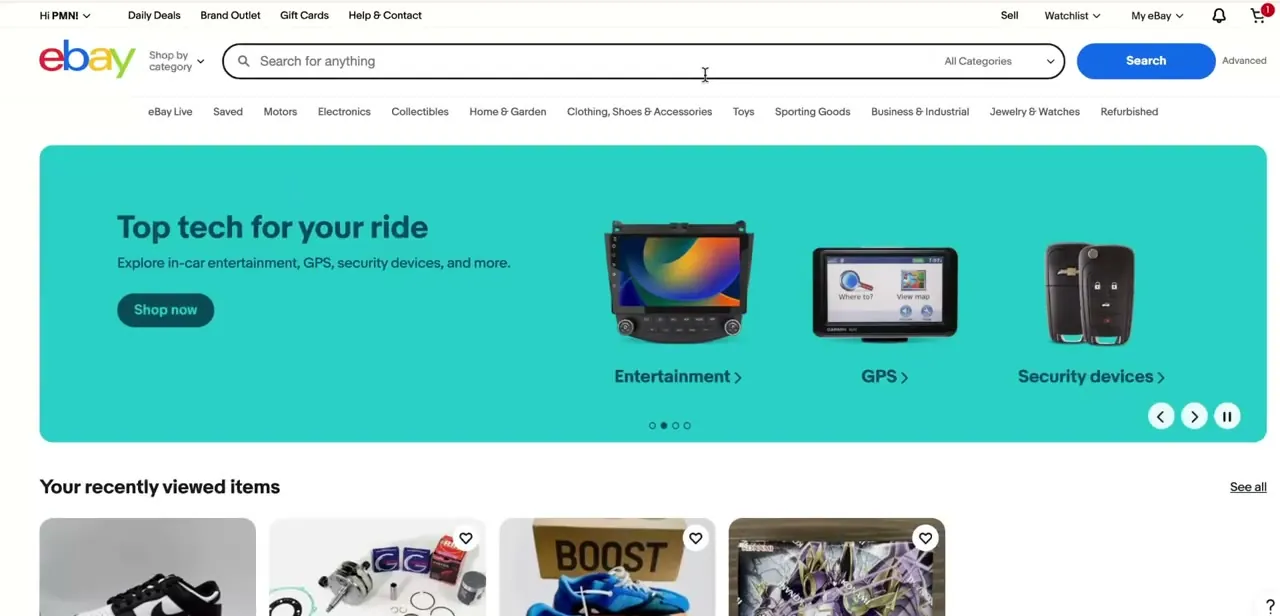
All listing management happens once you're signed in, from the account menu in the top navigation, the same bar that has Daily Deals, Gift Cards, Sell, Watchlist, and My eBay. Sell and My eBay are the two entry points here, and My eBay is generally the faster route into Seller Hub, where drafts, unsold items, and active listings are managed.
If you're not sure you're signed into the right account, check the greeting in the top-left corner before hunting for a listing to delete. Draft and unsold items are only visible to the account that created them.
02Find which Seller Hub section your listing is in
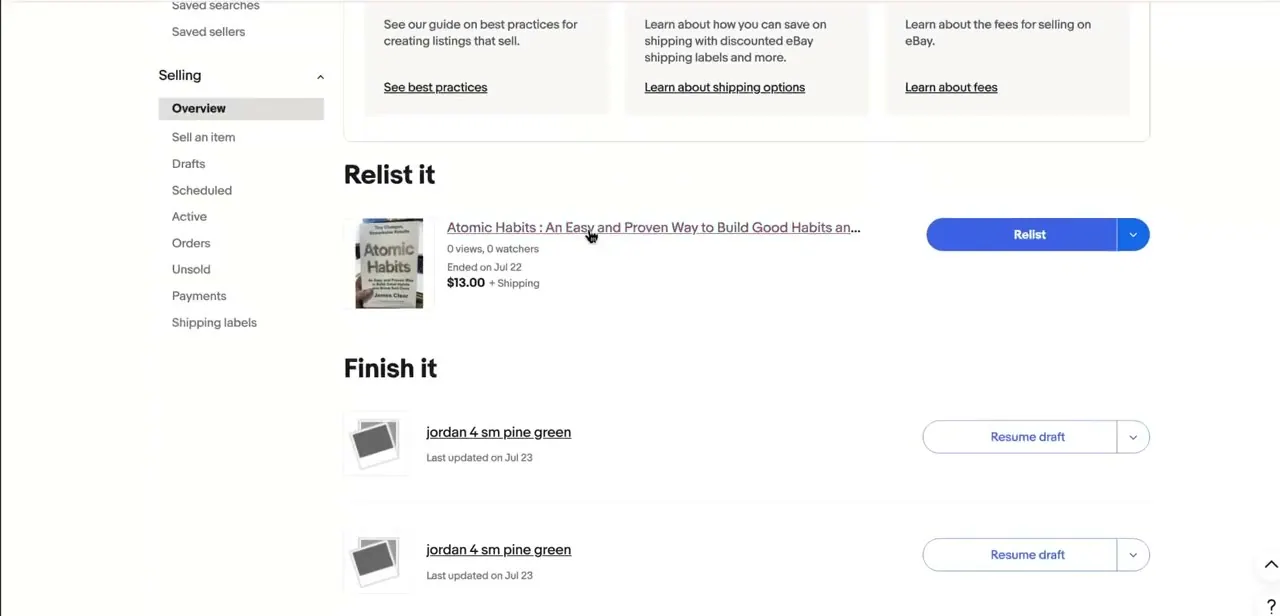
Seller Hub's Overview page gives a summarized preview of your Tasks, Orders, Listings, and Feedback, including a Relist it panel for items that ended without selling and a Finish it panel for drafts you started but never published. These panels are useful for spotting what needs attention, but the actual delete controls live in the dedicated section for each status.
The left-hand Selling menu splits listings by status: Drafts, Scheduled, Active, and Unsold are the ones that matter for cleanup. A draft you never published lives under Drafts, something that expired without selling lives under Unsold, and a listing that's currently live sits under Active. Click into the specific section matching what you're trying to remove.
03Delete a draft you never published
Open Drafts from the Selling menu. Tick the checkbox beside each draft you want gone, then use the Delete drafts control above the list.
Because a draft was never made active, removing it doesn't touch your account standing or seller metrics. eBay also deletes drafts on its own: one that hasn't been edited in 75 days gets removed automatically. If there's a draft you're not ready to finish but want to keep, open it and save it again to reset that clock, rather than leaving it untouched indefinitely.
04Delete or relist an item that ended unsold
Open Unsold from the Selling menu. Each row shows the item, its view and watcher count, and when it ended.
Tick the box beside a listing and you can either Relist it unchanged or delete it outright. Zero views and zero watchers usually means the listing or price needs a rework more than it needs deleting. An unsold listing that had bids before it closed without a sale is treated differently by eBay's own policy and generally has to stay in your history rather than being removed.
05End an active listing before you can delete it
eBay doesn't let you delete a listing while it's still live. The only action available under Active in the Selling menu is End item; once it's ended, it drops into Unsold, and only from there can you delete it for good.
Fixed-price listings can be ended at any time. Auctions are more restricted: with bids in place and fewer than 12 hours left on the clock, eBay's own policy requires the item to go to the highest bidder instead of letting you end it. If a listing already has watchers or bids, ending it rather than later deleting it keeps the history intact for your records and for anyone who'd already engaged with it.
| Status | Delete directly? | What to do instead |
|---|---|---|
| Draft (never published) | Yes | Drafts section: tick the box, click Delete drafts |
| Active (currently live) | No | End it first from Active, then delete it from Unsold |
| Unsold / ended | Yes | Unsold section: tick the box, choose Delete or Relist |
When it doesn't work
There's no delete option on my active listing
Why: eBay doesn't allow deleting a listing while it's live. Only ending it is available.
Fix: Click End item under Active. Once it moves to Unsold, delete it from there.
My auction listing won't end early
Why: It has bids and fewer than 12 hours remain, which under eBay's policy means the item must go to the highest bidder.
Fix: Let the auction close on its own. Early ending in this window isn't offered.
A draft I meant to finish has disappeared
Why: Drafts that go 75 days without being edited are deleted automatically.
Fix: Open and re-save drafts you want to keep periodically, or build a listing template instead of leaving a draft dormant.
Frequently asked questions
Can I delete a listing that's currently active?
Not directly. eBay only lets you end an active listing. Once it's ended, it appears under Unsold, and it can be deleted from there.
What's the difference between ending and deleting a listing?
Ending stops a live listing from being purchasable while keeping its history. Deleting removes the record, photos, and description permanently, and it's only available once a listing is a draft or is sitting in Unsold.
Can I delete a draft I never published?
Yes. Open Drafts in the Selling menu, tick the box beside it, and click Delete drafts. It never counted as active, so removing it doesn't affect your account.
Do unfinished drafts ever get removed on their own?
Yes. eBay automatically deletes a draft that hasn't been edited in 75 days.
Can I end an auction with bids whenever I want?
Only if more than 12 hours remain, or there are no bids yet. Inside the final 12 hours with bids in place, eBay requires the sale to go to the highest bidder instead.
Can I manage listings from the eBay mobile app, or only on desktop?
Both work. Drafts, Unsold, and Active are all available in the mobile app, though the layout is more condensed than the desktop Seller Hub.
Sources and last check
Click path and screens come from a walkthrough recorded in 2026. The ending-a-listing mechanics, including the 12-hour auction rule, were re-checked against eBay's official Help pages in September 2026, which corrected this guide's earlier framing of ending and deleting as two equal options for an active listing: eBay only allows ending a live listing, with deletion available afterward from Unsold. eBay's Help pages don't itemize the exact submenu names inside Seller Hub's Listings section, so those (Drafts, Unsold, Active) are carried over from the original recording rather than from official documentation.
About the author

Impran M N
I've been hooked on technology for as long as I can remember — especially the new tools and AI apps that seem to land every other week. Easy Tech Tuts is where I write up whatever I've just worked out: I do the task in the real product, record the screen, and turn it into the guide I wish I'd found first.



