 Easy Tech Tuts
How to Create Variations Listings on Ebay 2026 Easily
By Impran M NLast checked against official docs
Variation listings group similar products (different sizes, colors, or styles of the same item) under a single eBay listing instead of publishing a separate page for every version. Buyers get one clean listing with a dropdown to pick their option, and you get one set of reviews and one listing fee instead of several. This guide covers where the listing flow lives inside eBay's seller tools, the early steps you'll pass through before reaching the variation settings, and the limits and details that determine whether the listing gets accepted cleanly.
Before you start
- An eBay seller account with the listing category already decided. Most categories support variations, but not all of them do. Confirm this before you build out a full attribute grid.
01Start from My eBay Selling Overview
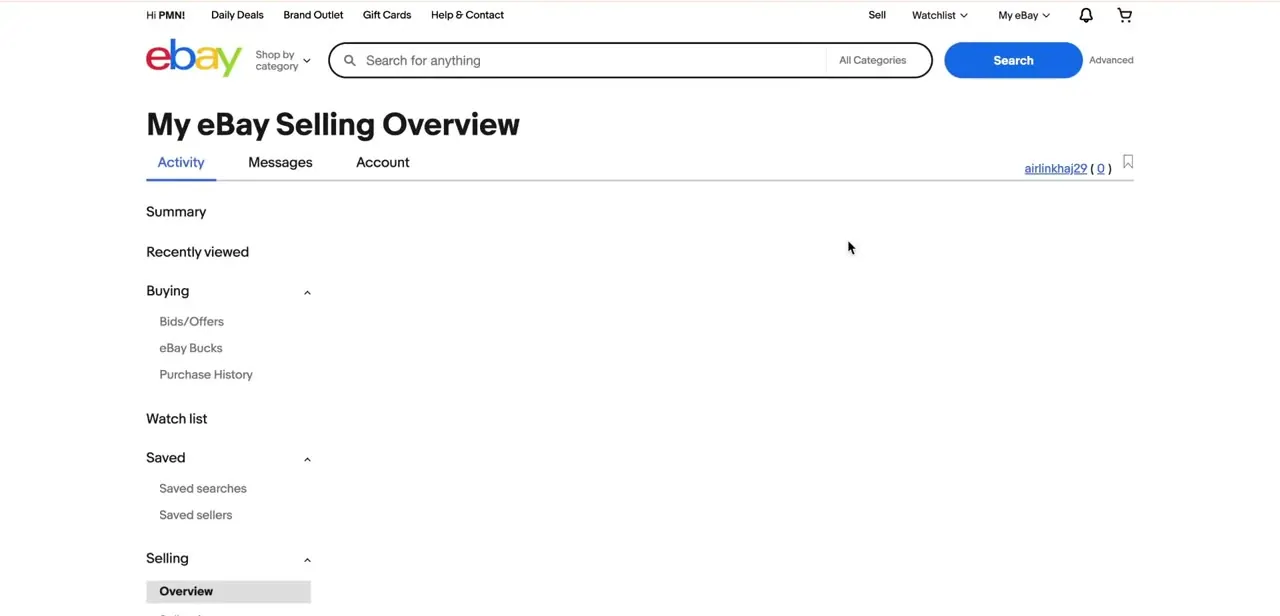
Log into your eBay account and go to My eBay, then Selling, which opens the Selling Overview page with tabs for Activity, Messages, and Account. This is your home base for everything related to listings (active, sold, and unsold), and it's also where you'll return to check on a variation listing after it's published. If you're setting this up for the first time, confirm your seller account details are complete here before starting a new listing, since an incomplete seller profile can interrupt the listing flow partway through.
02Begin a new listing and choose Sell
From the Selling Overview, use the Sell button to start a new listing. eBay will ask you to identify the product, either by searching for an existing catalog match or entering the details manually if nothing matches. Choosing an existing catalog listing as your starting point is usually faster and pulls in category-specific fields automatically, which matters once you get to variations: eBay needs to know what attributes (size, color, storage capacity) are valid for that category, and not every category supports variations at all.
03Work through the item condition and details
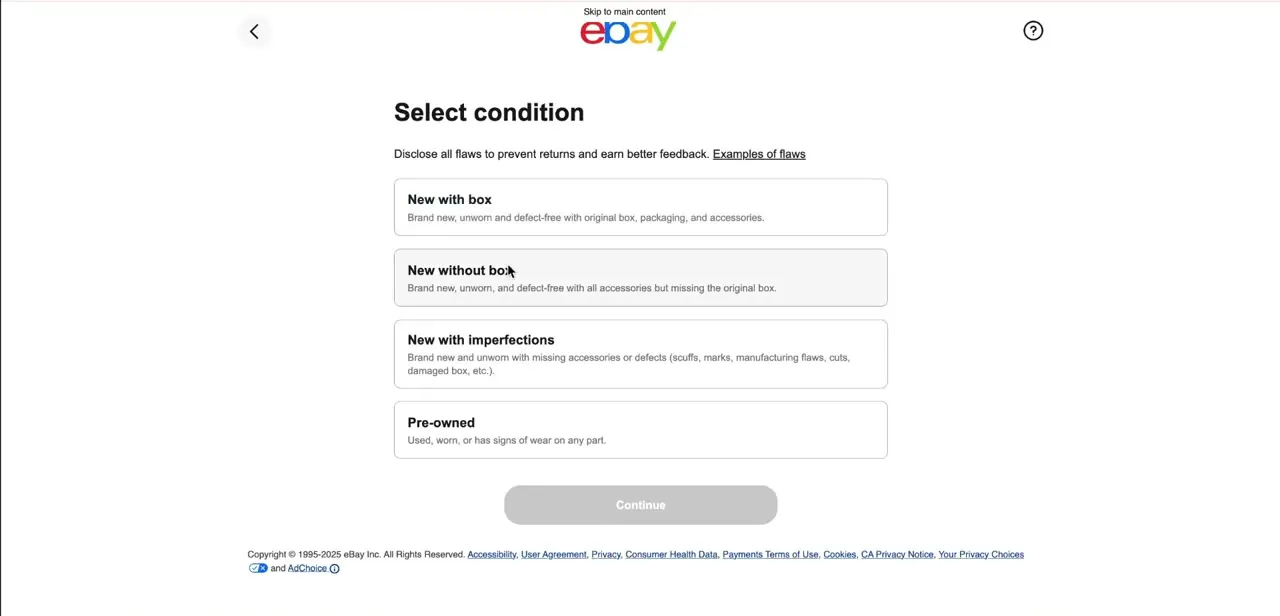
Early in the flow, eBay asks you to select condition, New with box, New without box, New with imperfections, or Pre-owned, along with a prompt to disclose any flaws to prevent returns and protect your feedback. This step applies to the listing as a whole before you branch into variations, so get the base details, title, and category right first. Changing the category later can reset variation attributes you've already configured.
04Turn on variations and define the attributes
Once you're past the basic item details, look for the option to add variations, usually labeled something like "Add variations" or a toggle near the item specifics section. Choose the attributes that genuinely differ between your units, such as size and color, and eBay generates a grid of every combination automatically.
Only pick attributes your category supports; adding a custom attribute eBay doesn't recognize for that category is one of the more common reasons a variation listing gets flagged. eBay caps a single listing at 5 variation attributes, up to 50 values each, and 250 total variation combinations. Most sellers never come close to those ceilings, but a product with many independent options (say, five sizes and twelve colors and several materials) can hit the combination limit faster than expected.
05Add photos and set price and quantity per variation
For each row in the variation grid, add a photo where the option is visually distinct. A red shirt needs its own image, but a size-only variation usually doesn't. eBay allows up to 24 photos per variation.
Fill in price and available quantity for every combination individually, since a size 10 in stock doesn't mean a size 6 is. Leaving any active variation with a blank price or no quantity is the other frequent cause of listings bouncing back for correction, so check the whole grid before moving on.
06Save as a draft or publish, and manage it from your drafts list
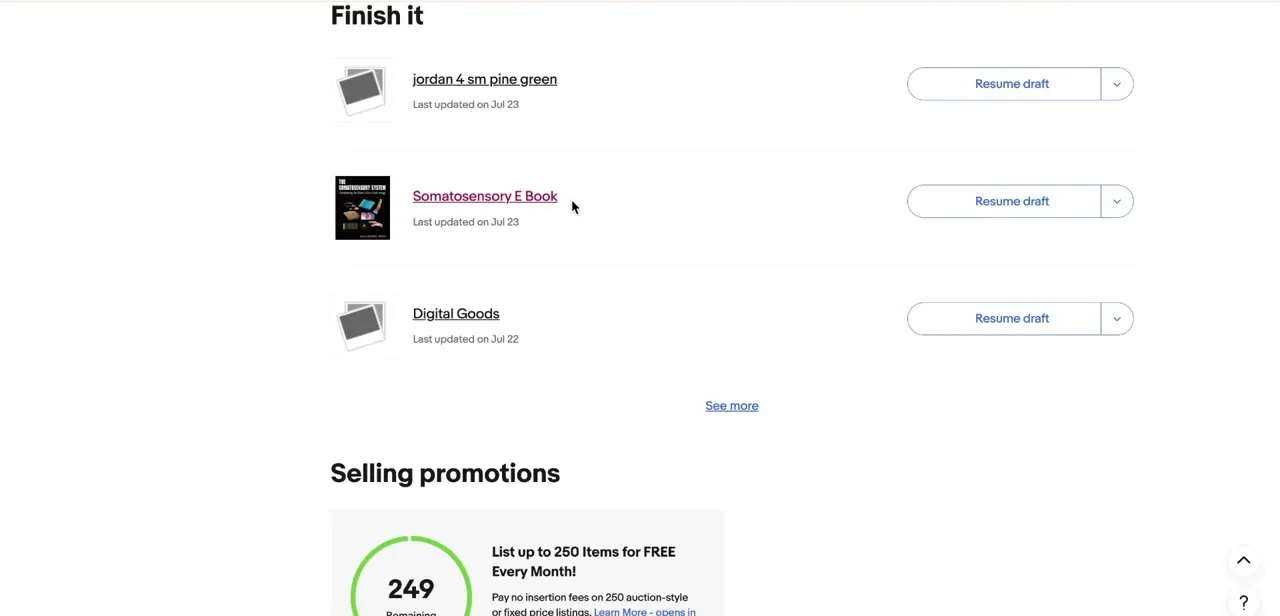
If you're not ready to publish, eBay saves the listing as a draft, and it shows up on your Selling Overview page with a "Resume draft" button and a last-updated date, alongside your other unfinished listings. This is useful for variation listings specifically because getting every combination's price and stock right can take more than one sitting. You can leave it, come back, and pick up exactly where the grid was left off instead of starting the attribute setup over.
When it doesn't work
There's no "Add variations" option for this listing
Why: Not every eBay category supports variation listings. If the category you picked doesn't, the option never appears regardless of the item details you've filled in.
Fix: Check whether the category supports variations before rebuilding the listing, or list the different versions as separate single-item listings instead.
The attribute I need isn't in the dropdown
Why: eBay only allows attributes it recognizes for that specific category, and caps a listing at 5 variation attributes with up to 50 values each.
Fix: Pick from the attributes eBay offers for the category instead of typing a custom one. If you're near the 5-attribute ceiling, combine less important distinctions into the listing description instead of adding a new attribute.
The listing won't publish and flags missing information
Why: One or more active variations in the grid has a blank price or no quantity set.
Fix: Scroll through every row of the grid, not just the first few, and fill in price and quantity for each combination before publishing.
A product with many size and color combinations won't all fit
Why: eBay limits a single listing to 250 total variation combinations.
Fix: Split the product into two listings by a major attribute (for example, by category of material or by a broad size range) if the true combination count goes over 250.
Frequently asked questions
Can I set different prices for different variations in one listing?
Yes, eBay allows each variation combination to have its own price and stock level within the same listing.
Is there a limit to how many variations I can add?
Yes. eBay allows up to 5 variation attributes per listing, up to 50 values per attribute, and up to 250 total variation combinations, all at no extra fee.
What kinds of products work best with variation listings?
Items like clothing, electronics, and accessories that naturally come in different sizes, colors, or styles are well suited to variation listings.
Why might my variation listing get rejected?
Common causes include using attributes eBay doesn't support for that category, exceeding the 5-attribute or 250-variation limits, missing prices or quantities on some combinations, or images that don't clearly match each variation option.
Do all eBay categories support variations?
No. Most categories are set up for variations, but not every one is. Confirm your category supports them before building the full grid.
Can I finish a variation listing later if I don't complete it in one sitting?
Yes. eBay saves an in-progress listing as a draft on your Selling Overview page, where you can resume it later instead of rebuilding the variation grid from scratch.
Sources and last check
The Selling Overview page, the Select condition screen, and the drafts list with Resume draft buttons come directly from screenshots of the actual listing flow. The attribute, value, variation-count, and photo-per-variation limits were checked against eBay's official help page on listings with variations in September 2026 and added, since the original article never stated any numeric limits despite describing the grid and the ways a listing gets flagged.
About the author

Impran M N
I've been hooked on technology for as long as I can remember — especially the new tools and AI apps that seem to land every other week. Easy Tech Tuts is where I write up whatever I've just worked out: I do the task in the real product, record the screen, and turn it into the guide I wish I'd found first.



