 Easy Tech Tuts
How to Change Country on Ebay or Change Region in Shipping, Ship from, Return Address 2026 Easily
By Impran M NLast checked against official docs
If you've moved to a different country, eBay doesn't have one single "country" switch. Your registration address, shipping address, ship-from address, and return address are separate settings, each updated on its own.
Miss one and you end up with mismatched shipping rates or returns going to the wrong place, even after you think you've relocated your account. One of those settings can't be changed once it's locked to a country, which is worth knowing before you go looking for it. This guide follows the Addresses page in the order that matters, and flags that restriction where it comes up.
01Open My eBay from the account menu
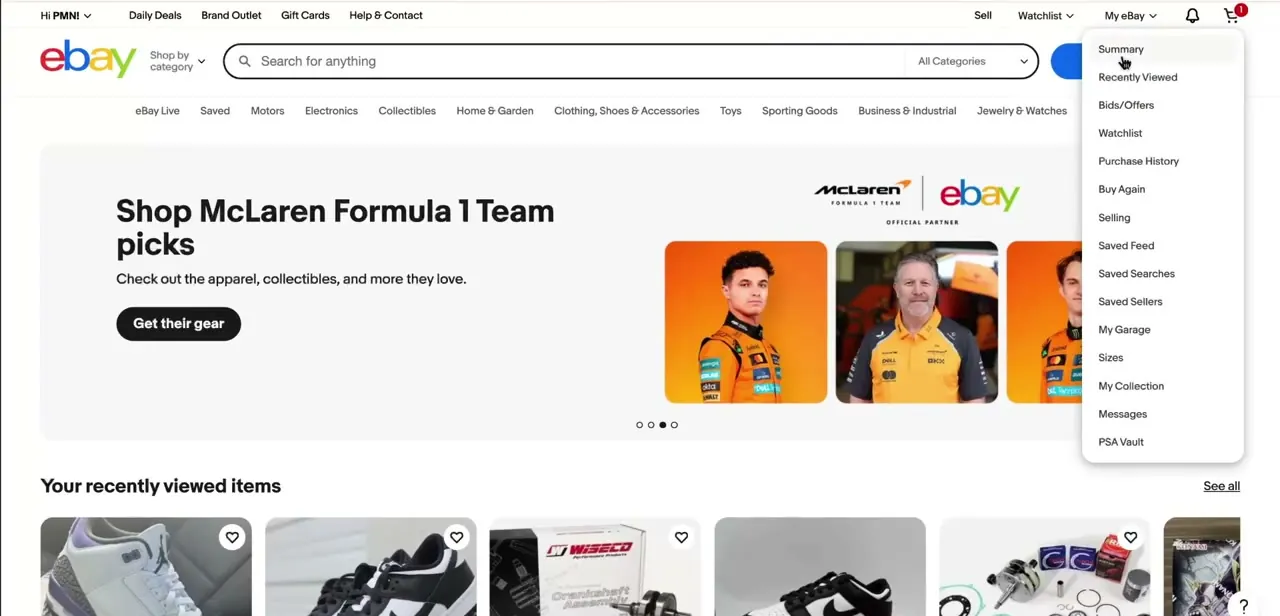
From the eBay homepage, click your account greeting near the top left to open the My eBay dropdown. It lists Summary, Recently Viewed, Bids/Offers, Watchlist, Purchase History, Selling, and more, but address settings aren't in this dropdown at all. Skip the shopping-focused links and head into account settings instead.
02Go to Account → Addresses
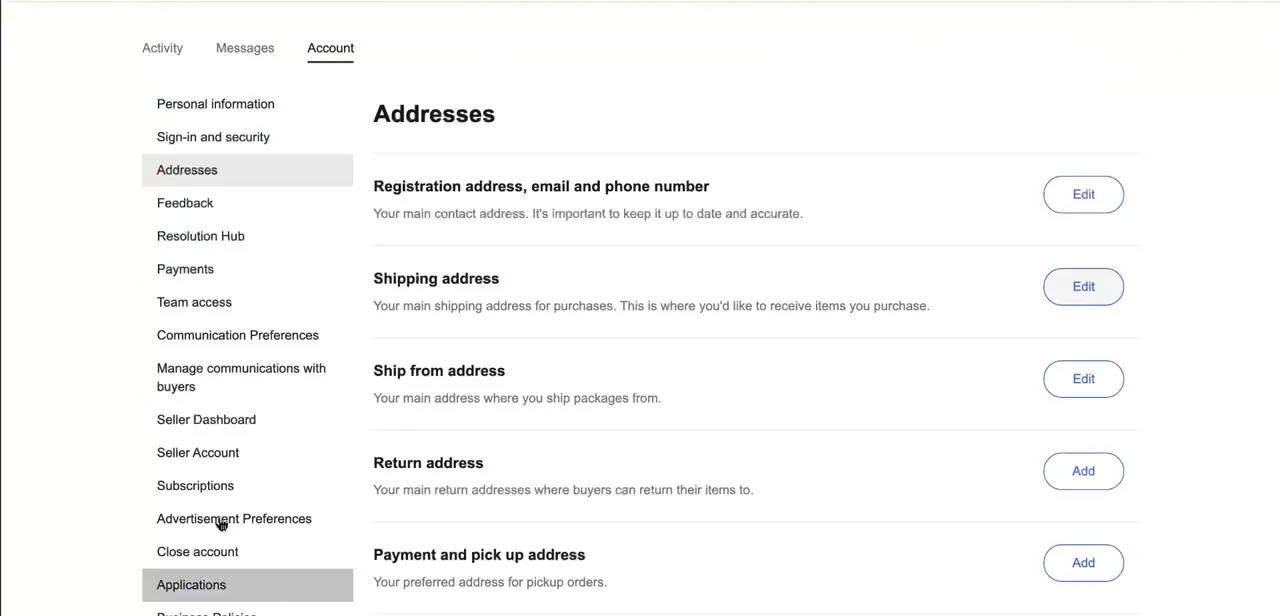
Account settings has three tabs at the top: Activity, Messages, and Account. Under Account, the left-hand list includes Personal information, Sign-in and security, and Addresses.
Click Addresses. This one page holds every location-related setting: Registration address (the business address tied to your account), Shipping address (where your own purchases as a buyer get delivered), Ship from address (where your sold items ship from), Return address (where buyers send returns), and Payment and pickup address. Each has its own Edit or Add button on the right.
03Update your Ship from address first
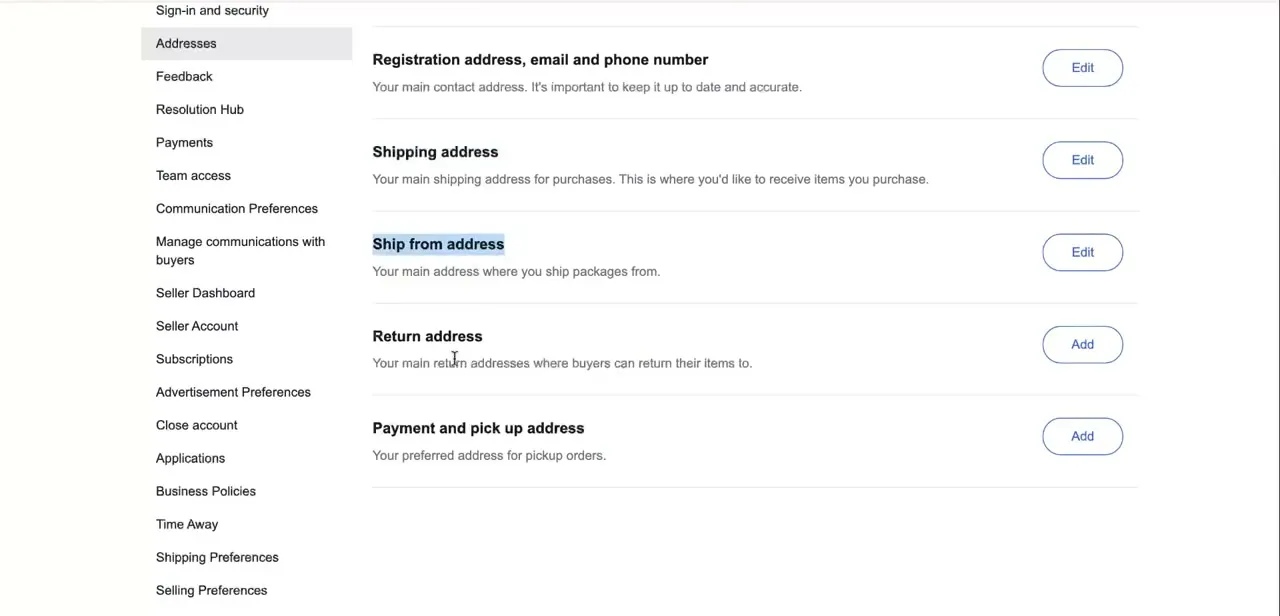
If you sell on eBay, Ship from address is the setting that drives what buyers see. eBay uses it to calculate the shipping costs and delivery estimates shown on your listings, so an outdated one means every active listing is quoting the wrong numbers. Click Edit next to Ship from address and enter your new country and full address. Of everything on this page, this is the closest thing eBay has to a "change my selling country" switch.
04Set or update your Return address
Return address often shows an Add button instead of Edit, because plenty of sellers never set one. eBay's own return-policy documentation describes several possible fallback addresses (registration address, ship-from address, or whichever address it decides is closest to the buyer), not one guaranteed default. If you want returns going to a specific place after a move, add or edit this address explicitly instead of assuming eBay will route it correctly on its own.
05Registration address: the one field you can't move to a new country
eBay's help documentation is direct about this: you cannot change the country of your registration address. Ship from and Return cover the selling side of a move, but the account's registration country stays fixed once it's set, since it's tied to legal and tax reporting for the account.
If you've genuinely relocated to a new country, eBay's documented path is to update whatever registration-address fields remain editable, then contact eBay Customer Service on the eBay site for your new country and ask them to move your account's "Site of Registration." Some sellers open a new account registered to the new country instead. Shipping address, by contrast, has no such lock and updates like any other field.
06Verify your live listings reflect the change
After updating Ship from address, open a couple of your active listings and check the shipping section. The location and estimated delivery times should reflect the new address, not the old one.
Listings don't always refresh instantly in every view, so check at least one before assuming buyers are seeing accurate information. If something still looks off after a few minutes, re-saving the Ship from address usually forces the update through.
When it doesn't work
eBay won't let me change the country on my registration address
Why: This isn't a bug. eBay locks the country on a registration address once it's set, tied to the account's legal and tax reporting.
Fix: Update Ship from and Return addresses for the selling side of the move, then contact eBay Customer Service on the site for your new country to request a change to your account's "Site of Registration." Otherwise, a new account registered to the new country is the alternative eBay describes.
Buyers still see the old shipping estimates after I updated Ship from address
Why: Listing pages don't always refresh the shipping calculation the instant the address is saved.
Fix: Re-save the Ship from address, then check a live listing again after a few minutes.
A return arrived at the wrong address
Why: No return address was set explicitly, so eBay applied one of its own fallback rules instead of the address you expected.
Fix: Add a return address on the Addresses page instead of leaving it blank, so returns aren't routed by a rule you didn't choose.
Frequently asked questions
Why does my ship-from address matter on eBay?
eBay uses it to calculate the shipping rates and delivery estimates shown to buyers on your listings, so an outdated one leads to inaccurate pricing and delivery windows.
Can I change the country on my eBay registration address?
No. eBay's help documentation states you cannot change the country of your registration address once it's set. To move your account to a different country's eBay site, you contact eBay Customer Service in the new country about changing your "Site of Registration," or open a new account there.
Is there one setting to change my country on eBay?
No. Location lives across several separate settings on the Addresses page: Registration address, Shipping address, Ship from address, and Return address, and the registration country can't be changed at all. Updating one doesn't update the others.
What happens if my return address is outdated or blank?
Buyers can end up sending returns to the wrong place, which delays refunds and invites disputes. eBay's return rules fall back to registration address, ship-from address, or whichever address it judges closest to the buyer, not one fixed default, so an unset return address leaves that choice to eBay.
Where exactly do I find these address settings?
From My eBay, go into Account settings and select Addresses from the left-hand menu. All five address types are listed on that one page with Edit or Add buttons.
Who needs to update these settings most?
Sellers relocating to another country or running multiple shipping locations benefit most, since accurate ship-from and return addresses affect buyer trust and shipping-cost accuracy directly.
Sources and last check
Click path and screens come from a walkthrough recorded on the Addresses page. The address-type definitions and the registration-country restriction were re-checked against eBay's official help pages in September 2026. That check corrected this guide's earlier advice to update the registration address after a move: eBay's own documentation states the country on a registration address cannot be changed. It also replaced an unverified claim about where unset returns default to with eBay's documented set of fallback rules.
About the author

Impran M N
I've been hooked on technology for as long as I can remember — especially the new tools and AI apps that seem to land every other week. Easy Tech Tuts is where I write up whatever I've just worked out: I do the task in the real product, record the screen, and turn it into the guide I wish I'd found first.



