 Easy Tech Tuts
How to Cancel a Sale on Ebay as a Seller & Refund the Buyer 2026 Easily
By Impran M NLast checked against official docs
Sometimes a sale needs to be canceled after payment has already gone through: an item turns out to be out of stock, a listing had the wrong address on file, or the buyer asks to back out. eBay has a dedicated seller-side cancellation tool that refunds the buyer automatically once you use it, but the reason you pick matters more than most sellers realize. Only one of the four official reasons counts against your account. This guide covers where the cancellation tool lives, the exact reasons eBay lets you choose from, and how to keep your seller performance clean afterward.
01Open your order in Seller Hub or My eBay
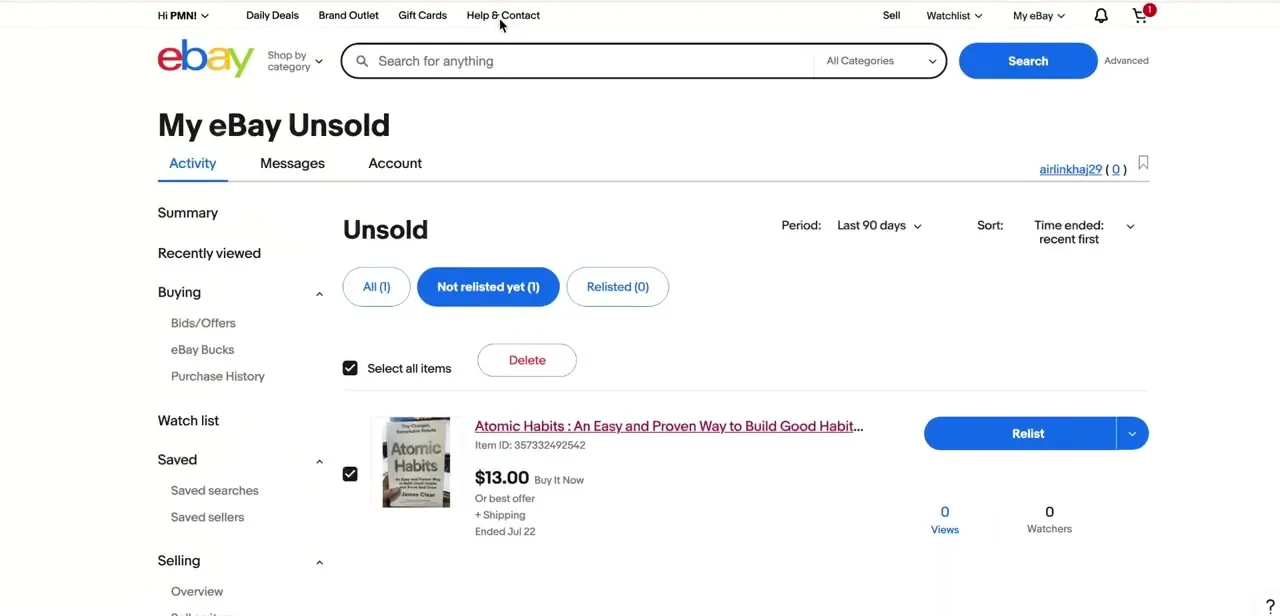
Sign in and go to My eBay or Seller Hub, whichever you use to manage listings. My eBay's Activity tab splits your listings into Sold, Unsold and Active.
Sold is where a completed order you need to cancel lives; Unsold, pictured here, is where listings that ended without a buyer sit with options to relist or delete. Getting used to this layout makes the order itself faster to find, especially if you're checking whether a listing sold before deciding to cancel it.
02Open eBay's cancellation tool
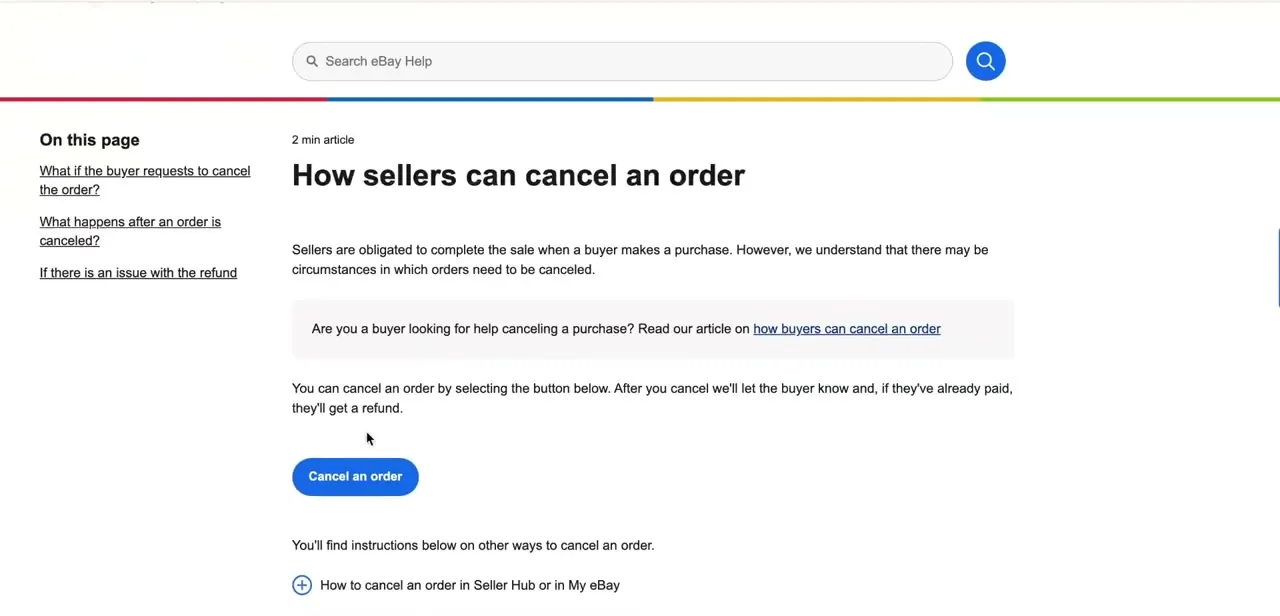
eBay's Help Center carries a page titled "How sellers can cancel an order," and unlike most help articles it puts a working Cancel an order button directly on the page instead of just describing where to click. The page states plainly what happens next: eBay notifies the buyer, and if they've already paid, they're refunded automatically as part of the cancellation. You can also reach the same flow from inside Seller Hub or My eBay: open the order, then choose Cancel order from More actions.
03Pick the reason that matches, not the one that's easiest
eBay gives sellers four cancellation reasons: Buyer asked to cancel, Problem with buyer's address, Out of stock or item is damaged, and Buyer hasn't paid (this last one only unlocks once 4 full days have passed since the sale). Only one of these leaves a mark: canceling as out of stock or damaged registers as a transaction defect against your account.
The other three don't, and a non-payment cancellation also removes any feedback tied to the order. There is no separate "pricing mistake" reason. If a listing had the wrong price, your real options are to honor the sale or cancel it as out of stock, defect included.
04Submit and confirm the refund
Submit the cancellation and check that the order's status shows the refund as issued. eBay marks it issued immediately on its own side even though a bank or card can take a few business days to post it, so don't be surprised if a buyer asks where the money is before it lands. If the listing was a single-quantity Buy It Now item, eBay relists it automatically unless you uncheck "Relist item?" during the cancellation.
05Tell the buyer, then check your account
A short message explaining why the order was canceled heads off a confused buyer opening a dispute before the refund even lands. Afterward, eBay tracks your cancellation history as part of seller performance, but not every reason weighs the same: out-of-stock and damaged-item cancellations are the ones that actually count as defects, so a string of those is worth investigating (a supplier problem, a listing quantity that's out of sync) rather than treated as routine.
| Reason | When you'd use it | Counts as a transaction defect? |
|---|---|---|
| Buyer asked to cancel | Buyer requested it and you're confirming | No |
| Problem with buyer's address | Address at checkout is wrong or undeliverable | No |
| Out of stock or item is damaged | You can't fulfill the sale | Yes |
| Buyer hasn't paid | 4+ full days have passed with no payment | No — feedback on the order is also removed |
Based on eBay's official order cancellation policy, checked September 2026.
When it doesn't work
The Cancel order option isn't available for an order
Why: eBay's cancellation window runs 30 days from the sale, and it also closes once the item has shipped.
Fix: Use Seller Hub's return or refund tools instead if the order has already shipped or is past 30 days; cancellation only works before then.
The listing pops back up for sale right after you cancel
Why: eBay automatically relists single-quantity Buy It Now items unless you opt out during cancellation.
Fix: Uncheck "Relist item?" in the cancellation flow if you don't want the listing live again.
A cancellation shows up as a transaction defect
Why: Out of stock or item is damaged is the one reason, out of the four available, that counts against seller performance.
Fix: Use Buyer hasn't paid, Problem with buyer's address, or Buyer asked to cancel when one of those genuinely applies; none of the three carries a defect.
The buyer says they haven't received their refund
Why: eBay shows the refund as issued the moment you cancel, but the buyer's bank or card issuer can take a few business days to post it.
Fix: Confirm the refund status in Seller Hub, then let the buyer know to allow a few business days before it appears on their statement.
Frequently asked questions
Will canceling a sale hurt my eBay seller rating?
It depends on the reason, not the act of canceling itself. Out of stock or item is damaged is the only one of eBay's four cancellation reasons that registers as a transaction defect. Buyer hasn't paid, Problem with buyer's address, and Buyer asked to cancel don't.
What cancellation reasons can I actually choose from?
Four: Buyer asked to cancel, Problem with buyer's address, Out of stock or item is damaged, and Buyer hasn't paid. The last one only becomes selectable after 4 full days without payment.
How long do I have to cancel an order?
Up to 30 days from the date of sale, and only before the item ships. After either of those, use Seller Hub's return or refund tools instead.
How fast does the buyer get their money back?
eBay issues a full refund automatically the moment the cancellation goes through, and it shows as issued on eBay's side right away. The buyer's bank or card issuer can still take a few business days to post it.
What if I listed the item at the wrong price?
There's no dedicated pricing-error reason. You either honor the sale at the listed price, or cancel it as out of stock, which does count as a transaction defect.
Can the buyer cancel the order instead of me?
Buyers can request a cancellation, and you get 3 days to accept or decline it. Either way, eBay removes any negative or neutral feedback tied to that request.
Sources and last check
Click path and screens come from a recorded walkthrough. The cancellation reasons, defect rules, 30-day window, unpaid-item threshold, and refund timing were checked against eBay's official cancellation help page and order cancellation policy in September 2026. That check removed a claimed "pricing mistake" cancellation reason that doesn't exist in eBay's flow, and corrected the earlier claim that frequent cancellations for any legitimate reason hurt seller standing — only the out-of-stock/damaged reason registers as a transaction defect.
About the author

Impran M N
I've been hooked on technology for as long as I can remember — especially the new tools and AI apps that seem to land every other week. Easy Tech Tuts is where I write up whatever I've just worked out: I do the task in the real product, record the screen, and turn it into the guide I wish I'd found first.



