 Easy Tech Tuts
How to Add Tracking Number to Ebay, Add Order Tracking on Sold & Shipped Product 2026 Easily
By Impran M NLast checked against official docs
Adding a tracking number after you ship an item confirms the sale for the buyer and protects you if a delivery dispute ever comes up. It's a two-minute task once you know where eBay hides it, but the option sits a few clicks deep inside the sold order itself, not on the main Selling dashboard. This guide walks through finding the order, attaching the carrier and tracking number, and what happens automatically once you save it, whether you're using classic My eBay or the newer Seller Hub.
01Open My eBay and go to Selling
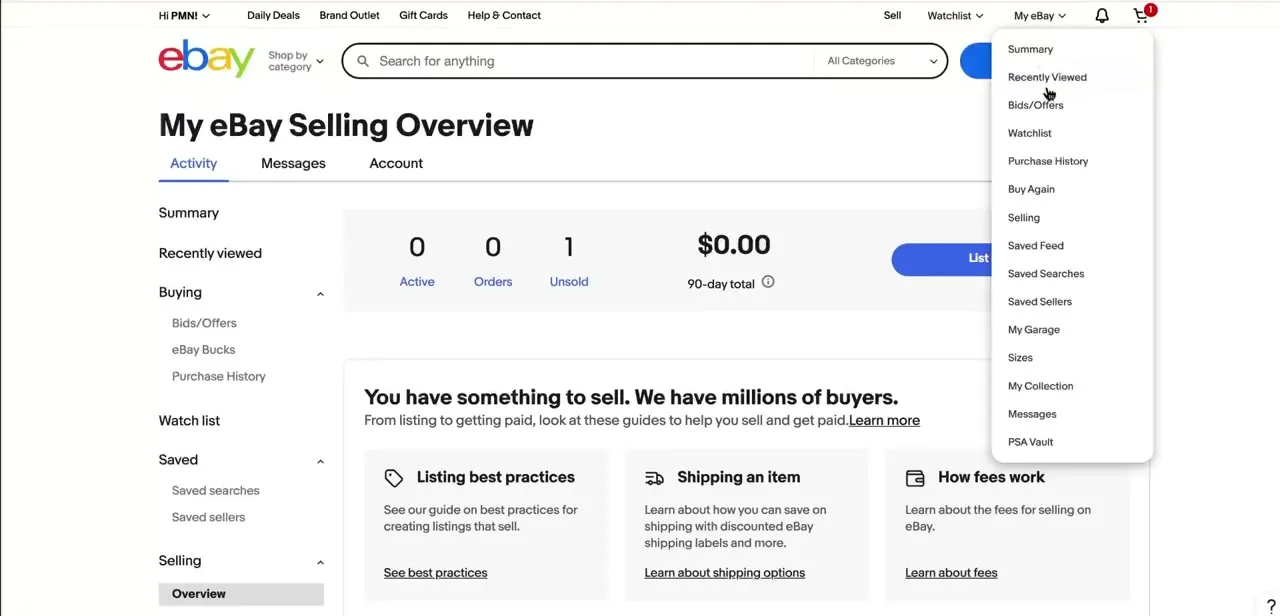
From any eBay page, click the My eBay dropdown near the top right of the screen. It opens a full list of account sections: Summary, Bids/Offers, Watchlist, Purchase History, and further down, Selling.
Choosing Selling takes you to your Selling Overview, which shows quick counts for Active listings, Orders, and Unsold items along with a 90-day sales total. If your account defaults to Seller Hub instead of classic My eBay, the same order sits under Orders there; the tracking option just lives under a different menu name, covered in the troubleshooting section below.
02Find the sold, shipped item in your orders
From Selling, switch to the Orders tab or the Sold section, which lets you filter by status: Awaiting shipment, Shipped, Awaiting feedback, and so on. Locate the item you've already packed and dropped off or scheduled a pickup for. If you're managing several sales at once, sorting by 'Time ended: recent first' keeps the newest orders at the top so you're not hunting through weeks of history for the one you just shipped.
03Open the order's action menu
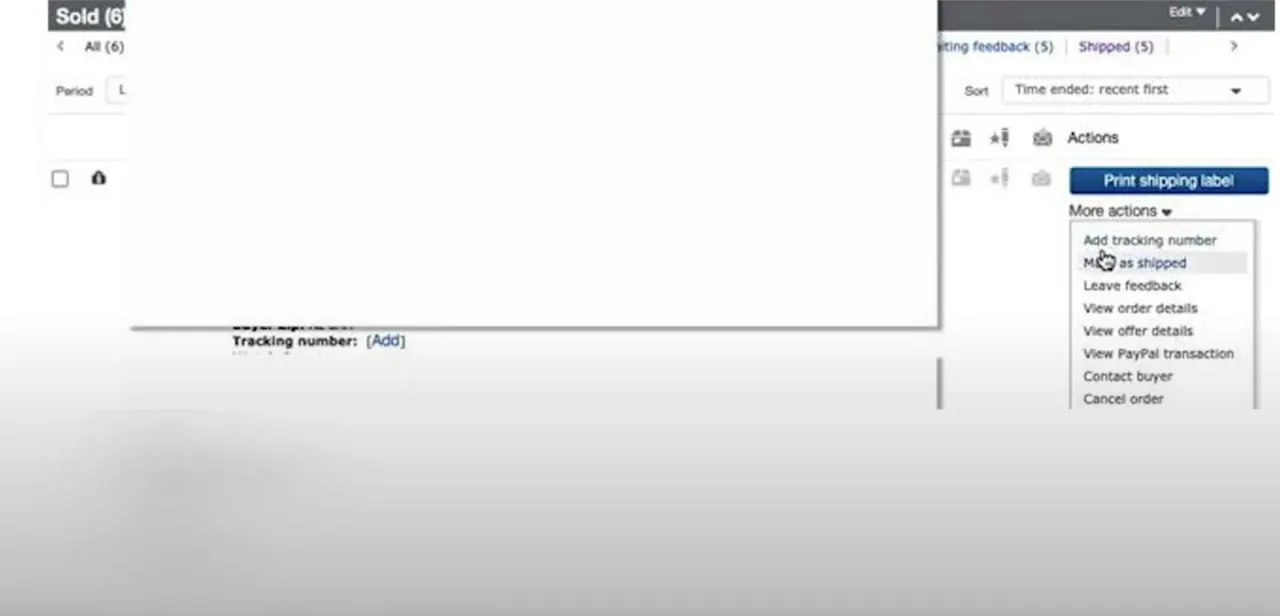
Each sold order has an Actions column with a 'More actions' dropdown. Opening it reveals what you can do to that order: Add tracking number, Mark as shipped, Leave feedback, View order details, Contact buyer, and Cancel order.
Older screenshots and guides sometimes show a 'View PayPal transaction' entry here too; eBay retired PayPal as a seller payout method in 2021 when Managed Payments became the standard, so that option no longer appears for most accounts. The order line itself also shows a direct 'Tracking number: [Add]' link next to the buyer's details, which is often the faster route if you can see it on screen already.
04Select the carrier and enter the tracking number
Clicking Add tracking number opens a small form asking for the shipping carrier (USPS, FedEx, UPS, DHL, or another courier from the dropdown) and a field for the tracking number itself. Type or paste the number exactly as the carrier gave it to you; eBay checks it against the carrier's own tracking data, so a mistyped digit or wrong carrier means the buyer sees no movement even though the package is in transit. eBay allows up to six tracking numbers on a single order, which matters if you split one sale across more than one box. Save the entry once the fields are filled in correctly.
05Let eBay notify the buyer automatically
Once you save valid tracking details, eBay updates the order status to shipped and emails the buyer the carrier and tracking number, no extra step needed. Uploading tracking within your handling time is also what qualifies you for eBay's Money Back Guarantee protection against 'item not received' claims, which is the real reason to add it promptly instead of batching it for later; buyers who can see a package moving are far less likely to open a case.
06Edit tracking if the details change
If you picked the wrong carrier, mistyped the number, or reshipped the item, go back into the same order and the action menu will now show an edit option in place of Add. Update it the same way; eBay refreshes the buyer-facing tracking link automatically once you save the correction.
07Handle late tracking numbers and mobile updates
If a courier hasn't issued a number yet at drop-off, mark the item as shipped so the buyer isn't left with an unshipped order on their end, then come back and add the tracking number once the carrier provides it. The eBay mobile app mirrors this flow: open Selling, find the order, and Add tracking number is available from the same order details screen, with the option to scan the label's barcode or QR code instead of typing the number. Treat tracking as part of the shipping process itself, not an optional follow-up.
When it doesn't work
The tracking number is saved but shows no movement on eBay
Why: eBay checks the number you entered against the selected carrier's own tracking data. A mistyped digit or the wrong carrier picked from the dropdown produces a saved number that never matches a real shipment.
Fix: Re-enter the number exactly as printed on the shipping label and confirm the carrier dropdown matches whoever is actually delivering it.
There's no 'Add tracking number' action for an order in Seller Hub
Why: Seller Hub uses a different menu than classic My eBay. Tracking is added from the Paid and shipped tab, not from a 'More actions' dropdown.
Fix: In Seller Hub, open Paid and shipped, check the box next to the order, then use the Dispatch dropdown and select Add tracking number.
An old guide or screenshot shows 'View PayPal transaction' that isn't there anymore
Why: eBay discontinued PayPal as a seller payout method in 2021; Managed Payments is now standard, so that menu item has been removed for essentially all sellers.
Fix: Use View order details or Seller Hub's order view for payment information instead of looking for a PayPal-specific link.
Frequently asked questions
What happens if I forget to add tracking on eBay?
Uploading tracking within your handling time is what qualifies the sale for eBay's Money Back Guarantee protection against 'item not received' claims. Skip it and a delivery dispute is harder to defend.
Can I add tracking from the eBay mobile app?
Yes. The mobile app supports the same Selling and order-details flow as the desktop site, and also lets you scan the label's barcode instead of typing the number in.
Does adding tracking automatically mark the item as shipped?
Yes, entering a valid tracking number updates the order status to shipped and triggers eBay's automatic email notification to the buyer.
Can I add more than one tracking number to a single order?
Yes, eBay allows up to six tracking numbers per order, which covers splitting one sale across multiple boxes.
Why can't I find 'Add tracking number' in Seller Hub?
Seller Hub puts it under the Paid and shipped tab's Dispatch dropdown rather than a 'More actions' menu. Classic My eBay still uses More actions, listed under the order's Orders section.
What if my carrier doesn't provide a tracking number?
For carriers without trackable service, you can still mark the item as shipped without a number, though this offers less protection than a trackable shipment if a dispute comes up.
Sources and last check
Click path and screens come from a walkthrough recorded in 2026, using classic My eBay. Re-checked against eBay's official help documentation in September 2026: that check added the six-tracking-numbers-per-order limit, the Money Back Guarantee connection, the Seller Hub alternative path, and the correction that 'View PayPal transaction' is a leftover from before eBay retired PayPal as a seller payout method in 2021, not something most sellers will see today.
About the author

Impran M N
I've been hooked on technology for as long as I can remember — especially the new tools and AI apps that seem to land every other week. Easy Tech Tuts is where I write up whatever I've just worked out: I do the task in the real product, record the screen, and turn it into the guide I wish I'd found first.



