 Easy Tech Tuts
How to Add Postage Costs on eBay 2026 Easily
By Impran M NLast checked against official docs
Getting shipping costs right on eBay is a balancing act: charge too much and buyers bounce off your listing, charge too little and postage quietly eats your margin on every sale. eBay's Shipping Preferences page in Seller Hub is where most of that balance gets set, from which carrier rates you offer down to which countries you're willing to ship to at all. This guide walks through the settings on that page so you can set it up once and apply it across your listings instead of guessing per item, including one limit worth knowing up front: excluding a location blocks checkout there, it doesn't block a buyer from bidding in the first place.
01Open Shipping Preferences and set your combined shipping rule
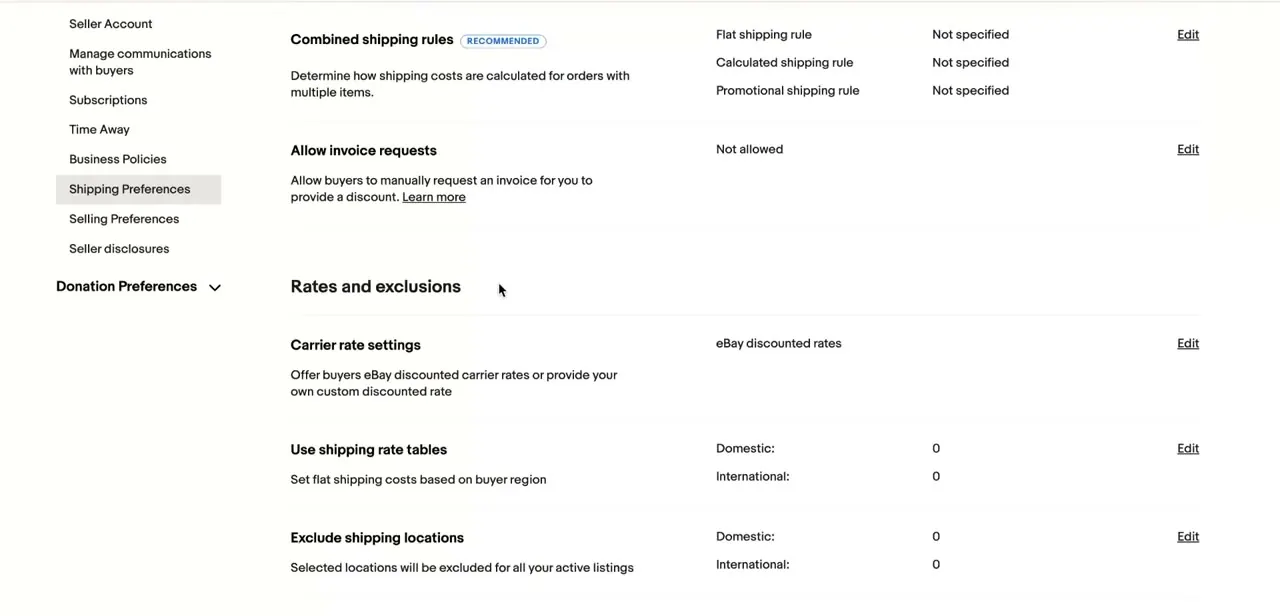
From Seller Hub's account menu, open Shipping Preferences, which sits alongside Seller Account, Business Policies, and Selling Preferences in the left-hand list. This one page controls the shipping defaults that apply across your listings instead of settings you'd otherwise repeat on every item.
Combined Shipping Rules control the charge eBay works out when a buyer takes multiple items from you in one order, split into a flat rule, a calculated rule, and a promotional rule, each editable on its own. By default, before you turn on combined shipping, eBay treats every item in an order as its own transaction with its own postage. Leaving the rules on "Not specified" after that keeps buyers paying full shipping per item, which tends to cost you the sale when someone is filling a cart, so configure at least one rule if you regularly sell multiples.
02Choose carrier rates and build a rate table
Under Rates and Exclusions, Carrier Rate Settings decides whose shipping price a buyer sees when you use calculated shipping: eBay's own rates, negotiated with USPS, UPS, and FedEx and available through eBay Labels, or a custom discount if you hold a separate account directly with a carrier. Most sellers stick with eBay's discounted rates since they need no extra setup.
This setting only affects calculated shipping; flat-rate listings and rate tables always charge the price you set yourself, discount or not. Shipping rate tables, in the same section, let you define flat costs by buyer region instead of typing a price into every listing, split into Domestic and International tables that both start at zero until configured. Build these once and new listings can reference the table instead of you recalculating postage each time.
03Exclude locations you won't ship to
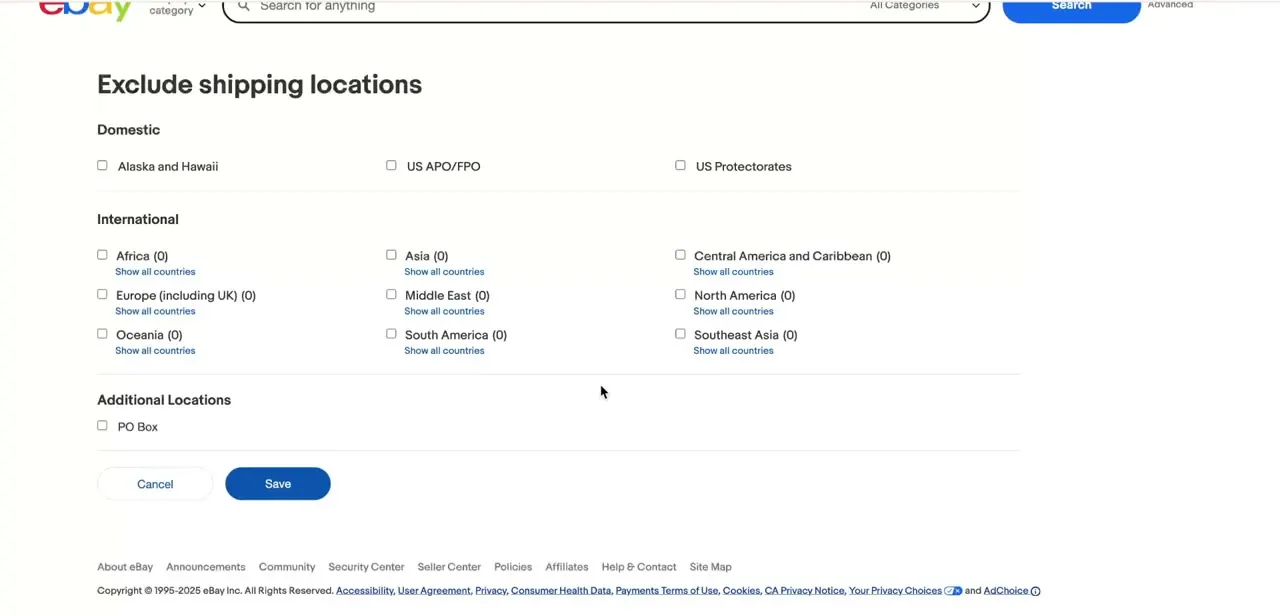
The Exclude Shipping Locations screen breaks the world into regions (Africa, Asia, Central America and Caribbean, Europe, the Middle East, North America, Oceania, South America, and Southeast Asia), each with checkboxes and a "Show all countries" link, plus a Domestic section for Alaska and Hawaii, US APO/FPO, and US Protectorates. eBay is specific about what this does and doesn't do: it stops a buyer from completing checkout with an address in an excluded location. It does not stop them from bidding on or agreeing to buy the item in the first place; only eBay's separate Buyer Requirements settings block that. If you're enrolled in eBay International Shipping, eligible items can also still reach some excluded locations through that program, since it runs on its own settings.
04Decide on free vs itemized shipping, then save it as a policy
Once your rates and exclusions are set, you can fold shipping into the item price and mark the listing as free shipping, which commonly improves how listings rank in eBay search, or keep it broken out so buyers see the exact carrier cost. Testing both on similar items is the only reliable way to know which converts better for what you sell; margins on shipping-inclusive pricing move differently by category and weight.
Instead of reconfiguring shipping on every new listing, save your settings as a Business Policy once you're happy with the rules, rate table, and exclusions. From then on, applying a shipping policy to a new listing takes one selection, and updating the policy later updates every listing that references it automatically.
When it doesn't work
An order still came through from a country on the exclusion list
Why: Excluding a location blocks checkout with an address there; it doesn't stop the buyer from bidding or agreeing to buy. If you use eBay International Shipping, eligible items can also reach some excluded locations through that program regardless of your exclusion list.
Fix: Add matching Buyer Requirements to block bidding outright, and check your eBay International Shipping settings separately if you're enrolled in it.
A multi-item order was still charged full shipping per item
Why: Combined shipping only applies once you've turned on the option to allow buyers to combine purchases, and only when items are added to the cart together instead of bought as separate immediate purchases.
Fix: Confirm combined shipping is switched on in Shipping Preferences, and note the buyer needs to use the cart for the discount to apply.
A calculated-shipping listing isn't showing eBay's discounted carrier rate
Why: Carrier Rate Settings only affects calculated shipping. Flat-rate listings and shipping rate tables always use the price entered manually, discounted or not.
Fix: Check the listing is set to calculated shipping, not flat rate or a rate table, if the discounted rate is expected to show.
Frequently asked questions
Should I offer free shipping or charge separately on eBay?
Free shipping, with the cost folded into the item price, can help search ranking, but a separate charge gives buyers more price transparency. Test both on similar listings to see what performs better for your category.
How does eBay calculate shipping cost?
Calculated shipping uses the weight and dimensions you enter, plus the buyer's delivery address, to pull live carrier rates instead of a flat price you set manually.
Does excluding a country stop someone there from buying?
Not on its own. Exclusions block checkout with an address in that location, but eBay says the buyer could still bid or agree to buy unless you've also set Buyer Requirements.
Can I set different shipping costs for different countries?
Yes. Shipping rate tables let you set different flat costs for domestic versus international buyers, split by region.
What happens if I don't set a combined shipping rule?
Each item in a multi-item order is charged its own full postage by default, which often discourages buyers from purchasing more than one thing from you at a time.
Can I update shipping costs on a listing that's already live?
Yes. You can edit shipping details on active listings from Seller Hub without relisting, and changes to a linked Business Policy apply automatically to every listing using it.
Sources and last check
Click path and screens come from a walkthrough recorded in July 2025. The combined shipping, carrier rate, and exclusion behaviour were re-checked against eBay's official help pages in September 2026. That check added the distinction eBay itself draws between excluding a shipping location (blocks checkout) and blocking a buyer outright (needs Buyer Requirements), plus the eBay International Shipping override, neither of which the original version mentioned. The seven-step original was also condensed to four, since three of its steps described settings on the same Shipping Preferences screen.
About the author

Impran M N
I've been hooked on technology for as long as I can remember — especially the new tools and AI apps that seem to land every other week. Easy Tech Tuts is where I write up whatever I've just worked out: I do the task in the real product, record the screen, and turn it into the guide I wish I'd found first.



