 Easy Tech Tuts
How to Add Multiple Quantity to a Listing on eBay, Add Bulk Items to one Listing 2026 Easily
By Impran M NLast checked against official docs
If you sell identical items in bulk (phone cases, stationery, handmade crafts, anything you stock more than one of), one listing with a quantity field beats duplicating the listing for every unit. Buyers choose how many they want from a single page, Seller Hub tracks what's left, and your store doesn't end up competing against its own duplicate listings in search results.
This only works on a Buy It Now listing, and it is a different feature from eBay's listing variations, which is for items that are similar but not identical: different colours or sizes, say. This guide covers where the quantity field sits, how stock is tracked once the listing is live, and what happens when you run out.
01Use Buy It Now, not variations, for identical stock
Multiple quantity only works on fixed-price (Buy It Now) listings. An auction sells one item to one winning bidder, so there is no quantity to split.
Head to Seller Hub and start a new listing, or resume one sitting in your drafts, building it as a Buy It Now listing before you reach the pricing details. It also is not the same tool as eBay's listing variations.
Variations are for items that are related but not identical, such as the same T-shirt in five sizes, and eBay caps a listing at 250 variations. Quantity is simpler: one item, one price, and a count of how many identical units you have.
02Set the quantity in the Pricing section
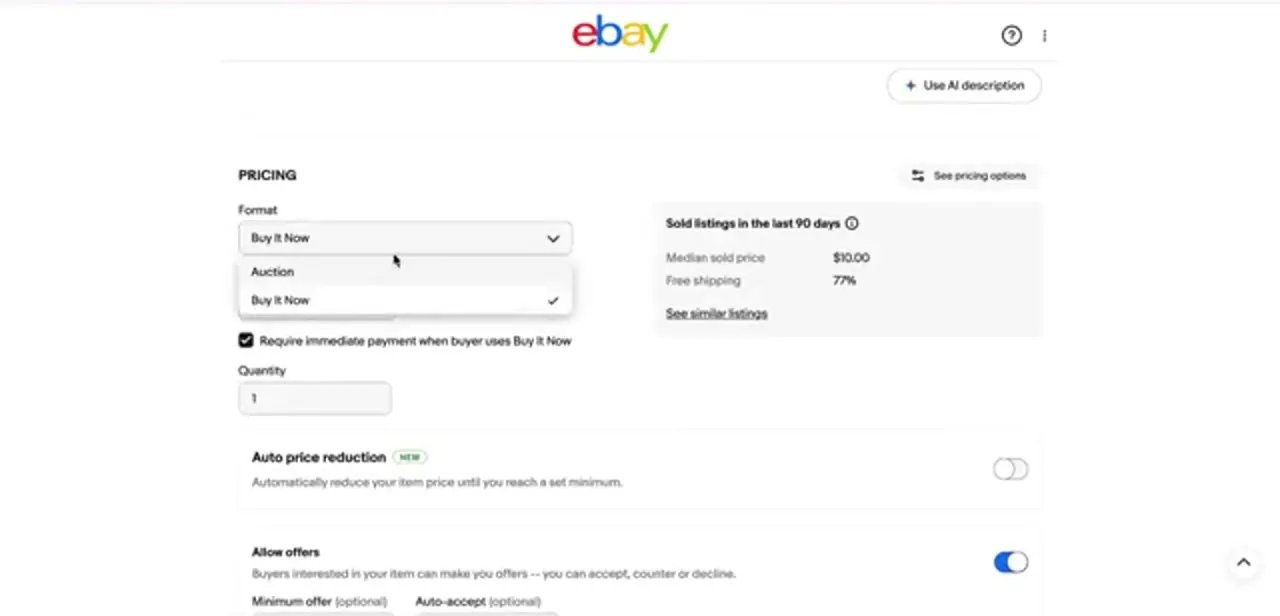
In the Pricing section, the Format dropdown switches between Auction and Buy It Now. Pick Buy It Now if it is not already selected.
The Quantity field sits just below it and defaults to 1. Change that number to however many identical units you have; it is the figure eBay offers buyers up to, and the one it counts down as orders come in. Leave "Require immediate payment when buyer uses Buy It Now" checked if you would rather have funds secured the moment someone buys, which matters more as your listing's volume grows.
03Check the listing in Seller Hub
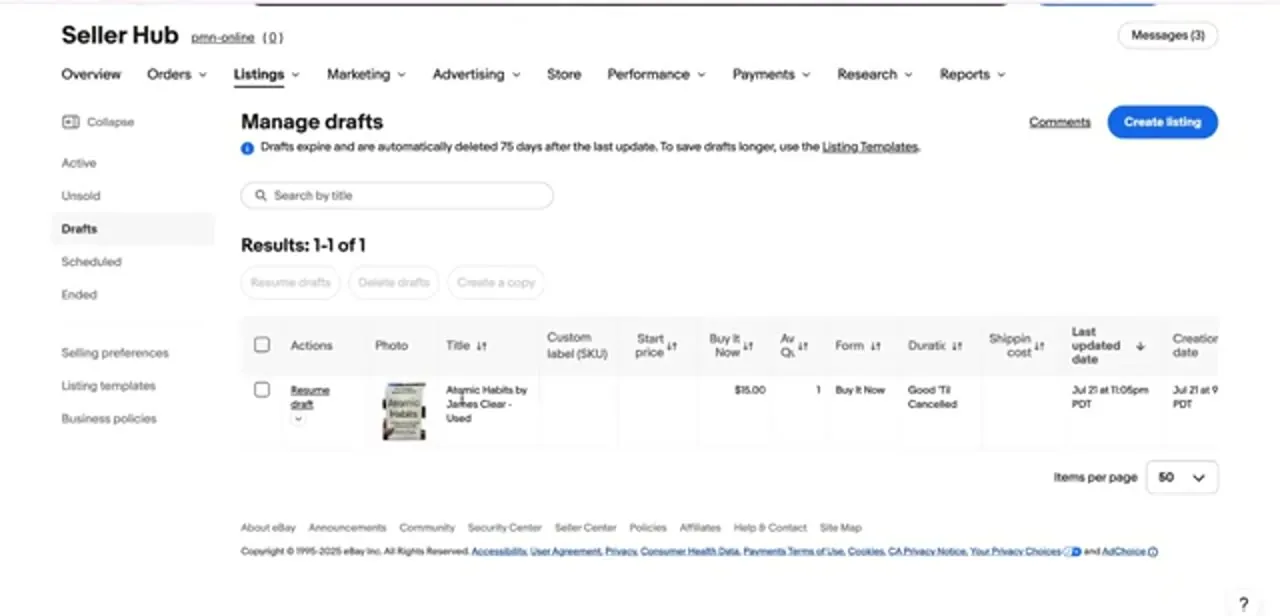
Once saved, the listing appears in Seller Hub under Listings, whether it is a draft, scheduled, or active. The table shows your available stock in the Av.
Qty column next to price, format, and duration, so you can scan your whole inventory without opening each listing on its own. Duration matters here too.
A bulk listing set to Good 'Til Cancelled stays live and keeps selling until you end it or the quantity hits zero. Per eBay's own help pages, it ends once stock runs out unless you have turned on the separate "out of stock" option that keeps it visible anyway.
04What buyers see, and how stock updates itself
Live, the listing shows buyers a quantity selector instead of a plain Buy It Now button. Someone who wants three phone cases picks three in one checkout instead of placing three separate orders, and you process one shipment instead of three.
Every completed sale reduces the number automatically, so there is no manual step where you log back in and adjust a count after each order. That is the main reason bulk listings save time over duplicate single-item ones.
05Keep the number accurate
Automatic tracking only works if what you entered matches what is on the shelf. If stock moves outside eBay (a sale at a market stall, damaged inventory, a restock), update the listing's quantity promptly so eBay is not offering units you cannot fulfil. Overselling on a bulk listing is one of the fastest ways to rack up cancellations and dent your seller metrics, so check this number on a schedule instead of setting it once and forgetting it.
When it doesn't work
There's no Quantity field on the listing form
Why: The listing is still set to Auction format. Quantity only appears once Format is switched to Buy It Now.
Fix: Open the Pricing section and change Format to Buy It Now; the Quantity field appears directly below it.
A Good 'Til Cancelled listing disappeared before all the stock sold
Why: The listing's quantity hit zero and the out-of-stock option was not turned on, so eBay ended it instead of keeping it visible.
Fix: Turn on the out-of-stock option if you want the listing to stay live (shown as unavailable) between restocks, or set your starting quantity higher.
You've sold more units than you have
Why: The quantity entered no longer matches real stock, usually because inventory moved somewhere eBay cannot see: a market sale, damage, a miscount.
Fix: Update the listing's quantity as soon as stock changes outside eBay, and check it on a regular schedule, not only after a sale.
Frequently asked questions
Does multiple quantity work on auction-style listings?
No. It only works on fixed-price Buy It Now listings. An auction resolves to a single winning bidder, so there's nothing to split across buyers.
What's the difference between quantity and variations?
Quantity is for identical units of one item. Variations are for related items that differ in something like size or colour, and a single listing can carry up to 250 of them. Use whichever one matches your stock.
Does eBay update my stock count automatically?
Yes. The Quantity field drops with every completed sale, and that's what shows up in the Av. Qty column in Seller Hub.
Will a Good 'Til Cancelled listing stay up after it sells out?
Only if you've turned on the out-of-stock option. Otherwise eBay ends the listing once quantity reaches zero.
Where do I check remaining stock on a bulk listing?
Seller Hub → Listings. The Av. Qty column shows what's left on every active, scheduled, or draft listing without opening them individually.
Sources and last check
Click path and screens come from a recorded walkthrough. The Buy It Now requirement, the 250-variation cap, and the Good 'Til Cancelled out-of-stock behaviour were re-checked against eBay's official help page on multi-quantity and variation listings in September 2026; the distinction between quantity and variations was added because the original draft conflated the two.
About the author

Impran M N
I've been hooked on technology for as long as I can remember — especially the new tools and AI apps that seem to land every other week. Easy Tech Tuts is where I write up whatever I've just worked out: I do the task in the real product, record the screen, and turn it into the guide I wish I'd found first.



