 Easy Tech Tuts
How can I Block a Buyer on ebay on site, app, from purchasing 2026 Easily
By Impran M NLast checked against official docs
If a buyer has caused problems in the past, an unpaid order, a harassing message, a pattern of last-minute cancellations, eBay lets you cut them off from your listings through the Blocked Buyer list. The page itself is short, but two things it doesn't spell out trip people up: blocking doesn't automatically stop messages, and it doesn't touch a bid the buyer already placed before you blocked them. This guide walks through the page as it currently reads and covers both gaps.
01Find the Block bidders or buyers page
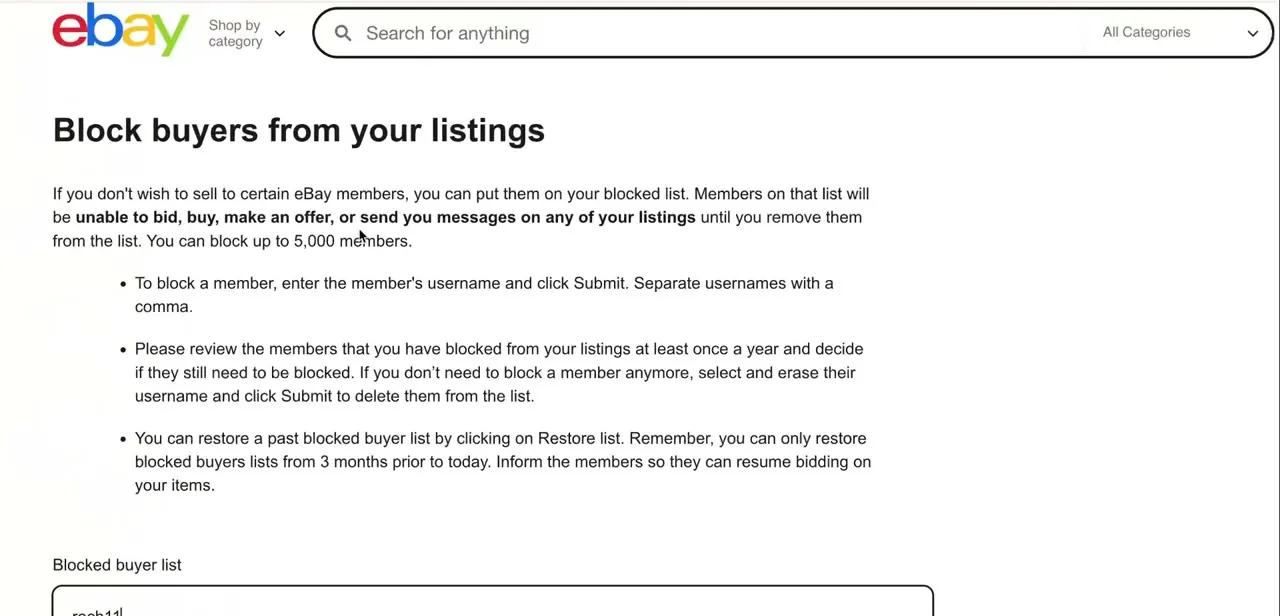
On the website, this setting lives under My eBay → Account → Site Preferences. eBay's page is headed "Blocking a buyer," and its core rule is one sentence: a blocked member will "be unable to place bids or buy from you until you remove them from the list." That's the entire scope. It's specific to bidding and buying, not a platform-wide restriction on the buyer's account, and by default it doesn't cover messages either, which is easy to assume it does.
02Add a username to the blocked list
To block a member, enter their username in the Blocked buyer list field and select Submit. To block more than one person at once, separate usernames with a comma instead of submitting them one at a time. You can block up to 5,000 members in total.
03Remove or restore the list
The same field works in reverse: delete a username and select Submit again, and that member regains normal access to bid, buy, and message you. If you've cleared the list by mistake, eBay's Restore list option can bring back an earlier version of it. eBay's page doesn't state how far back that history goes, so treat it as a recovery option for a recent mistake rather than a long-term archive, and don't rely on it to reinstate blocks from a long time ago.
04Know the two things a block doesn't cover
Two gaps catch sellers out. First, eBay's own preferences page states that blocked buyers can still contact you by default; stopping that requires a separate checkbox, "Don't allow blocked buyers to contact you," in Site Preferences, and even with it on eBay notes they may still reach you about an existing transaction.
Second, blocking someone doesn't cancel a bid they already placed on an active auction. eBay treats blocking (which only affects bids and purchases going forward) and bid cancellation (a separate action on the Cancelling bids page, done per listing) as two different tools. If a blocked buyer is still the high bidder when your auction ends, you have a sale to someone you just blocked unless you cancel that bid yourself.
When it doesn't work
A buyer I blocked is still messaging me
Why: Blocking only stops bids, purchases, and offers by default. eBay leaves messaging open unless you turn on a separate setting.
Fix: In Site Preferences, enable "Don't allow blocked buyers to contact you." Even then, eBay notes they may still be able to reach you about an existing transaction.
A buyer I just blocked still won the auction
Why: Blocking prevents future bids; it doesn't remove a bid the buyer placed before you blocked them.
Fix: Cancel the specific bid from the Cancelling bids page on the listing itself. Blocking and bid cancellation are separate actions.
I can't find the blocked-buyer setting
Why: It sits under Site Preferences, not under Selling tools or the listing itself, which is where most people look first.
Fix: Go to My eBay, then Account, then Site Preferences, and look for the blocked buyer/bidder list there.
Frequently asked questions
What does blocking a buyer actually prevent?
eBay states it directly: a blocked member can't bid or buy from you until you remove them from the list. It doesn't, on its own, stop them from messaging you or cancel a bid they already placed.
Does blocking someone stop them from messaging me?
Not by default. eBay's Site Preferences page says blocked buyers can still contact you unless you separately turn on "Don't allow blocked buyers to contact you," and even that has an exception for messages about an existing transaction.
How many buyers can I block?
Up to 5,000 members. You can add multiple usernames at once by separating them with commas before selecting Submit.
If I block someone mid-auction, does that remove their bid?
No. Blocking only affects future bids and purchases. To remove a bid already placed, cancel it separately from the Cancelling bids page on that listing.
How do I unblock someone?
Delete their username from the Blocked buyer list field and select Submit. They immediately regain the ability to bid, buy, and message you.
Sources and last check
Re-checked against eBay's official help pages in September 2026. This corrected two claims the previous draft made: that blocking stops a buyer from sending messages (it doesn't, by default; that's a separate Site Preferences setting), and that eBay recommends reviewing the blocked list annually (no current eBay page states that, so it was removed rather than repeated unverified). The note about blocking not cancelling an already-placed bid is new and comes from eBay's own Cancelling Bids help page. The previous app-specific step was dropped because no official eBay documentation for the exact app navigation could be found; the underlying rules are the same account setting either way.
About the author

Impran M N
I've been hooked on technology for as long as I can remember — especially the new tools and AI apps that seem to land every other week. Easy Tech Tuts is where I write up whatever I've just worked out: I do the task in the real product, record the screen, and turn it into the guide I wish I'd found first.



