 Easy Tech Tuts
Ebay Refund Guide 2026, How to get Money Back From a Bad Seller 2026 Easily
By Impran M NLast checked against official docs
If an eBay order arrives damaged, doesn't match the listing photos, or never shows up at all, buyer protection is there to get your money back. The process works best when you document the problem clearly and go through the right channel first. This guide covers checking a seller before you rely on them, opening a direct conversation about the issue, and the exact deadlines eBay enforces once you open a formal return or Item Not Received request.
01Check the seller's feedback before you rely on their word
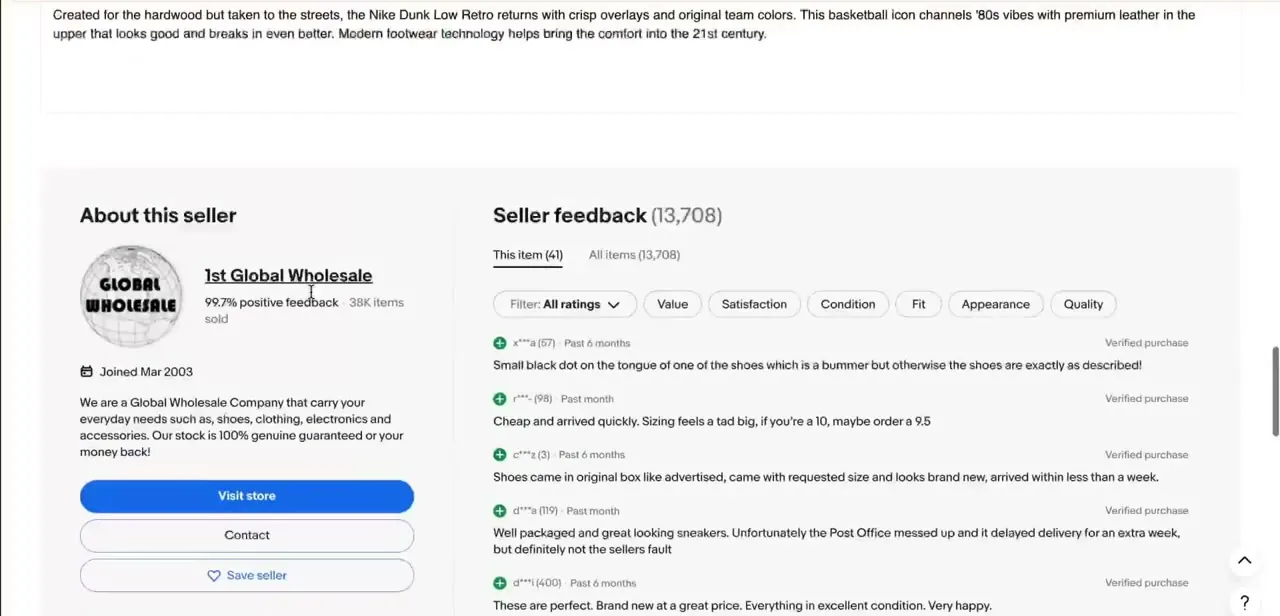
Every eBay listing has an "About this seller" panel showing their feedback percentage, how many items they've sold, and how long they've been on the platform, plus a running feed of recent reviews filtered by rating category: value, satisfaction, condition, fit, appearance, and quality. Before you escalate anything, skim this feedback for patterns.
A seller with thousands of sales and a stray complaint about slow shipping is a different situation than one with recent, repeated complaints about items not matching photos. This context matters once you're writing your refund request, since referencing a seller's own feedback history can strengthen your case if the problem you're having matches what others have already reported.
02Open a direct conversation with the seller
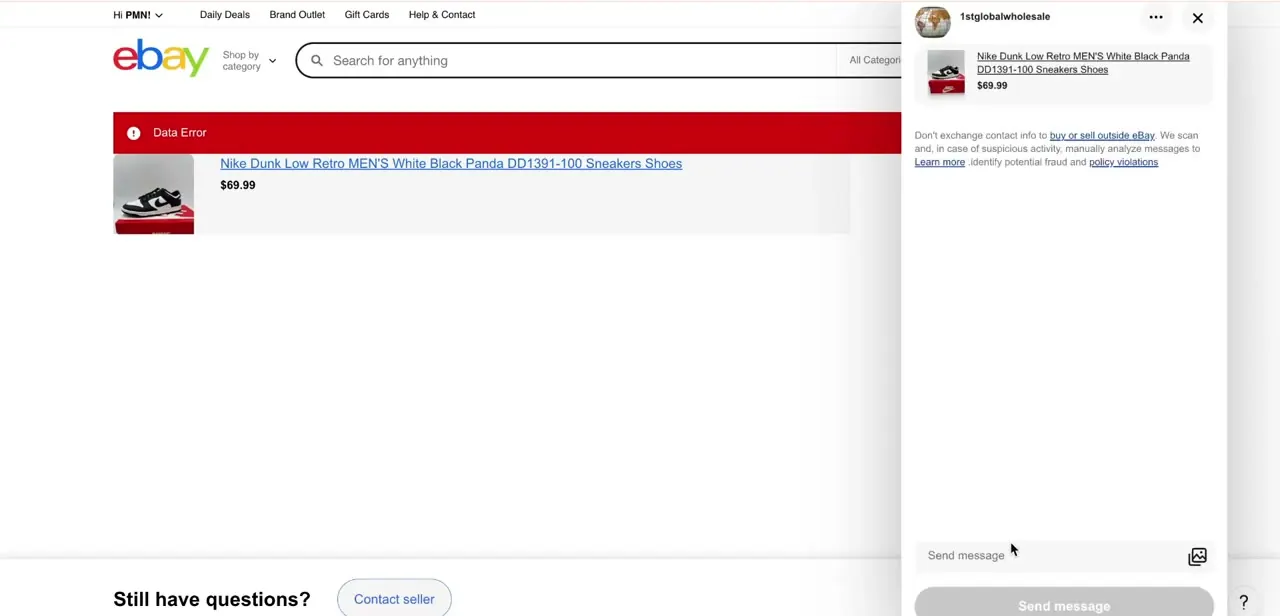
From the item or your Purchase History, use the Contact option to open eBay's built-in messaging panel, which keeps the conversation attached to that specific order and item. Message threads opened this way are timestamped and tied to the transaction, which is the paper trail buyer protection cases rely on. It's a meaningfully stronger position than emailing a seller directly or messaging them on a third-party app. eBay also screens these threads for anyone trying to move a deal off-platform, so keep the conversation here instead of agreeing to settle things outside eBay's system.
03Describe the problem clearly and attach proof
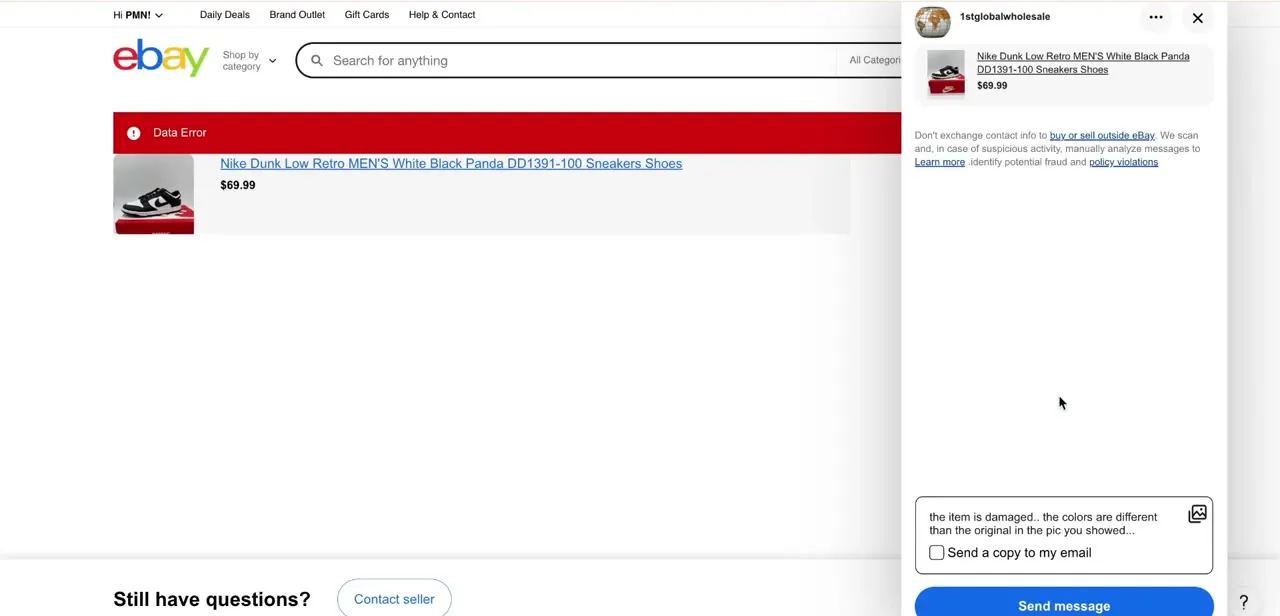
Write exactly what's wrong in plain terms. For a damaged or misrepresented item, something like "the item is damaged, the colors are different than the original in the pic you showed" gives the seller, and eBay if it escalates, an unambiguous statement of the issue instead of a vague complaint.
Attach photos using the image icon next to the message box: a clear picture of the damage or the color mismatch next to the listing photo does more to resolve a case than paragraphs of explanation. There's also a checkbox to send a copy of the message to your own email, worth ticking so you have your own record outside eBay in case you need it later.
04Open the formal return or refund request
You don't have to wait for the seller to reply before doing this; opening the formal request is what starts eBay's clock. Go to Purchase History, select the order, and choose Return this item if it's damaged or doesn't match the listing, or Item Not Received if it never showed up.
Select your reason, add a comment, and for a damaged or faulty item you can attach 1 to 10 photos directly to the request before selecting Confirm return. Once it's open, eBay gives the seller 3 business days to respond and resolve it. This is separate from the informal message thread, and it's the step that puts eBay's Money Back Guarantee behind your claim instead of just the seller's goodwill.
05Ask eBay to step in if the seller denies or ignores the request
If it's been more than 3 business days since you opened the request and it isn't resolved, you can ask eBay to step in from the same request. eBay says it typically responds within 48 hours, though it can take longer if it needs more information. Don't let the request sit too long either way: eBay automatically closes a return or Item Not Received request after 21 business days with no activity. Having the earlier message thread with your description and photos attached makes the review faster, since eBay's team can see what was reported and when instead of piecing the timeline together from scratch.
06Track the refund once it's approved
An approved refund goes back to your original payment method, whether that's a card, PayPal balance, or bank account depending on how you paid. Check that account rather than only the case status, since a case can show as resolved before the money has actually posted. When the reason was item not as described, damaged, or faulty, eBay's policy has the seller cover return shipping and has you refunded the original shipping charge too, so a refund that's missing that amount is worth a follow-up using the case number.
When it doesn't work
"Ask eBay to step in" isn't available yet
Why: eBay only allows this once more than 3 business days have passed since you opened the return or Item Not Received request (or, for an already-shipped return, once tracking shows it reached the seller more than 2 business days ago without a refund).
Fix: Wait out the window, then use the same request to ask eBay to step in. If it's a returned item, check tracking first.
The return or refund request disappeared or shows as closed
Why: eBay automatically closes a request after 21 business days of no activity from either side.
Fix: Don't let a request sit; follow up or ask eBay to step in well before the 21-business-day mark if the seller isn't resolving it.
The seller wants you to pay for return shipping on a damaged or not-as-described item
Why: This isn't how eBay's policy works. For faulty, damaged, or not-as-described returns, the seller has to cover return shipping and refund your original shipping cost.
Fix: Point the seller to this policy in the message thread. If they still refuse, it's grounds to ask eBay to step in.
Frequently asked questions
What if my eBay item never arrived?
Open a formal Item Not Received request from your Purchase History. Messaging the seller first can clear things up faster, but the formal request is what starts eBay's 3-business-day response clock and puts buyer protection behind your claim.
How long does the seller have to respond to my request?
3 business days from when you open the return or Item Not Received request. After that, you can ask eBay to step in directly.
What if the seller denies my refund request?
Once 3 business days have passed since you opened the request, ask eBay to step in from the same request. eBay typically answers within 48 hours.
Do I need photos to request a refund?
Photos make a real difference, especially for damaged or not-as-described items. You can attach 1 to 10 of them directly on the formal return request, and it's worth also attaching them in the message thread.
Should I check seller feedback before buying?
Yes. The About this seller panel on every listing shows their feedback percentage and recent reviews by category, which can flag a pattern of issues before you place an order.
How can I check if my refund was processed?
Check the account tied to your original payment method (card, PayPal, or bank) rather than relying only on the case status, since eBay sometimes marks a case resolved before the funds have posted.
Sources and last check
Click path and screens come from a real buyer messaging and return flow. The response and escalation deadlines (3 business days for the seller, the 3/2-business-day thresholds to ask eBay to step in, the 21-business-day auto-close, and eBay's 48-hour typical response) plus the return-shipping policy were re-checked against eBay's official buyer help pages in September 2026 and added; the original draft only said sellers have "a set window" without naming it.
About the author

Impran M N
I've been hooked on technology for as long as I can remember — especially the new tools and AI apps that seem to land every other week. Easy Tech Tuts is where I write up whatever I've just worked out: I do the task in the real product, record the screen, and turn it into the guide I wish I'd found first.



