Easy Tech Tuts
How to Fix Cloudflare Verify You Are Human, Fix Failed Loop Easily 2026
By Impran M NLast checked against official docs
Ticking the Cloudflare checkbox, watching the spinner, and landing back on the same challenge page is one of the more maddening browser failures, because nothing is broken in an obvious way. Almost always the cause is local: stale cookies from a previous challenge, an outdated browser, an extension interfering with the page's scripts, or an IP address the site has learned to distrust.
This guide works through those causes in the order that resolves the most cases fastest, starting with the browser data reset that fixes the majority of loops. It ends with the one piece of information worth collecting if nothing works, so you can hand the site's owner something they can look up.
01Understand why a real person gets stuck in the loop
Cloudflare's challenge runs a short set of browser checks in the background and, once they pass, sets a clearance cookie so you're not challenged again right away. By default that cookie lasts about 30 minutes, though individual sites can configure it shorter or longer.
A loop means the cookie never gets set, or gets set and is then rejected. Cloudflare's own troubleshooting guidance points to a handful of causes: an outdated browser, an extension blocking standard headers or the challenge's scripts, or an IP address with a poor reputation, often a shared VPN or corporate proxy. Each cause has a distinct fix, which is why working through them in order beats reloading the page a twentieth time.
02Open your browser's privacy and security settings
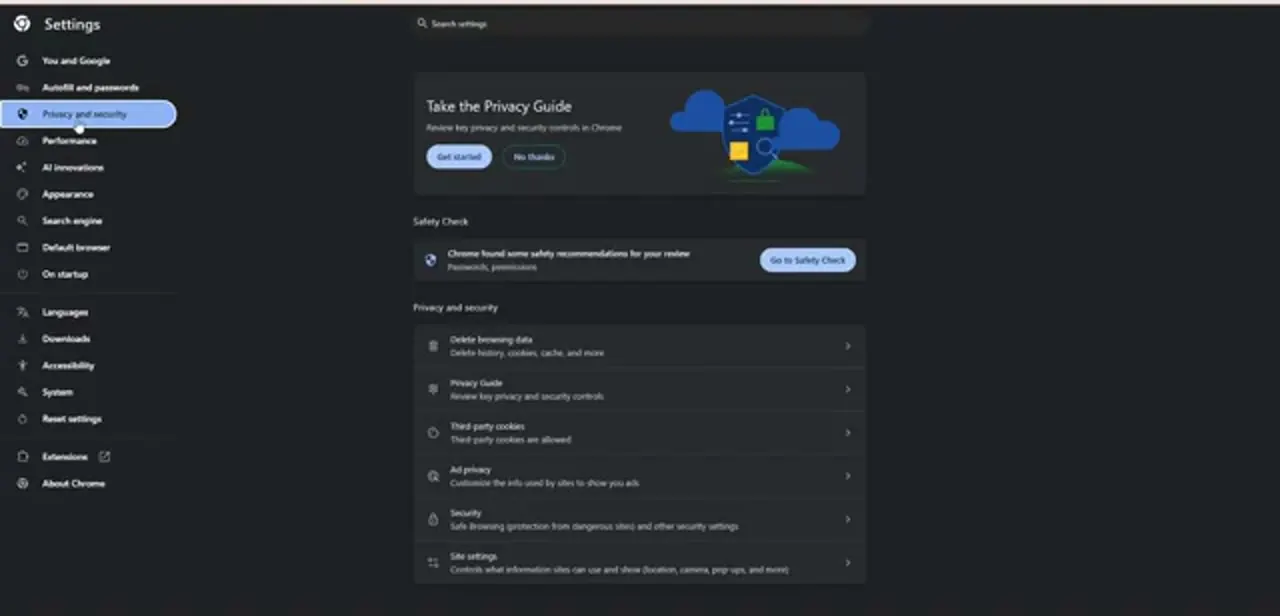
Start in the browser, since that's where most loops originate. In Chrome, open Settings and pick Privacy and security from the left sidebar.
The section that matters is Delete browsing data at the top, described right there as history, cookies, cache and more. While you're on this page, note Third-party cookies and Site settings further down: if third-party cookies are blocked outright, some embedded Turnstile widgets can't store what they need, so that setting is worth checking if the loop only happens on pages where the challenge appears inside another site's form.
03Delete the cookies and cached files behind the challenge
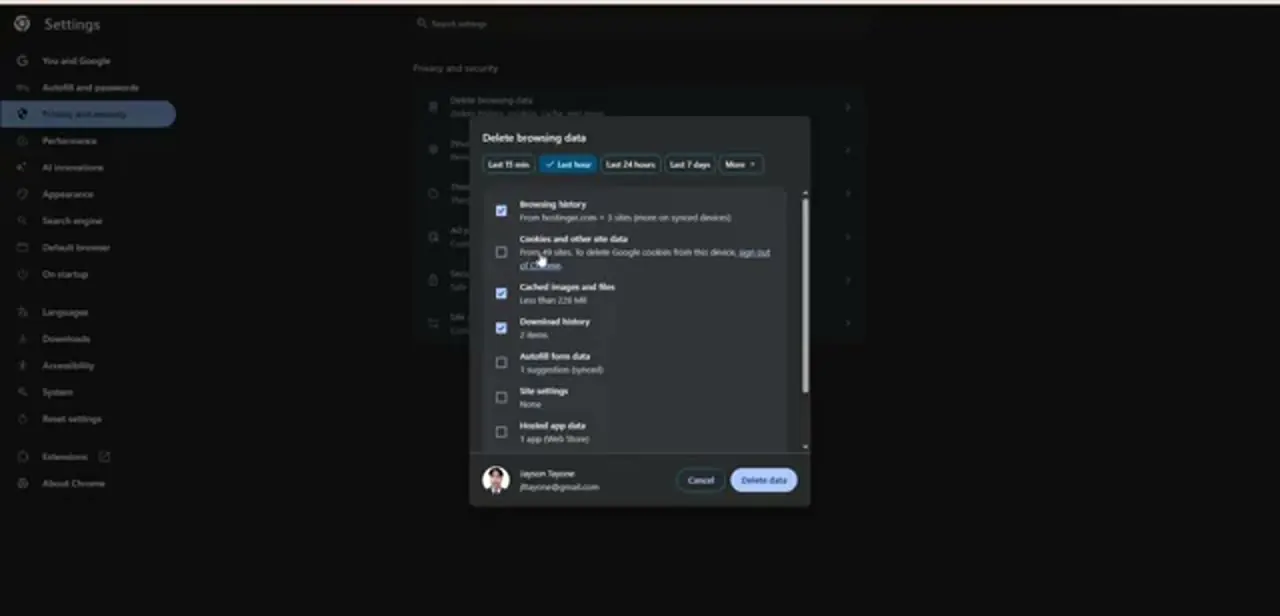
Delete browsing data opens a dialog with a time range across the top (Last 15 min, Last hour, Last 24 hours, Last 7 days, or a wider option under More) and a checklist of what to remove. Pick a range that comfortably covers when the loop began; an hour is usually enough if it started today.
The two boxes that matter are Cookies and other site data and Cached images and files. Cookies is easy to miss, since it's often left unticked by default.
Chrome tells you how many sites will be affected, so expect to sign back in to some of them. Confirm with Delete data, close every tab for the problem site, and load it fresh. A large share of loops end here.
04Update your browser and check the device clock
Cloudflare's own guidance lists an out-of-date browser as a direct cause of failed challenges, since older versions can't run the checks the challenge relies on. Update to the latest stable release of Chrome, Firefox, Safari or Edge, then reload.
It's also worth checking your system clock. Any cookie, Cloudflare's clearance cookie included, is evaluated against your device's own time, so a clock that's minutes or hours off, or set to the wrong time zone, can make a fresh cookie look expired the moment it arrives. Turn on automatic date, time and time zone in your operating system's settings and force a sync, particularly on dual-boot machines, virtual machines, or anything that's sat powered off for a while.
05Rule out extensions with a clean window
Ad blockers, script blockers, anti-fingerprinting tools and user-agent switchers can all interfere with the exact signals the challenge reads, and a user-agent switcher is especially likely to cause a hard failure, since it makes your browser claim to be something it isn't. The fastest test is a private or incognito window, which starts with no cookies and, by default, no extensions running.
If the site loads there, the problem sits in your local setup, an extension or stored data, not your network. From there, open the extensions manager and disable the privacy and blocking extensions one at a time until the loop stops, then add a site exception for the one responsible instead of leaving it off.
06Change your network, and note the Ray ID if it persists
If a clean, updated browser still loops, the signal being distrusted is likely your IP address. Cloudflare names shared VPN exit nodes and corporate gateways as common sources of a poor IP reputation, since one abusive user on the same address affects everyone behind it.
Disconnect the VPN, switch servers, or retry. Tethering to your phone for one load is a decisive test: if the page opens instantly on mobile data, your home or office IP is the problem, and restarting your router will often pull a fresh address.
When nothing works, scroll to the bottom of the challenge page and copy the Ray ID shown there. It identifies your exact request in Cloudflare's logs, so the site's administrator can look up precisely which rule stopped you, which is far more useful in a support message than describing the loop.
Frequently asked questions
Why does Cloudflare keep failing to verify me even though I'm not a bot?
The challenge sets a clearance cookie that your browser has to accept and return correctly. A stale cookie, an outdated browser, an extension blocking the challenge's scripts, a drifted system clock, or a poorly-rated shared IP can each stop that from happening, sending you back to the same page.
Which browser data should I delete to fix the loop?
Cookies and other site data plus cached images and files, for a time range covering when the loop started. Cookies is the important one and is often left unticked in the delete dialog by default.
Can my system clock really cause this?
Yes, though this is how cookies work generally, not something specific to Cloudflare. A clock that's noticeably off makes any time-limited cookie look expired the moment it arrives. Turning on automatic date, time and time zone and forcing a sync resolves it.
Does using a VPN cause the verification loop?
Often. Cloudflare's own troubleshooting notes flag shared VPN and corporate proxy IPs as a common source of a poor reputation score. Switching servers, disconnecting, or briefly tethering to mobile data will tell you if the IP is the cause.
What is the Ray ID and why does it matter?
It's the unique identifier for your request, printed at the bottom of the challenge page. A site administrator can use it to find the exact log entry and see which rule blocked you, so include it in any support request.
Sources and last check
Screens and click path come from a recorded browser walkthrough. The causes and fixes (cookies, outdated browser, extensions, IP reputation, the clearance cookie's default lifetime) were re-checked against Cloudflare's official challenge-troubleshooting and clearance documentation in September 2026, which confirmed the browser-update and IP-reputation causes and added the 30-minute default clearance window. Cloudflare's own docs don't specifically call out device-clock drift; that entry rests on how cookie expiry works in every browser, not on a Cloudflare-specific statement, and is flagged as such here.
About the author

Impran M N
I've been hooked on technology for as long as I can remember — especially the new tools and AI apps that seem to land every other week. Easy Tech Tuts is where I write up whatever I've just worked out: I do the task in the real product, record the screen, and turn it into the guide I wish I'd found first.