Easy Tech Tuts
How to Integrate Notion With Slack, Connect & Use Easily 2026
By Impran M NLast checked against official docs
Bridging your Notion workspace with your Slack channels cuts down on the tab-switching that slows down project handoffs. There are two doors into this integration: install Slack connections from inside Notion's own settings, or add a Notion app from Slack's App Directory.
This guide walks through both, plus what you get once they're connected — link previews with AI-generated summaries, and an AI connector that lets Notion answer questions using your Slack history. The two pieces aren't priced the way they look at first glance.
Before you start
- A Notion workspace and a Slack workspace you already belong to
- Owner-level access on both sides if you're setting up the AI connector specifically
01Open Notion's settings and find Connections
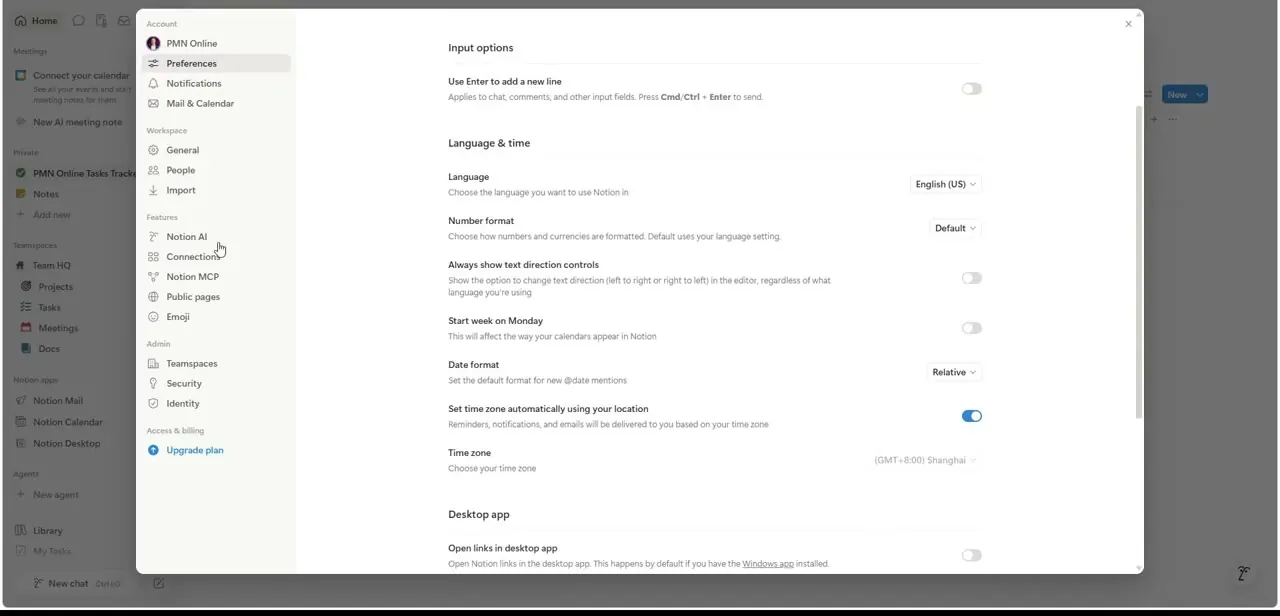
Click your workspace name in Notion to open Account & Settings, then look under the Features section in the left sidebar for Connections, sitting between Notion AI and Notion MCP. This is the central place Notion manages every third-party app it talks to, not just Slack. From here you can see what's already connected and open Discover connections to browse everything available.
02Install Slack from Discover connections
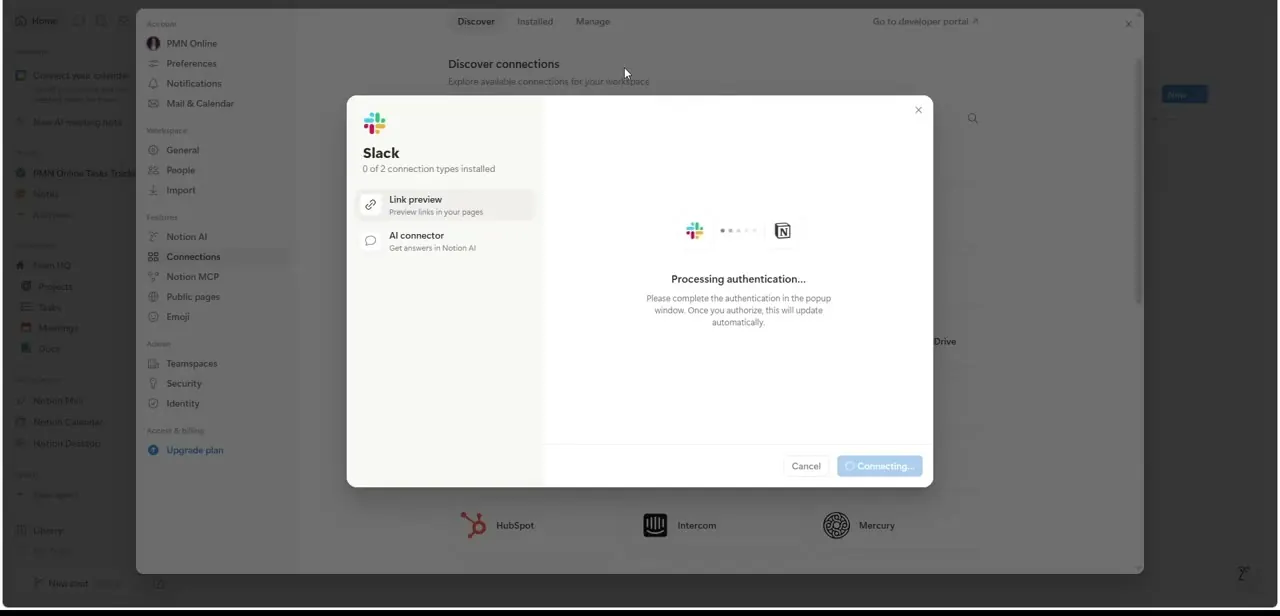
Discover connections shows a searchable gallery of apps, and Slack's card lists what it offers: Link preview, a rich card that appears when you paste a Notion page into Slack, and an AI connector toggle that lets Notion AI search and answer using Slack content. Clicking into the card starts an OAuth handshake: a popup opens to Slack, you sign in and approve the requested scopes, and the modal shows "Processing authentication" while it waits.
Link preview turns on for anyone on any plan. The AI connector toggle only works if your workspace is on Notion Business or Enterprise; on lower plans it stays visible but won't complete.
03Know what Link preview shows
Slack publishes its own integration page describing the same connection from the other direction. Drop a Notion link into a channel and Slack expands it into a card with the document's title, an AI-written summary of the key points, and metadata showing who created it and when.
That unfurling only works for pages your Slack workspace has been given access to. A link to a private, unshared page posts as plain text instead.
04Or add the Notion AI app from Slack's own directory
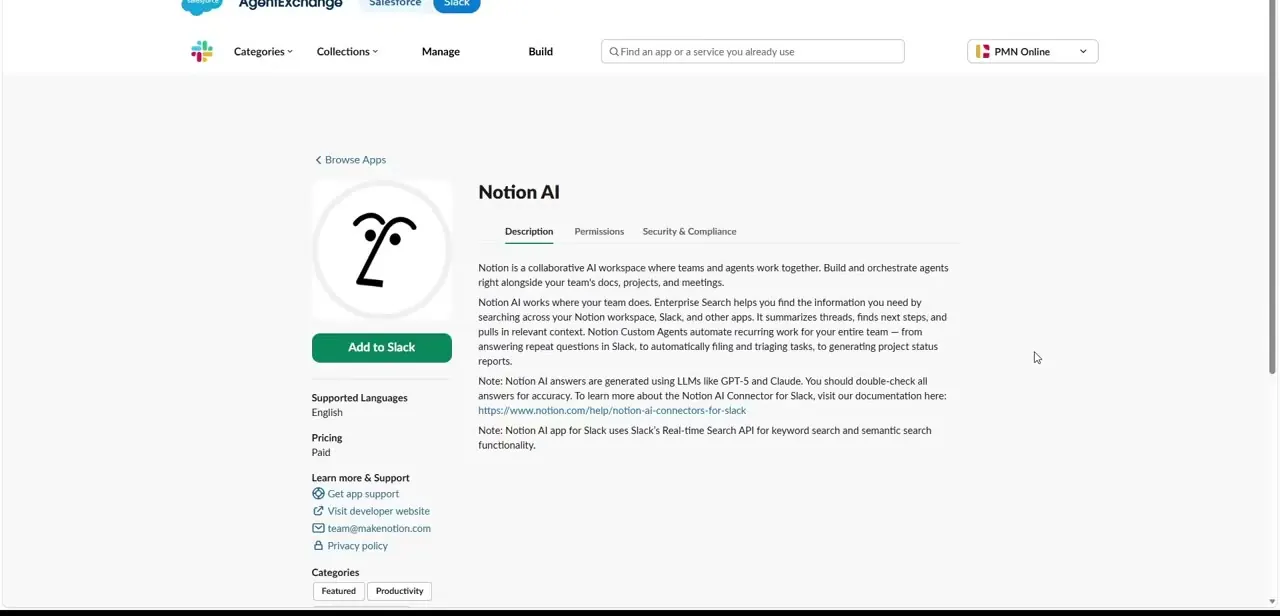
The second path starts from Slack. Searching Notion inside Slack's AgentExchange app directory surfaces a listing for Notion AI, separate from the basic link-preview connection and marked Paid.
Its description explains that Notion AI works across your workspace's docs, projects, and meetings, and that in Slack it can summarize threads, find next steps, and pull in context from Slack's search. This is the same underlying AI connector as the toggle inside Notion's own Discover page; installing from Slack's side is just a second door to it, gated by the same Business/Enterprise plan requirement, not a separate fee.
05Verify the connection and check the setup requirements
Test either connection by pasting a link to a shared Notion page into a Slack channel; it should unfurl into a rich card within a second or two. If you set up the AI connector, ask Notion AI a question in Slack that references something discussed in a channel to confirm it's pulling in Slack content.
Setting up the AI connector specifically requires being an owner of both the Slack workspace and the Notion workspace, and the workspace needs more than one member. Both connections can be managed or removed later from the same two places: Notion's Connections settings, or Slack's Apps section.
When it doesn't work
The AI connector toggle won't complete, or isn't there
Why: Notion's Slack AI connector needs a Business or Enterprise Notion plan. On Free, Plus, or standard Business-tier gaps it either doesn't appear or fails after authentication.
Fix: Check your workspace's plan in Notion's billing settings, and upgrade or ask a workspace admin to.
The Slack authorization popup closes without finishing the connection
Why: The AI connector requires you to be an owner of both the Slack workspace and the Notion workspace, and the workspace needs more than one member.
Fix: Complete the setup from an account that owns both workspaces, or hand it to someone who does.
Notion AI can't answer questions about a Slack conversation from earlier today
Why: Indexing after setup can take up to 36 hours, and only covers roughly the past year of messages in channels that were included when the connector was configured.
Fix: Wait for indexing to finish, and confirm the specific channel was selected during setup, not left out.
Frequently asked questions
Is the Notion and Slack integration free?
The Link preview connection is free on every plan. The AI connector that lets Notion AI search Slack requires a Business or Enterprise Notion plan, whichever side you install it from.
Do I need to give Slack access to my entire Notion workspace?
No. Pages need to be explicitly shared before they'll unfurl as rich previews or be searchable through the AI connector, and the Slack side lets you pick specific channels or all future public ones.
Why isn't my Notion link showing a preview in Slack?
Check that the page is shared and that the Link preview connection is installed and authenticated in Notion's Connections settings. Unshared pages post as plain text instead of rich cards.
What's the difference between installing from Notion versus from Slack?
They lead to the same two features. Notion's Discover connections page toggles Link preview and the AI connector for Slack; Slack's own App Directory lists the same AI connector as a separate, Paid app. The Paid label reflects Notion's Business/Enterprise plan requirement, not an extra Slack-side charge.
Do I need to be an admin to set this up?
For the AI connector, yes. You need owner-level access on both the Slack workspace and the Notion workspace, and the workspace must have more than one member.
Sources and last check
Click path and screens come from a walkthrough recorded in July 2025. Plan requirements, the owner/member conditions, and the indexing window were re-checked against Notion's own help center in September 2026 — that check corrected the earlier claim that the AI connector's cost comes from a separate Slack-side purchase. It's gated by Notion's own Business/Enterprise plan on either install path.
About the author

Impran M N
I've been hooked on technology for as long as I can remember — especially the new tools and AI apps that seem to land every other week. Easy Tech Tuts is where I write up whatever I've just worked out: I do the task in the real product, record the screen, and turn it into the guide I wish I'd found first.