Easy Tech Tuts
How to Use Gemini Ai with Google Workspace with 2.5 Pro Veo 3 Vidoes 2026 Easily
By Impran M NLast checked against official docs
Gemini shows up as an app icon next to Gmail and Docs in every Workspace account, but whether it works for your users depends on a setting most people never open: the Gemini app controls inside the Google Admin console. This guide covers the real path — from the apps launcher where Gemini first appears, into the Admin console where an administrator sets service status and user access, and out to using the current Gemini model day to day.
It also covers something a lot of 2026 guides still get wrong: video generation doesn't live inside the general Gemini panel. It's a separate feature of Google Vids, gated by its own plan rules.
Before you start
- A Google Workspace account with Admin console access, or an administrator on hand who can flip the settings below
01Find Gemini in the Google apps launcher
Gemini sits in the grid from the nine-dot apps launcher in the top corner of any Google page, alongside Drive, Docs, Sheets, and, for admins, the Admin console itself. This is the fastest way to jump between the consumer-facing Gemini app and the Workspace admin tools without hunting through bookmarks. If Gemini isn't in that grid at all, that's the first sign it hasn't been turned on for the account yet, which the next two steps fix.
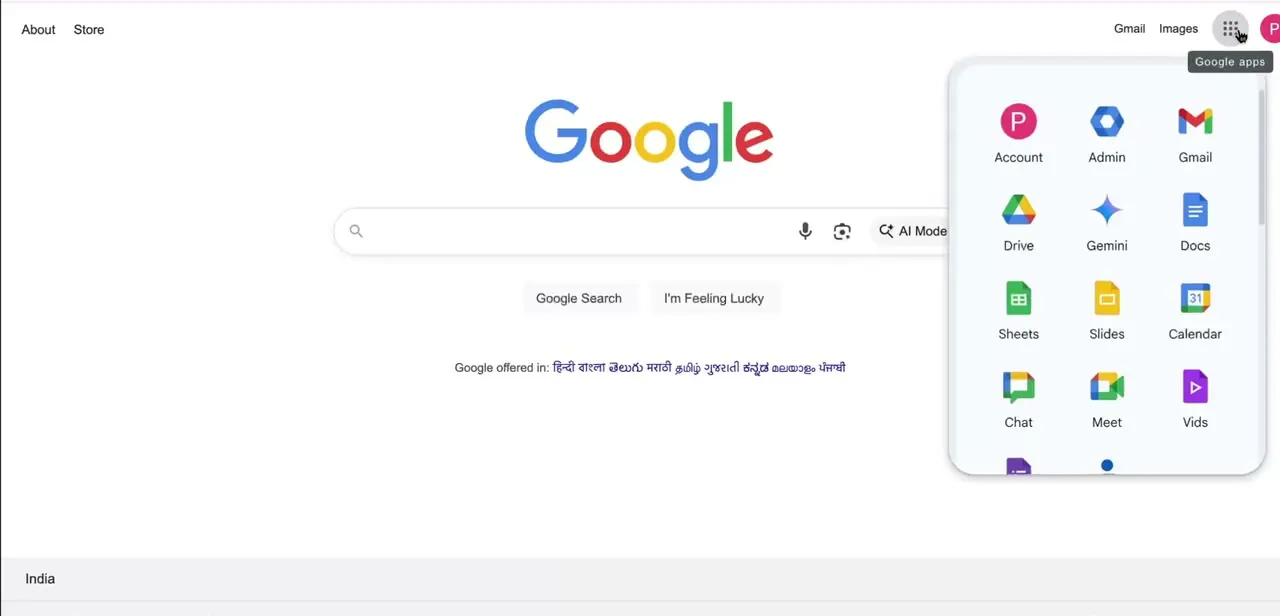
02Open Generative AI settings in the Admin console
From the launcher, admins go into Admin, then Generative AI in the left-hand navigation. It expands into Gemini app, Gemini for Workspace, NotebookLM, and Gemini reports.
Gemini app controls the standalone gemini.google.com experience; Gemini for Workspace governs the AI features embedded inside Docs, Sheets, and Gmail. They're configured separately, so check both if something works in one place and not the other.
03Check the service status and user access
The Gemini app settings page opens on Service status, showing either On for everyone or a more restricted setting. This is the master switch: if it's off, nothing else on the page matters, since no one in the organization can reach Gemini regardless of their individual permissions.
Changing it can take up to 24 hours to apply, though it's usually faster. Making this change requires the Gemini Settings administrator privilege.
Below Service status, the User access panel controls per-user rules — for example, whether access follows license assignment or is opened to everyone regardless of license. It's common to gate a new AI feature to a licensed group before rolling it out further, so if some users can't reach Gemini while the service itself is on, this panel is the next thing to check.
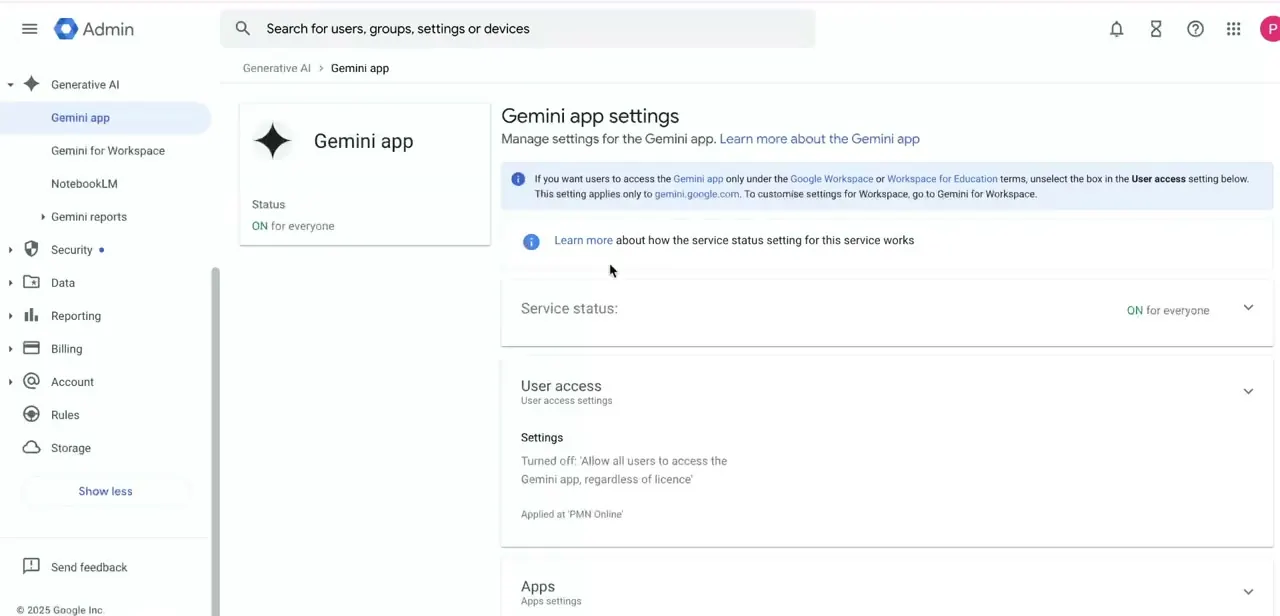
04Confirm the licence behind the access toggle
Because access is commonly tied to licence, confirm which Workspace edition each user is on before assuming a toggle is broken. Flipping User access to on for someone without the right licence attached won't produce a working Gemini app for that person; the licence has to be assigned first, and the deeper reasoning features behind AI Expanded Access need that add-on specifically.
05Use the current model, and find Veo in the right place
Google rolled Gemini 3 Pro out to the Gemini app for Workspace customers in November 2025, selectable from the model dropdown; it's replaced the older Gemini 2.5 Pro that most 2026 guides still describe as current, and the update applies automatically without any per-user setup beyond the access already granted above. Video generation is not part of that same panel.
Veo lives specifically inside Google Vids: open the Generate video icon in the right sidebar of the Vids editor, choose Veo, and describe the clip. It's a different app with its own edition rules, which is why turning on Gemini elsewhere doesn't automatically make Veo appear.
When it doesn't work
Gemini is missing for the whole organization
Why: Service status under Generative AI > Gemini app is set to off, or only recently switched on.
Fix: Set Service status to On for everyone and Save. Allow up to 24 hours for the change to reach every user, though it's typically quicker.
Service status is on, but some users still don't see Gemini
Why: The User access setting is scoped to license, and those specific users don't have a qualifying Workspace edition assigned.
Fix: Check the User access panel and either assign the licence those users need or turn on access regardless of licence, if that fits the organization's rollout plan.
Veo video generation doesn't appear anywhere
Why: Looking for it inside the Gemini side panel instead of Google Vids, or being on an edition whose temporary free access window (Business Starter, Enterprise Starter, Nonprofit, through May 31, 2026) has ended.
Fix: Open Google Vids directly and use the Generate video icon in the editor's right sidebar. If it's still missing, check current edition eligibility on Google's Workspace plans page instead of assuming last year's access still holds.
Frequently asked questions
Which Gemini model runs inside Workspace now?
Gemini 3 Pro, rolled out to the Gemini app for Workspace customers in November 2025 and selectable from the model dropdown. It replaced Gemini 2.5 Pro and updates automatically, so there's nothing to manually upgrade once Gemini app access is on.
Is Gemini included in all Google Workspace plans?
It ships with most current Business, Enterprise, Education, and Frontline editions, but the Admin console's User access setting can still restrict it, and the heaviest reasoning limits sit behind the separate AI Expanded Access add-on.
Where do I find Veo video generation?
Inside Google Vids, not the general Gemini panel. Open the Vids editor, use the Generate video icon in the right sidebar, and select Veo.
Why can't some users see Gemini even though it's turned on?
Check the User access panel under Generative AI > Gemini app. Access can be scoped to a specific organizational unit or gated by licence instead of opened to everyone by default.
My organization was on Business Starter and had free Veo access. Is that still active?
Google's own announcement scoped that free access, for Business Starter, Enterprise Starter, and Nonprofit accounts, through May 31, 2026. That date has passed, so check the current Workspace plans page instead of assuming it still applies.
Do I need any special training to use Gemini in Workspace?
No. Once access is enabled, Gemini works through plain-language prompts inside the apps already in daily use.
Sources and last check
Click path and screens (apps launcher, Gemini app settings, User access) come from a walkthrough recorded in 2026 and match the current Admin console navigation. The model and Veo claims were re-checked against Google's official Workspace Updates blog in September 2026: Gemini 3 Pro replaced Gemini 2.5 Pro in the Gemini app in November 2025, and Veo video generation lives inside Google Vids, not the general Gemini panel this guide previously implied. Both corrections are reflected above; the seoTitle/slug still reference 2.5 Pro and Veo 3 because they carry the original published URL.
About the author

Impran M N
I've been hooked on technology for as long as I can remember — especially the new tools and AI apps that seem to land every other week. Easy Tech Tuts is where I write up whatever I've just worked out: I do the task in the real product, record the screen, and turn it into the guide I wish I'd found first.