Easy Tech Tuts
How to Create Anki Flashcards With ChatGPT | Study Faster | Easily 2026
By Impran M NLast checked against official docs
Writing flashcards by hand is the slowest part of studying, and it's usually the reason people give up on spaced repetition before it starts paying off. ChatGPT can do the tedious part for you: turn a pile of notes, a textbook chapter, or a rough topic description into clean, exam-focused question-and-answer pairs, then hand them back in a format Anki can import directly.
This guide covers asking ChatGPT for the right kind of notes, getting them out as a CSV that Anki will accept without a fight, and the field-mapping step that trips people up the first time. It closes with the habits that make AI-generated cards stick instead of piling up unreviewed.
Before you start
- A ChatGPT account
- Anki installed on desktop or Android (the iPhone app is a one-time paid purchase; desktop and Android are free)
01Open ChatGPT and set the context
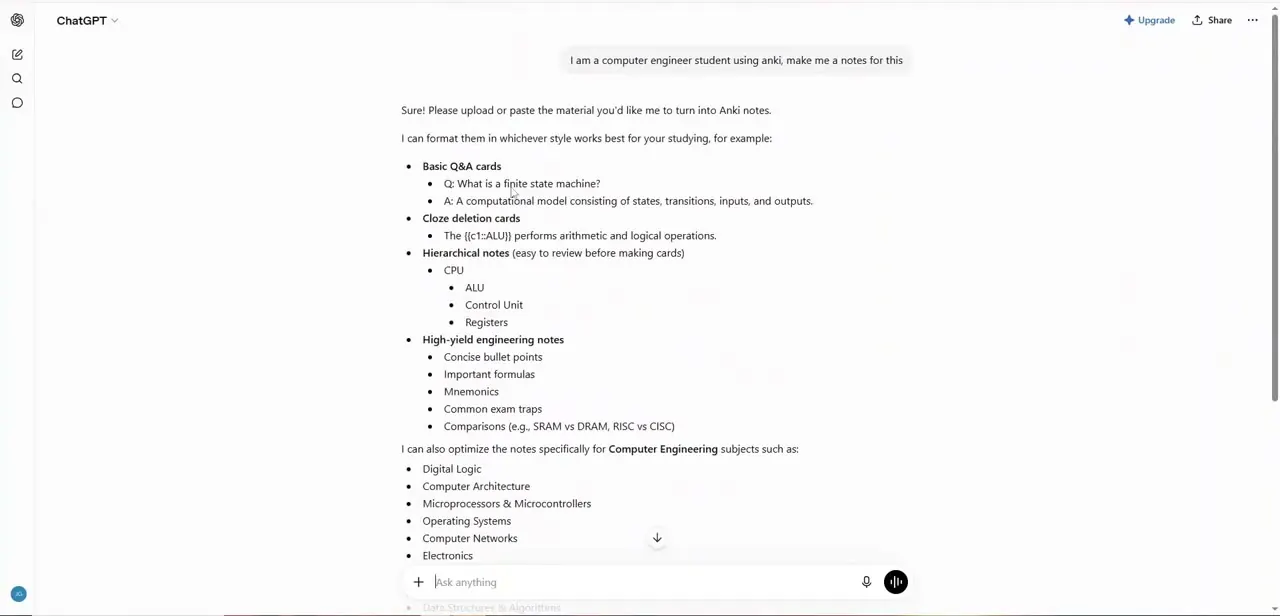
Start a fresh chat and tell ChatGPT who you are and what you're studying before asking for anything. A one-line prompt naming your course or subject area works better than a bare "give me flashcards," because ChatGPT tailors the depth and vocabulary to the level you describe.
If you already have source material (lecture slides, a textbook PDF, your own written notes), say so up front and mention you'll be pasting or uploading it; that changes how ChatGPT structures its first reply. A new chat per subject also keeps things focused, so a later request for a CSV export doesn't pull in content from an unrelated topic earlier in the thread.
02Ask ChatGPT to generate structured notes
Describe your subject and ChatGPT offers to format the material several ways: basic Q&A cards, cloze-deletion cards with a blanked-out term, hierarchical outline notes, or high-yield bullet points with mnemonics and common exam traps. In one exchange, a computer engineering student asked for notes and ChatGPT laid out all four formats along with a list of relevant subjects: digital logic, computer architecture, microprocessors, operating systems, and more.
The student could pick what fit. Choosing the right format matters more than people expect. Cloze deletions suit definitions and formulas, basic Q&A pairs suit anything conceptual, and mixing both in one deck is fine.
03Ask for a CSV without a header row
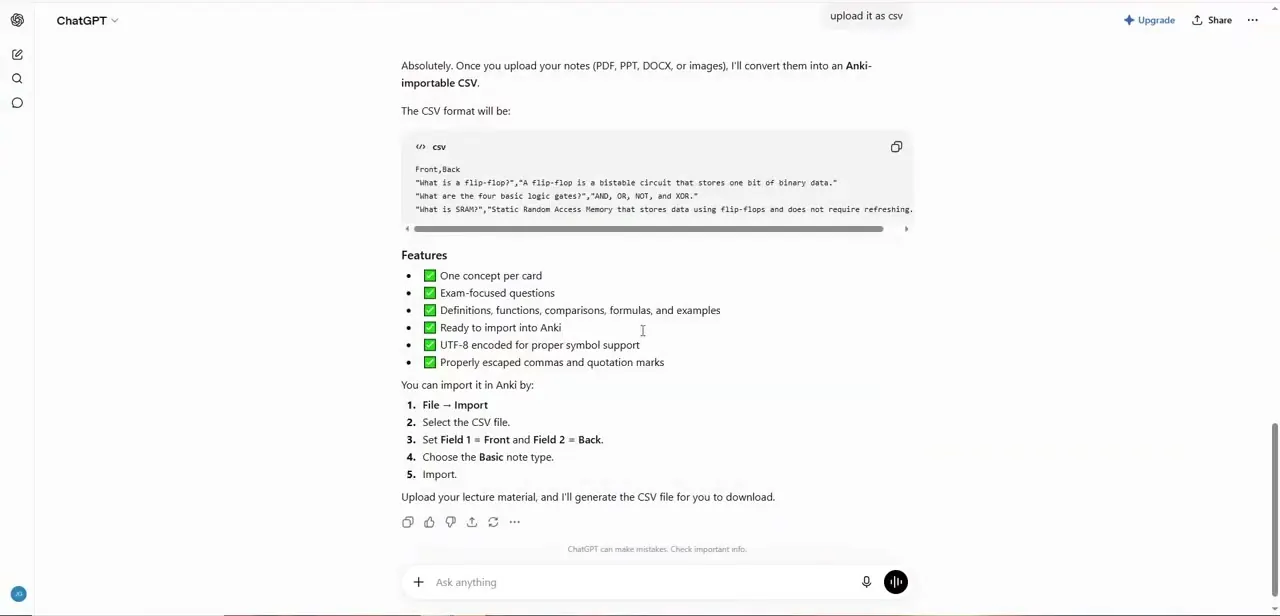
Once you've settled on content, ask ChatGPT to package it as a CSV instead of copying formatted text out of the chat window by hand. Anki's importer reads plain CSV files with one card per line, so this single request saves the reformatting step almost everyone gets stuck on.
Ask specifically for two columns, front and back, with no header row and no column labels on the first line. This matters more than it sounds: Anki treats every line in a CSV as a note unless that line starts with a # character.
A literal first line reading Front,Back doesn't get skipped automatically; Anki imports it as an actual card. Also ask ChatGPT to escape commas and quotation marks inside the text, encode the file as UTF-8, and keep one concept per card, focused on exam-relevant material instead of trivia.
04Download the CSV and check it before importing
ChatGPT shows the CSV inline before you download it: one quoted question-and-answer pair per line, in Front,Back order. Skim it before importing.
This is the easiest point to catch a card that's too long, a definition that got cut off, or a question that doesn't match its answer. If ChatGPT added a header row after all, delete that first line or put a # in front of it.
Either way stops Anki from importing the words "Front" and "Back" as a card of their own. ChatGPT also lists what it aimed for while building the file: one concept per card, exam-focused phrasing, escaped punctuation, and UTF-8 encoding so accented characters and symbols display correctly once the deck is in Anki.
05Import the CSV into Anki
In Anki, go to File then Import and select the CSV file. The import screen asks you to map columns to fields: set Field 1 to Front and Field 2 to Back so ChatGPT's questions land on the front of each card and the answers land on the back.
Choose the Basic note type unless you built cloze-deletion cards, which need the Cloze note type instead. Pick the deck you want the cards added to, since Anki won't sort them for you afterward, then click Import.
Anki also uses the first field to catch duplicates: if a note with a matching Front already exists in that note type, Anki updates it in place instead of adding a second copy. That's useful the second time you import a revised batch on the same topic, but it also means a card you deliberately want to keep as a near-duplicate needs a slightly different Front.
06Refine the cards before you study them
Run through the freshly imported deck once and edit anything that reads awkwardly out of context. ChatGPT writes fluent answers, but a phrase that made sense in the chat window doesn't always make sense as an isolated flashcard six weeks later.
Split any card that's testing two ideas at once into two separate cards; single-concept cards get recalled faster and more reliably than compound ones. This pass also catches duplicate or near-duplicate cards, which show up more often than expected when a topic gets covered from a couple of angles in the same conversation. It's also a good time to tag each card with its source chapter or week, so you can filter the deck down to just the material for an upcoming quiz.
07Study with spaced repetition consistently
The generation method doesn't matter if the deck sits unreviewed. Schedule short daily sessions instead of long cram blocks; Anki's default algorithm is built around frequent, spaced review, and it works best when you open the app most days.
Rate each card honestly with the difficulty buttons instead of always tapping "good," since the whole point of the algorithm is to show weak cards more often and strong ones less. ChatGPT can regenerate a fresh batch in minutes, so treat flashcard creation as an ongoing habit tied to each week's material instead of a one-time project before an exam.
Professionals learning a new tool for work can use the same rhythm. A small daily deck update beats one overwhelming session built the night before a deadline.
When it doesn't work
A card shows up reading "Front" on one side and "Back" on the other
Why: The CSV had a literal header row (Front,Back), and Anki has no built-in option to skip a first-row header; it imports every non-comment line as a note.
Fix: Delete that line from the file before importing, or add a # at the start of it, then re-import.
Cloze cards show the literal curly-brace syntax instead of a blank
Why: The notes were imported using the Basic note type instead of Cloze.
Fix: Re-import as the Cloze note type, since only that type parses {{c1::...}} syntax into an actual blank.
Re-importing an updated batch quietly overwrites cards you'd already edited
Why: Anki matches duplicates by the first field. A re-imported card with the same Front as an existing note updates that note in place, including any edits you'd already made to the Back.
Fix: Check the duplicate-handling setting in the import screen before confirming, or give a revised card a distinctly different Front if you want to keep both versions.
Frequently asked questions
What kind of prompts work best for generating flashcards?
Name your subject and level up front, and ask specifically for the Anki-importable CSV format instead of plain text. That gets you cards ready to import in one step instead of content you have to reformat by hand.
Why does Anki show a stray card that just says "Front" and "Back"?
The CSV likely had a plain header row with no # in front of it. Anki imports every line as a note unless the line is blank or starts with #, so delete the header row or mark it as a comment before importing.
How do I get the CSV into Anki?
In Anki, choose File then Import, select the CSV, set Field 1 to Front and Field 2 to Back, choose the Basic note type (or Cloze if you generated cloze-deletion cards), pick your deck, and import.
Do I still need to edit what ChatGPT generates?
Yes. Skim the CSV before importing, and do a quick pass after: split any card testing two ideas at once, and fix anything that reads oddly outside the original chat context.
Is this method useful for professionals learning new skills, not just students?
Yes. The same generate-then-import flow works for any subject you can describe to ChatGPT, whether that's exam material or a new tool you're picking up for work.
Can beginners use this without much technical setup?
Yes. It requires a ChatGPT account, a free Anki install on desktop or Android, and the built-in File then Import dialog. No plugins or scripting needed.
Sources and last check
Screens and click path come from a walkthrough recorded in July 2025. The CSV import mechanics, most importantly the header-row behavior, were re-checked against Anki's own manual in September 2026. That check found the previous version's advice to include a literal Front,Back header row would make Anki import it as a spurious card, since Anki only skips lines starting with a # character. This version corrects that and adds the duplicate-detection behavior that applies when a revised batch is re-imported.
About the author

Impran M N
I've been hooked on technology for as long as I can remember — especially the new tools and AI apps that seem to land every other week. Easy Tech Tuts is where I write up whatever I've just worked out: I do the task in the real product, record the screen, and turn it into the guide I wish I'd found first.