Easy Tech Tuts
Zapier vs Power Automate, Which Power Automate Alternative is the Best in AI Era 2026?
By Impran M NLast checked against official docs
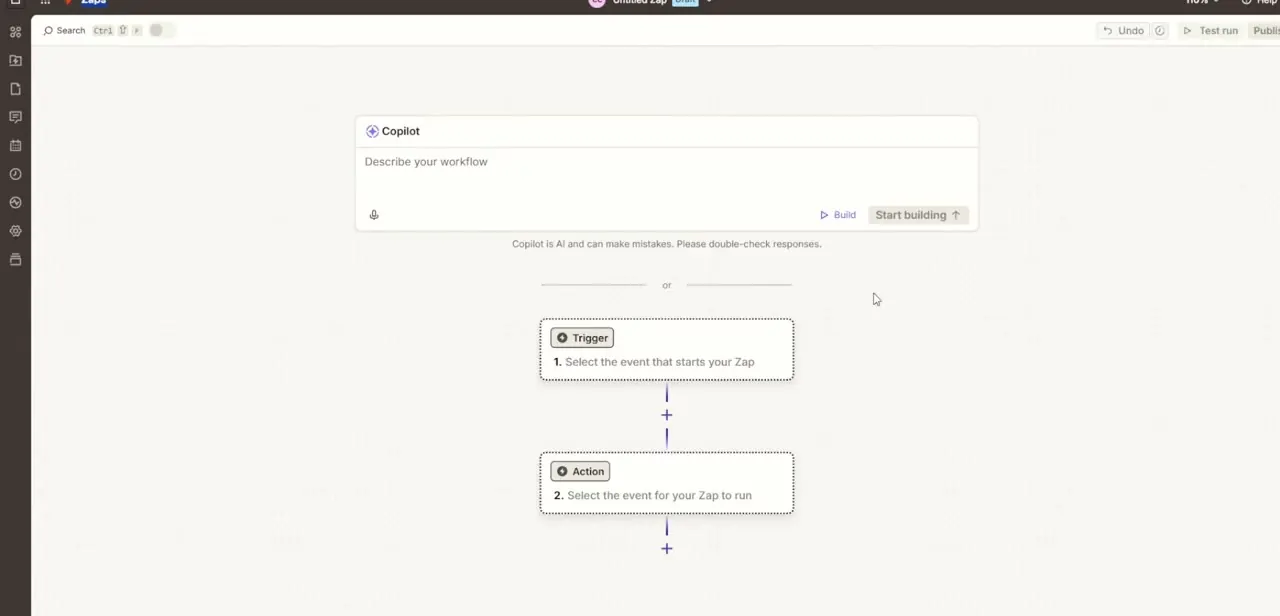
Choosing between Zapier and Microsoft Power Automate usually comes down to one question: does your team already live inside Microsoft 365, or is it stitched together from dozens of independent SaaS apps? Both platforms now lean hard on AI to shorten the path from idea to working automation, but they get there differently: one through a Copilot-style prompt box, the other through an enormous app-connector library. This guide walks through what each tool's builder looks like, how their pricing actually stacks up, and where templates save the most setup time, so you can match the platform to how your business works instead of picking on brand name alone.
01Start automating with Power Automate's Copilot builder
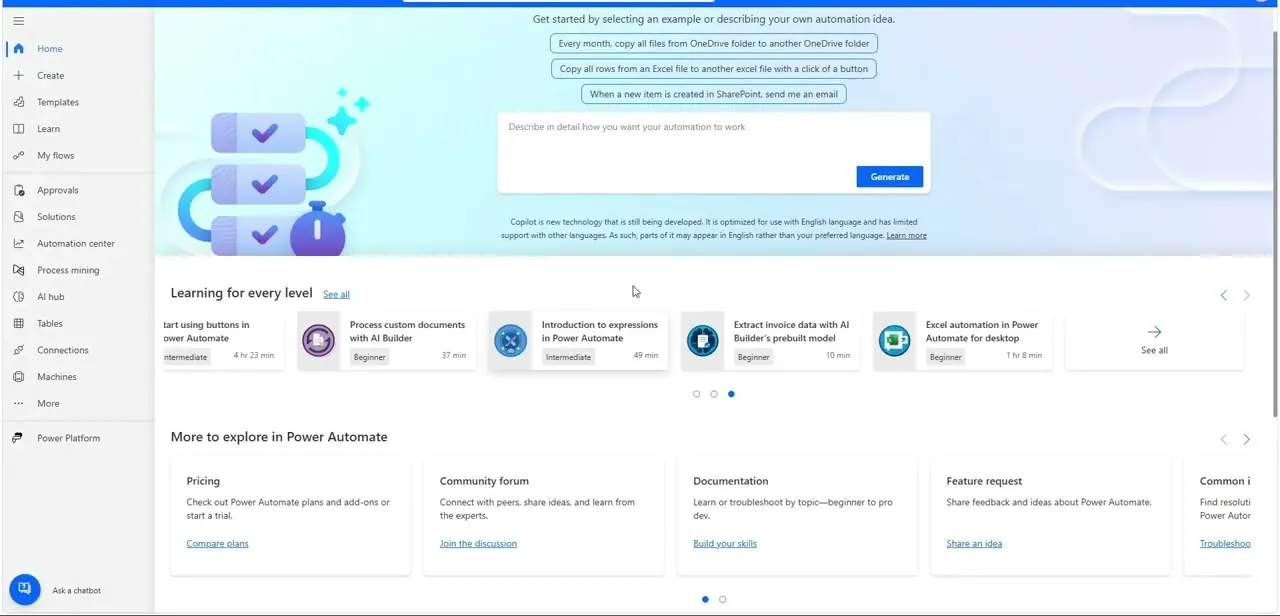
Power Automate's home screen leads with a prompt box: describe what you want automated in plain English, such as "copy all rows from an Excel file to another Excel file with a click of a button," one of the suggested starters, and Copilot drafts the flow. That's a different starting point from the classic trigger-and-action builder; you write a sentence instead of assembling steps by hand.
Below the prompt box sits a row of skill-building lessons (expressions, AI Builder, desktop automation), signaling that Power Automate expects you to grow into more advanced flows over time. One caveat for anyone leaning on AI Builder here: Microsoft has confirmed the free AI Builder credits bundled with Premium and Process licenses are being removed on November 1, 2026, so flows that depend on them will need a separate Copilot Credits or AI Builder capacity add-on after that date.
02Browse Zapier's app and tool library
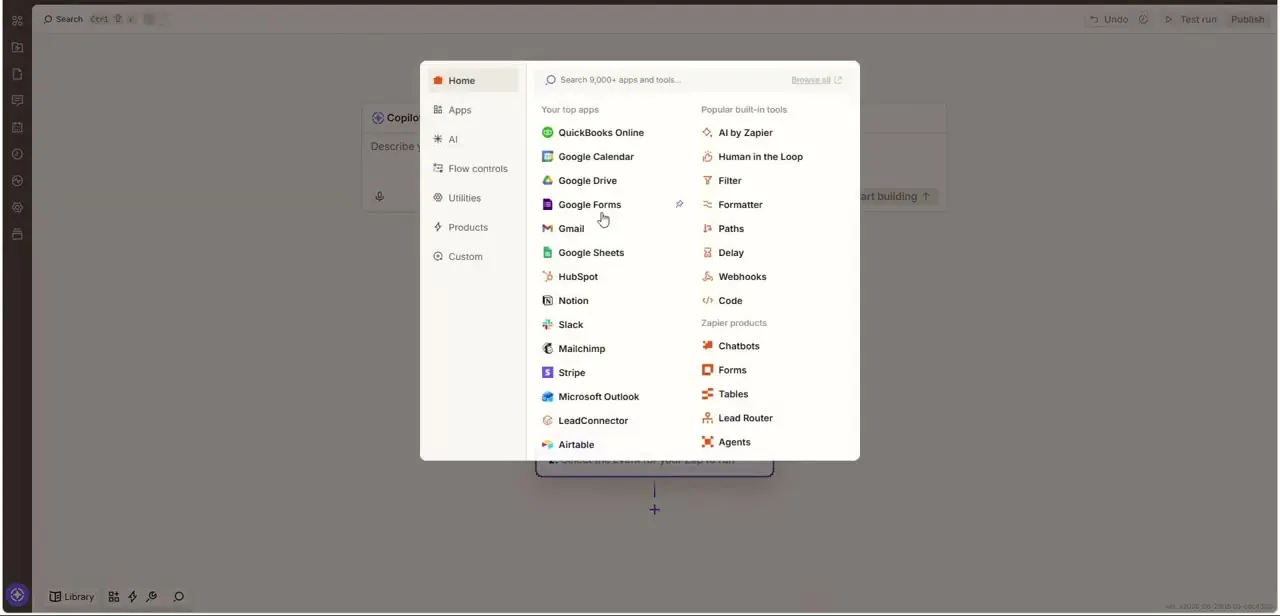
Zapier's equivalent starting point is its app search panel, opened from inside the flow editor when adding a new step. It lists your most-used apps first, such as QuickBooks, Google Calendar, Slack, and HubSpot, alongside Zapier's own built-in utility tools like Filter, Paths, Delay, and Code, plus newer additions like Chatbots and Agents under "Zapier products." The panel makes Zapier's core strength obvious: breadth.
With thousands of pre-built app connections searchable from one box, it suits a stack made of many small, unrelated tools rather than one unified platform. Zapier extended that AI push further in 2026 with an MCP server that exposes its actions to outside AI tools like Claude and ChatGPT, letting those assistants trigger a Zap directly instead of only Zapier's own Copilot doing the building.
03Compare the pricing tiers
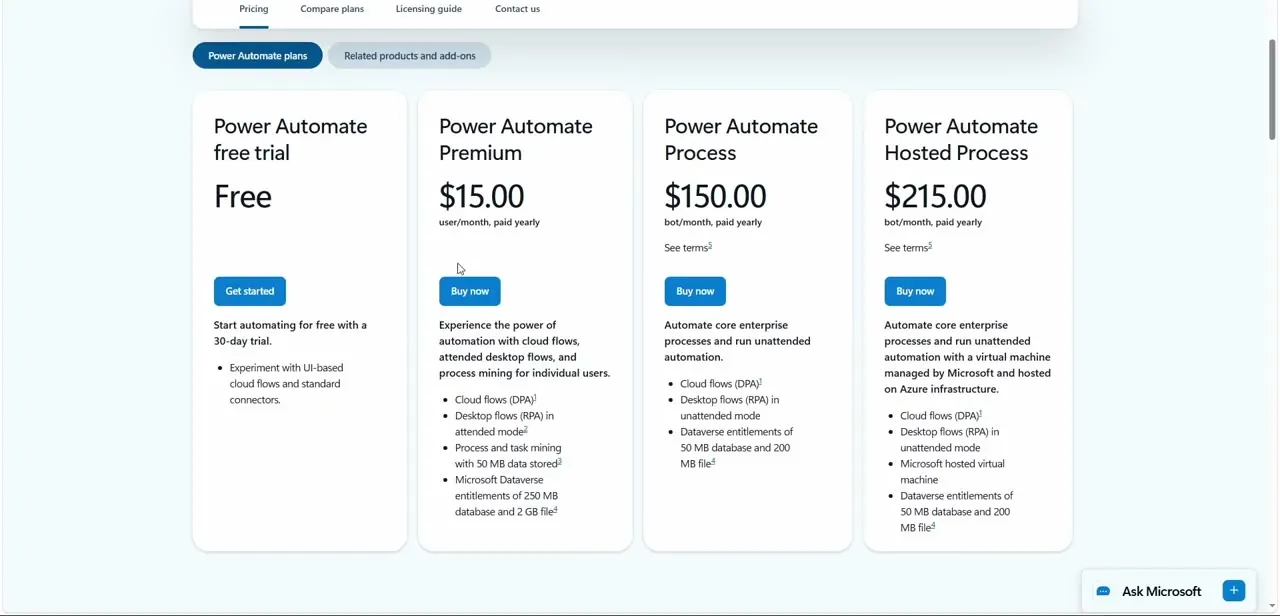
Power Automate's pricing page lists four tiers, all billed yearly: a free 30-day trial, Premium at $15 per user/month for cloud flows and attended desktop automation, Process at $150 per bot/month for unattended enterprise automation, and Hosted Process at $215 per bot/month, which adds a Microsoft-managed virtual machine. Zapier prices differently, by task rather than by user or bot: its Free plan gives 100 tasks a month on two-step Zaps only, Professional starts at roughly $20/month (billed annually) for 750 tasks and multi-step workflows, and Team starts at about $69/month for 2,000 tasks and up to 25 users.
Both vendors charge noticeably more on month-to-month billing than on an annual plan. The shape of the two pricing models matters more than the headline numbers: Power Automate's Process tier can get expensive fast if you only need a handful of complex unattended flows, while Zapier's task-based pricing scales with how much you actually run rather than how many people touch it.
04Check how connections are managed
Both platforms centralize your authenticated app connections in one place so you're not re-logging into the same service for every new automation. Zapier's Connections page lists every app you've linked, with a dedicated Zap history log next to it so you can trace exactly which connection fired which run. This matters more than it sounds: when a flow breaks, the first thing to check is whether a connection expired or a permission was revoked, and having that list separate from the flow builder itself makes troubleshooting faster.
05Use templates instead of starting from a blank flow
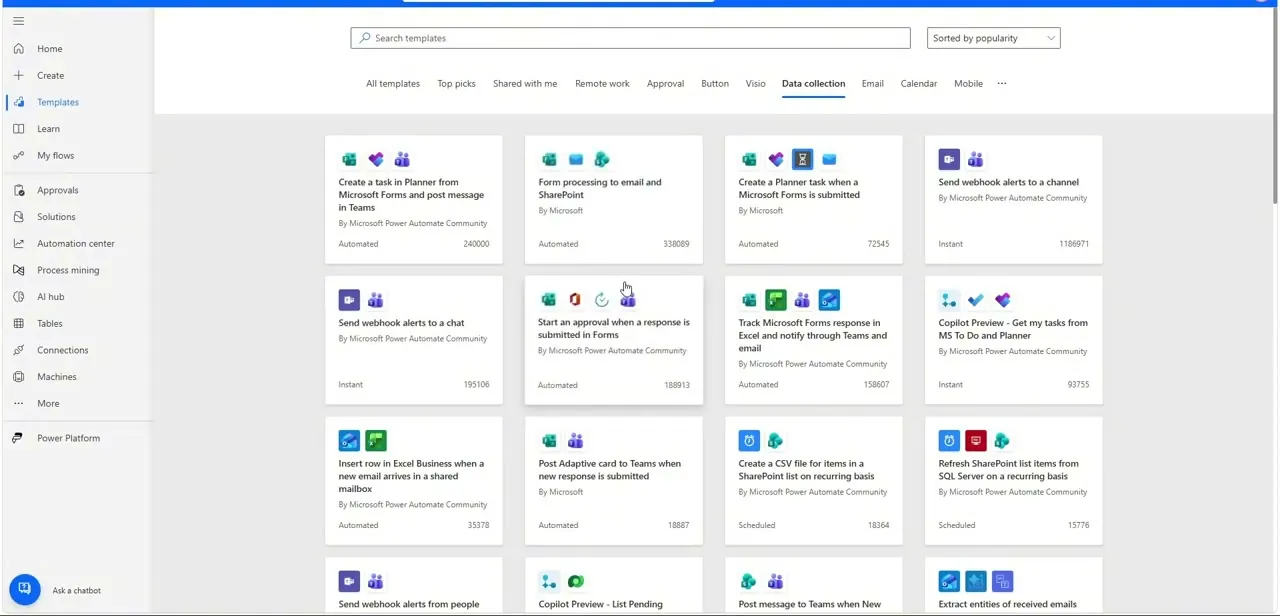
Power Automate's Templates gallery groups pre-built flows by category, such as Data collection, Email, Calendar, and Approval, with each card showing the trigger, the apps involved, and a usage count so you can gauge how proven a template is before adopting it. Popular entries include posting Microsoft Forms responses to Teams, refreshing SharePoint lists on a schedule, and starting approvals from form submissions. If your use case is common, and most are, starting from a template here is faster than prompting Copilot from scratch and then fixing the details.
06Match the platform to your business
If your team runs primarily on Microsoft 365 (SharePoint, Teams, Outlook, Excel), Power Automate's native integration and Copilot-driven flow generation will feel faster since there's no connector tax; it talks to those apps directly. If your stack is a patchwork of independent SaaS tools with no single vendor tying them together, Zapier's connector breadth and simpler task-based pricing tend to win, especially for small teams that don't need unattended desktop bots or enterprise governance.
Neither platform is better in the abstract. Power Automate suits teams already inside the Microsoft ecosystem who need desktop or unattended automation at scale; Zapier suits lean teams gluing together many third-party apps with lighter, cloud-only flows.
Test both on your own highest-volume workflow with their free tiers before paying for either. The real difference shows up in how many extra steps each one needs for your specific apps, not in the marketing pages.
| Platform | Entry paid tier | Top tier for heavy or unattended use | Priced per |
|---|---|---|---|
| Zapier | Professional, from about $20/mo for 750 tasks | Enterprise, custom pricing | Task |
| Power Automate | Premium, $15/mo | Hosted Process, $215/mo | User (Premium) or bot (Process tiers) |
Figures confirmed against each vendor's own pricing page in September 2026. Both vendors charge noticeably more on month-to-month billing than on an annual plan.
Frequently asked questions
Is Zapier or Power Automate better for Microsoft 365 users?
Power Automate, in most cases. It connects natively to SharePoint, Teams, Outlook, and Excel without a separate connector, and its Copilot builder is tuned for those apps.
Which platform is cheaper for a small business?
It depends on volume more than sticker price. Zapier's Professional tier starts around $20/month for 750 tasks, which suits a handful of lightweight cloud automations. Power Automate's Premium tier is a flat $15 per user/month, which can work out cheaper if several people on your team already need it and you're already paying for Microsoft 365 licenses.
Do both tools use AI to build flows now?
Yes. Power Automate uses a Copilot prompt box for plain-English flow building, and Zapier has its own Copilot alongside AI-powered products like Chatbots and Agents. In 2026, Zapier also added an MCP server that lets outside AI assistants, including Claude and ChatGPT, call Zapier actions directly.
Can I use templates instead of building a flow from scratch?
Yes, both platforms have large template galleries. Power Automate's Templates page groups them by category with usage counts, a fast way to find a proven starting point for common tasks like form-to-email or scheduled data refreshes.
Does Power Automate support desktop and unattended automation?
Yes, one of its clearest advantages over Zapier. The Process and Hosted Process tiers ($150 and $215 per bot/month) are built for unattended RPA-style automation, including a Microsoft-managed virtual machine on the Hosted Process plan.
Is Power Automate's pricing the same every month, or does it change?
The figures above are for annual billing. Microsoft, like Zapier, charges more for month-to-month plans, so check the current monthly rate on the pricing page before comparing sticker prices across the two vendors.
Sources and last check
Power Automate's tier prices ($15, $150, $215 per month) were re-checked against Microsoft's official pricing page in September 2026 and are accurate as published. Zapier's tier prices, absent from the original draft, were added from Zapier's own pricing page the same month. Also added: Microsoft's confirmed removal of bundled AI Builder credits on November 1, 2026, and Zapier's 2026 MCP server for external AI tools.
About the author

Impran M N
I've been hooked on technology for as long as I can remember — especially the new tools and AI apps that seem to land every other week. Easy Tech Tuts is where I write up whatever I've just worked out: I do the task in the real product, record the screen, and turn it into the guide I wish I'd found first.