Easy Tech Tuts
Zapier vs Make vs N8n, Best Zapier Alternative from Make com, N8N, IFTTT & Workato
By Impran M NLast checked against official docs
Zapier, Make, n8n, IFTTT and Workato all connect apps, but they bill for different things, and that difference decides your cost more than the headline price does. Zapier charges per completed action.
Make charges per module run. n8n charges per whole workflow run, however many steps it has. IFTTT charges by how many applets you keep switched on, and Workato doesn't publish prices at all. This comparison looks at what each builder shows on screen (a Zapier flow, a Make scenario with a router, n8n's pricing page) and then at the pricing unit behind each one, using the vendors' own pricing pages as of September 2026.
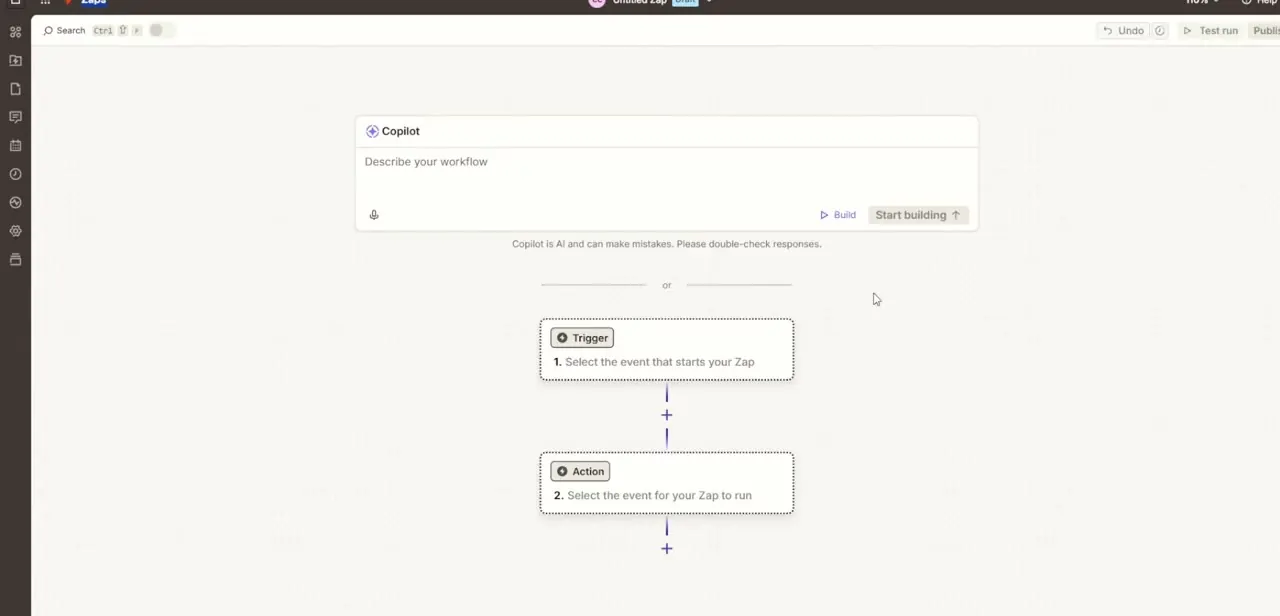
01Zapier: a vertical list of steps
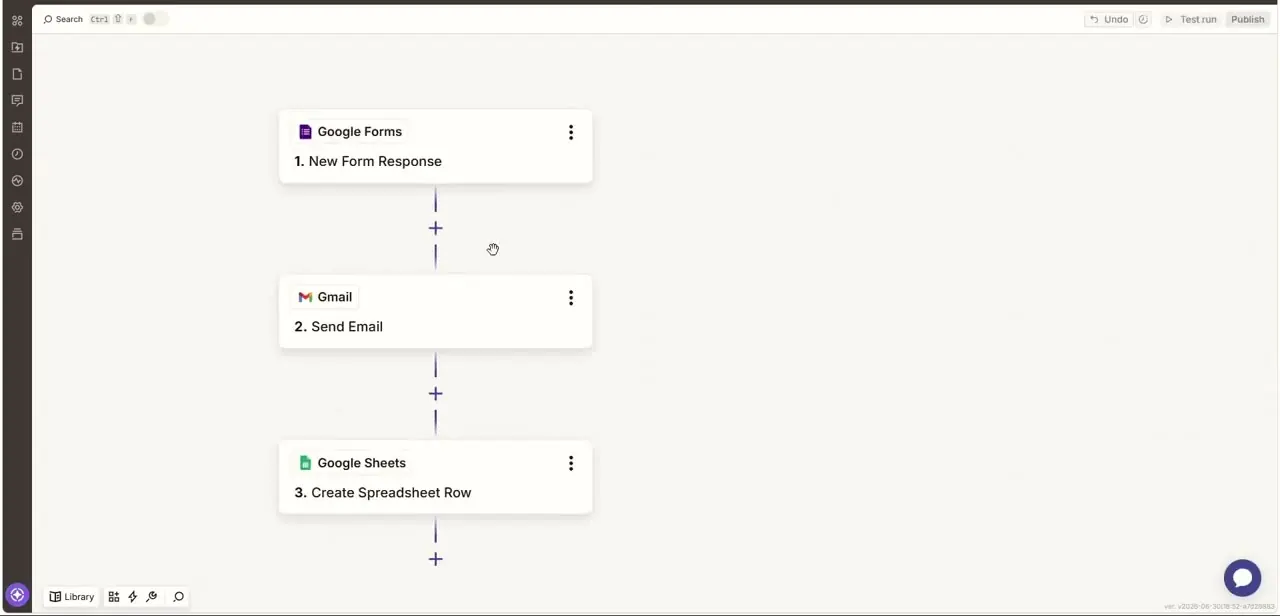
A Zapier flow reads top to bottom: trigger, then each action in order. In this example a new Google Forms response triggers a Gmail step that sends an email, and a Google Sheets step then logs the response as a row.
There's no canvas to arrange, which is why beginners get a working automation fastest here. Zapier can branch.
Paths and Filters are included from the Professional plan upward. The Free plan is limited to two-step Zaps (one trigger, one action) and 100 tasks a month.
A task is counted each time an action completes successfully. Triggers, failed actions and built-in tools such as Filter and Formatter don't count.
02Make: a canvas built around routers
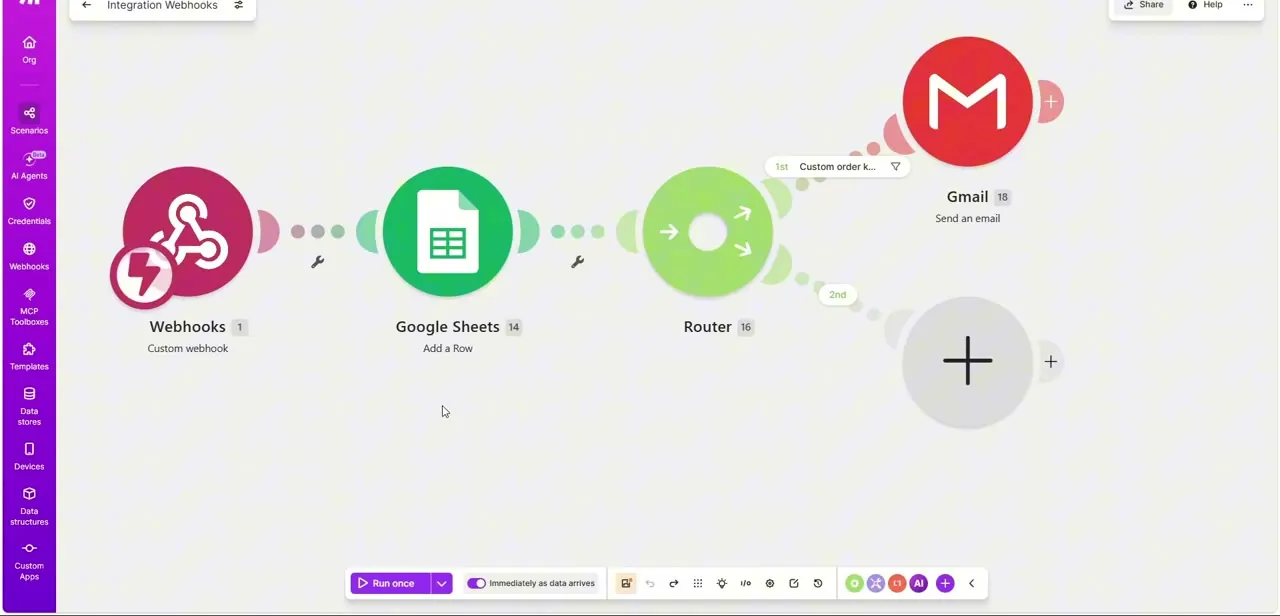
Make's scenario builder is a free-form canvas. The difference shows once a workflow needs a decision.
This scenario takes a webhook, reads Google Sheets, and hits a Router module that splits into separate paths: one filtered branch sends a Gmail message, another is still waiting for its module. One trigger fanning out into several conditional outcomes is the main reason people move from Zapier to Make.
The same canvas handles longer chains. A scenario named Social Media Comment Responder links a YouTube trigger, a video-info lookup, a Make AI Agents module and a Slack notification.
Make bills in credits. Each module action, such as adding a sheet row or fetching an email, uses one credit.
Make says routers and error handlers don't consume credits. The Free plan includes 1,000 credits a month with a 15-minute minimum interval between scheduled runs.
03n8n: pay per workflow run, or self-host
n8n's Community Edition is free to self-host, so the engine can run on your own server at no licence cost. Its paid cloud plans charge per execution, and n8n defines an execution as one run of the entire workflow, regardless of how many steps it has or how much data it moves.
For long workflows that fire often, this is the biggest cost difference in this comparison. A ten-step workflow is one execution on n8n, but up to ten tasks on Zapier or ten credits on Make.
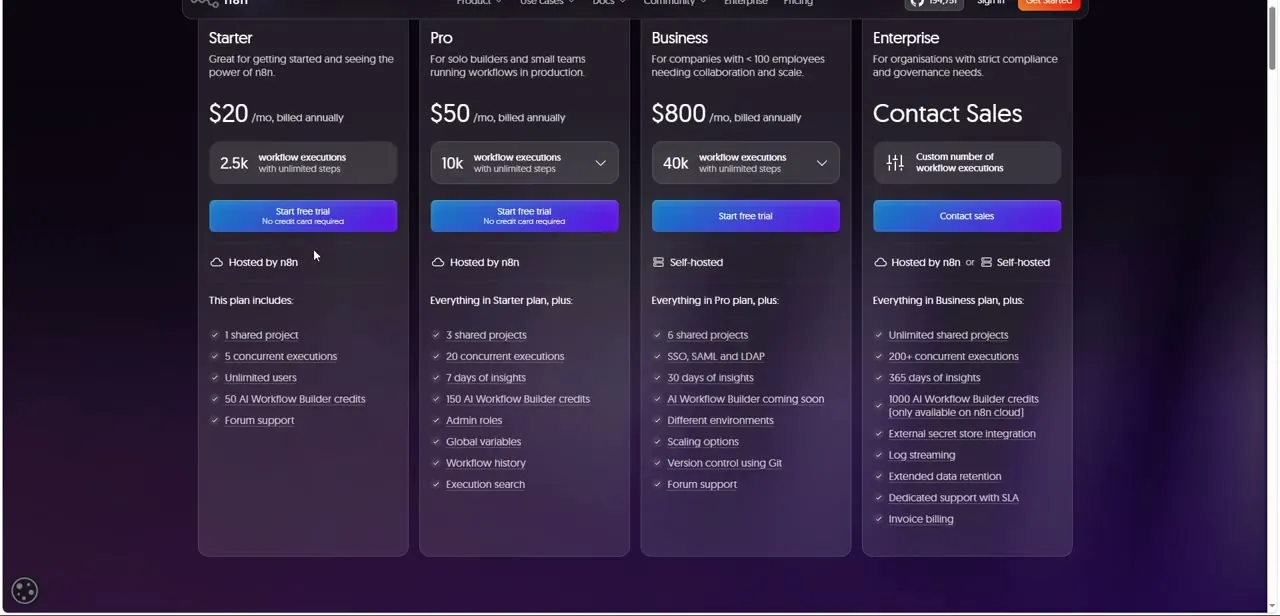
The tiers in the recording are Starter, Pro, Business and Enterprise. When the page was re-checked in September 2026 it listed Starter at €20 a month (2,500 executions) and Pro at €50 (10,000 executions), both cloud-only and billed annually.
Business came in at €667 a month for 40,000 executions, as a self-hosted plan with SSO and Git version control, and Enterprise was quote-based. The recording showed dollar prices, including $800 for Business, so expect the figure to vary with currency and billing period.
04IFTTT: cheap, personal, applet-limited
IFTTT is aimed at personal automations: a smart-home event, a social post, a phone notification. The Free plan allows two applets, each with one trigger and one action.
Pro ($2.99 a month billed annually) raises that to 20 applets and allows multiple actions. Pro+ ($8.99 a month billed annually) removes the applet cap and adds queries and filter code for conditional logic.
Runs aren't metered on any tier. The trade-off is depth: there's no team collaboration or the error handling a business workflow needs.
05Workato: enterprise, sales-led pricing
Workato sits at the other end. It targets larger organisations that need governance and integrations across many business systems.
Its pricing page publishes no figures and routes you to a demo request, so budget for a sales conversation and an annual contract, not a card-on-file signup. If your team has no IT or security requirements to satisfy, the other four tools will be cheaper to start with.
06Pick by workflow shape and run volume
A straight trigger-to-action chain points to Zapier, or to IFTTT if it's personal. Heavy branching and routing point to Make.
Long, frequent workflows, or a need to keep data on your own servers, point to n8n, whose per-run billing and free self-hosted edition reward teams willing to manage infrastructure. Before committing, estimate a month of usage in each tool's own unit.
Count the steps in your busiest workflow and multiply by how often it runs. That number means something different on each platform, as the table below shows.
| Tool | Billing unit | Free option | Entry paid plan (as listed) |
|---|---|---|---|
| Zapier | Task: each successfully completed action | 100 tasks/month, two-step Zaps only | Professional from $19.99/month billed annually (750 tasks) |
| Make | Credit: each module action | 1,000 credits/month, 15-minute schedule minimum | From $9/month for 5,000 credits |
| n8n | Execution: one full workflow run | Community Edition, self-hosted | Starter €20/month billed annually (2,500 executions) |
| IFTTT | Number of active applets | 2 applets | Pro $2.99/month billed annually (20 applets) |
| Workato | Not published | None listed | Quote via sales |
Taken from each vendor's pricing page in September 2026. Prices change often and n8n showed euro pricing at the time of checking, so confirm on the vendor's site before buying.
Frequently asked questions
Which is easiest for beginners: Zapier, Make or n8n?
Zapier. Its flows read as a simple top-to-bottom list with no canvas to arrange. Make and n8n give more control over branching and data handling, and take longer to learn.
Can Zapier branch like Make's router?
Yes, with Paths, which Zapier includes from the Professional plan upward. The Free plan is limited to two-step Zaps, so no branching there.
Is n8n free?
The Community Edition is free to self-host. n8n's cloud plans are paid, starting with Starter at €20 a month billed annually for 2,500 executions as of September 2026.
Why can the same workflow cost so differently on each tool?
Because the billing units differ. A ten-step workflow run once uses one n8n execution, but up to ten Zapier tasks or ten Make credits, depending on which steps count.
How much does Workato cost?
Workato doesn't publish pricing. Its pricing page asks you to request a demo.
Sources and last check
The Zapier flow, Make scenarios and n8n pricing screen come from the original video recording. Plan limits, billing units and entry prices for all five tools were re-checked against each vendor's own pricing page in September 2026. That check corrected the earlier implication that Zapier can't branch (Paths exist on paid plans), updated n8n's figures to the prices listed at the time, and added the per-task, per-credit and per-execution differences. No workflows were built or run for this comparison.
About the author

Impran M N
I've been hooked on technology for as long as I can remember — especially the new tools and AI apps that seem to land every other week. Easy Tech Tuts is where I write up whatever I've just worked out: I do the task in the real product, record the screen, and turn it into the guide I wish I'd found first.