Easy Tech Tuts
How to Get Monday.com API Key Easily 2026
By Impran M NLast checked against official docs
Every custom script, automation agent, or third-party integration that talks to Monday.com needs a personal API token to authenticate. Monday.com doesn't put this anywhere near the boards you use daily, and the route to it depends on your account role, which is exactly why people go looking under one menu and never find it. This guide covers both click paths, explains what you're looking at once you're there, and covers the security habits worth building in before you paste that token into anything.
01Open the account menu
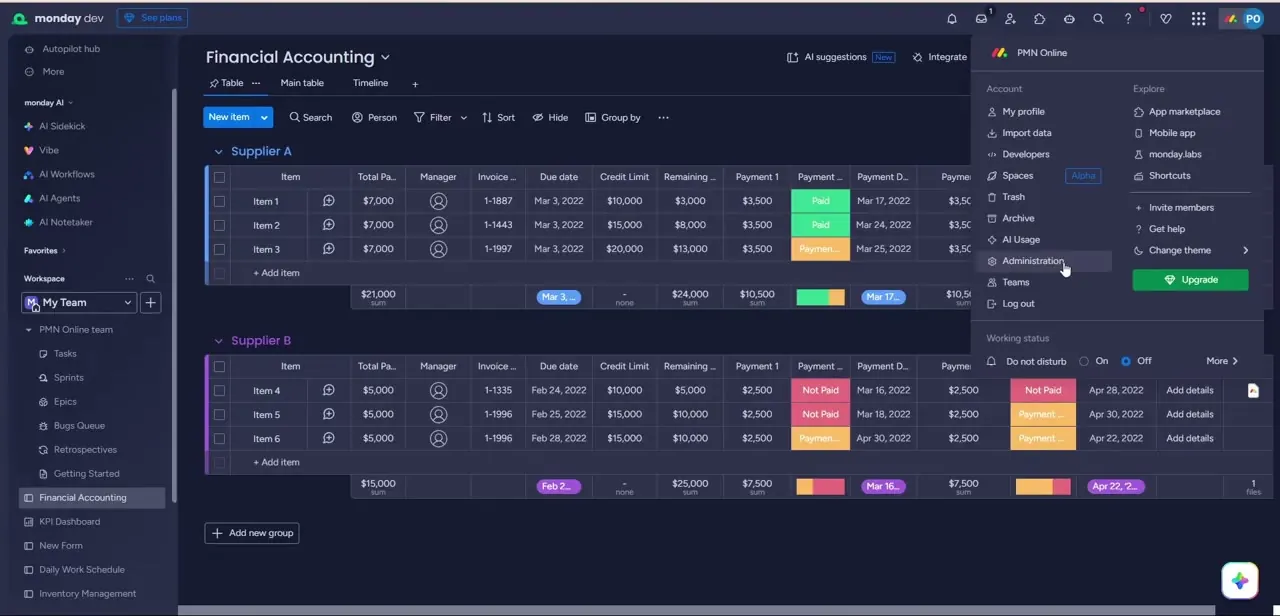
Click your avatar in the top-right corner of any Monday.com workspace to open the account panel. It's split into two columns: Account on the left, with items like My profile, Developers, and Administration, and Explore on the right, with the app marketplace and mobile app links. Which of those two Account items you need, Developers or Administration, depends on your role, which the next step covers.
02Find your token screen: Developers for most people, Administration for admins
If you are not an account admin, click Developers in the avatar menu. It opens the Developer Center in a new tab; from there, click API token, then Show, to reveal your personal token.
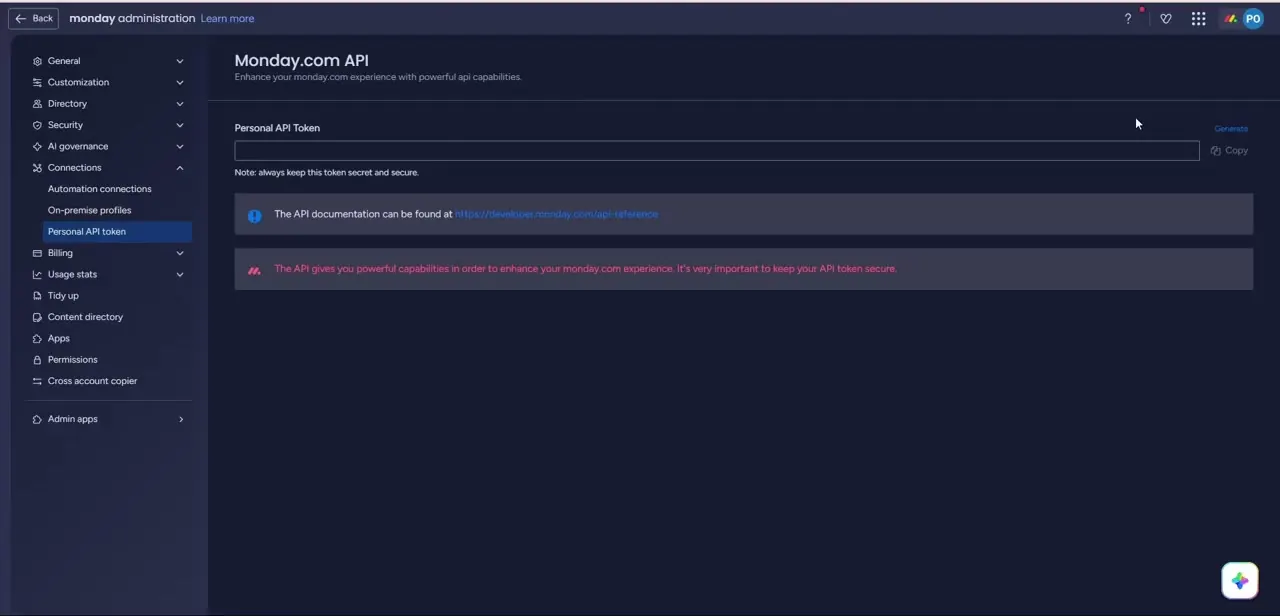
If you are an account admin, you have a second route: Administration in the same avatar menu, then Connections in the left sidebar, then Personal API token. That's the screen shown here, with a single input labeled Personal API Token, a Generate link, and a Copy button.
A blue note links to the API documentation, and a red banner warns that the token grants powerful access to your account, so treat it like a password. Both routes point at the same personal token, tied to your own user account rather than to a board or workspace.
03Generate the token and copy it immediately
With the field empty, click Generate (or Show, on the Developers path, once a token already exists). Monday.com fills the box with a long signed string, your personal token, tied to your user account and its permission level, not to a specific board or workspace.
Click Copy right away and paste it straight into wherever it needs to live: an environment variable, a secrets manager, or the header of your script. Don't leave it sitting in a chat message or a plain text file. Move it into secure storage before doing anything else with it.
04Understand what the token can and can't do
A personal API token inherits your own user permissions across the account. If you can see a board, edit an item, or manage automations manually, your token can do the same thing through the API.
This is different from an OAuth app credential, which is scoped to whatever permissions a user explicitly grants during an install flow. For a personal script or a local automation agent only you will run, the personal token is the simpler path. For anything you plan to distribute to other users or connect on their behalf, look at building an OAuth app instead, so you're not handing out access tied to your own account.
05Test the connection before building on top of it
Before wiring the token into a larger workflow, send one simple authenticated request to Monday.com's GraphQL API endpoint. A query for your own account name or user ID is enough to confirm the token works and that you're pointed at the right API URL. Catching an authentication problem at this stage, with one request, is far faster than debugging it inside a half-built integration with multiple moving parts.
06Regenerate the token if it's ever exposed
If a token ends up somewhere it shouldn't, committed to a public repository, pasted into a shared document, or used in a script that got copied around, go back to the same token screen and click Generate again. Monday.com issues a fresh token and immediately invalidates the old one, which cuts off anything still using it. Update every place that referenced the old token afterward, since regenerating breaks those connections until you swap in the new value, and check your workspace's activity log for anything that looks like it came from the compromised key.
When it doesn't work
Administration isn't in your avatar menu
Why: Administration only appears for account admins; regular members don't get it at all.
Fix: Use Developers in the same avatar menu instead, then API token → Show, which works for every role.
A script or integration suddenly stops authenticating
Why: The personal token was regenerated, intentionally or by someone else with admin access, which immediately invalidates the previous value.
Fix: Generate a fresh token from the same screen and update every place that referenced the old one.
API calls return a permissions error even though the token is valid
Why: A personal token mirrors your own user permissions exactly; if your account has read-only access to a board, the token can't write to it either.
Fix: Check what your own user account can do on that board first. If you need broader or narrower access than your account has, that's a permissions change, not a token problem.
Frequently asked questions
Where do I find my Monday.com API key?
It depends on your role. Most people click their avatar, then Developers, which opens the Developer Center; click API token, then Show. Account admins can also reach the same token through Administration → Connections → Personal API token.
Why don't I see Administration in my avatar menu?
Administration is only shown to account admins. If it's missing, you're a regular member, and Developers → API token in the same avatar menu gets you to your own personal token instead.
Is a personal API token the same as an OAuth token?
No. A personal token inherits your own account permissions and is meant for scripts or automations you run yourself. OAuth tokens are scoped per app and per user consent, and are the right choice for integrations you distribute to others.
What happens if I regenerate my API token?
Monday.com immediately invalidates the old token and issues a new one. Any script, integration, or agent still using the old value will stop authenticating until you update it with the new token.
Can I limit what my API token can access?
A personal token mirrors your own user permissions across the account rather than offering granular scopes. If you need tighter, per-integration access control, build an OAuth app instead.
Sources and last check
Click path re-checked against Monday.com's official developer documentation in September 2026. That check found the original draft's Administration-only path works for account admins but not for regular members, who need Developers → API token instead; the steps and FAQ here now cover both.
About the author

Impran M N
I've been hooked on technology for as long as I can remember — especially the new tools and AI apps that seem to land every other week. Easy Tech Tuts is where I write up whatever I've just worked out: I do the task in the real product, record the screen, and turn it into the guide I wish I'd found first.