Easy Tech Tuts
How To Merge Cells In Smartsheet Easily 2026
By Impran M N
If you're coming from Excel, you might go looking for a merge cells button in Smartsheet and not find one. That's intentional, since Smartsheet's grid structure avoids the row-breaking issues traditional merging can cause. This guide covers the native alternatives that get you the same visual effect.
01Understand why merging is omitted
Smartsheet's grid structure avoids traditional multi-column cell merging to prevent broken rows and dataset corruption.
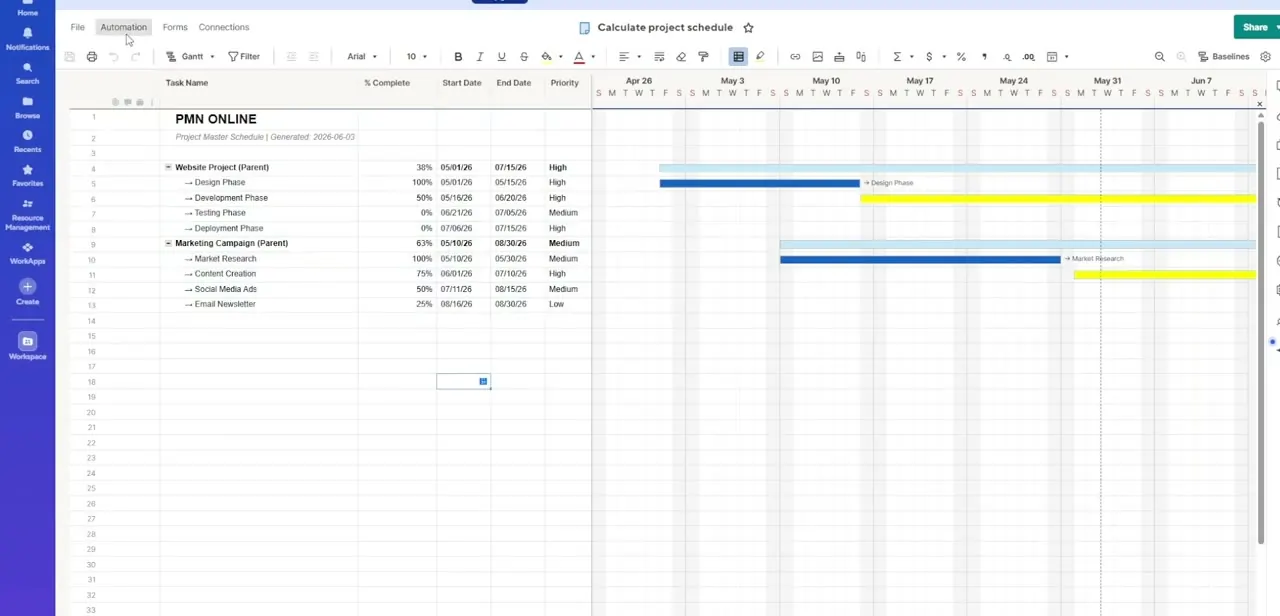
02Use Parent-Child Row Hierarchies
Group rows underneath a single spanning header row to create a visual structure similar to a merged cell.
03Style parent rows for emphasis
Apply background fills, bold fonts, and borders to parent rows to make the grouped structure clearly scannable.
04Combine text with JOIN
Use the JOIN function or the + operator to combine text from separate columns into a single cell.
05Set up rollups for numbers
Configure parent-row rollup formulas to automatically summarize or combine numeric values from child rows.
Frequently asked questions
Does Smartsheet have a merge cells button like Excel?
No, Smartsheet intentionally omits traditional cell merging to protect grid structure and prevent broken rows.
How do I get a visual effect similar to merged cells?
Using Parent-Child Row Hierarchies to group rows under a spanning header row achieves a similar visual result.
Can I combine text from two columns into one?
Yes, the JOIN function or the + operator lets you combine text from separate columns into a single cell.
Will collapsing rows help clean up a grouped structure?
Yes, expanding and collapsing grouped subtasks beneath parent categories helps manage large boards without visual clutter.
Watch the full walkthrough
The same steps, demonstrated on screen from start to finish.