Easy Tech Tuts
How to Sync Etsy with QuickBooks Online Easily 2026
By Impran M NLast checked against official docs
Etsy doesn't hand sales data to QuickBooks Online on its own. The connection runs through an app Intuit calls Etsy Connector, installed from QuickBooks' own integrations panel.
Once it's linked, every Etsy order turns into a sales receipt or invoice in QuickBooks, with matching customer and product records, so you stop retyping order totals into a spreadsheet at the end of the week. This guide covers finding the connector, what it needs from you before the first sync, and what to check once orders start flowing in.
Before you start
- A QuickBooks Online company file with an Income account and an Expense account already set up (the connector requires you to choose both during install)
- An Etsy seller account you can sign in to directly
01Open My integrations from the QuickBooks dashboard
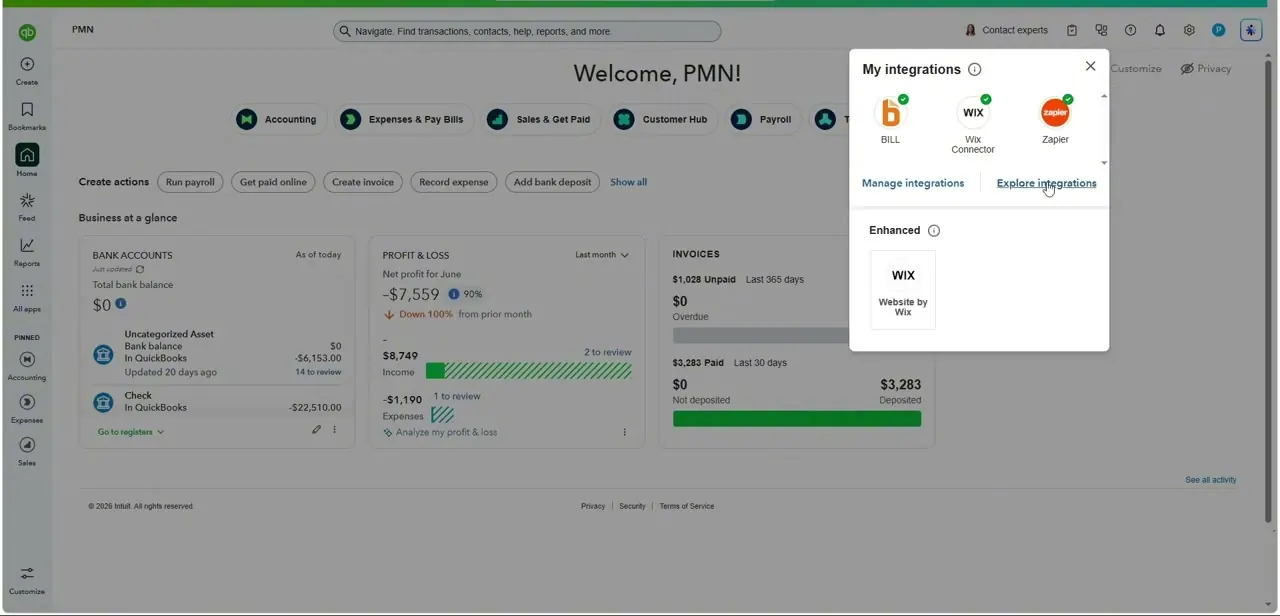
From your QuickBooks Online home screen, open the integrations panel in the top corner. It lists apps already connected to your account, things like Bill, the Wix Connector, or Zapier show up here if you've used them, alongside a "Find integrations" link for adding new ones. Etsy isn't listed among the defaults, which is exactly why you need to search for it.
02Find the Etsy Connector listing
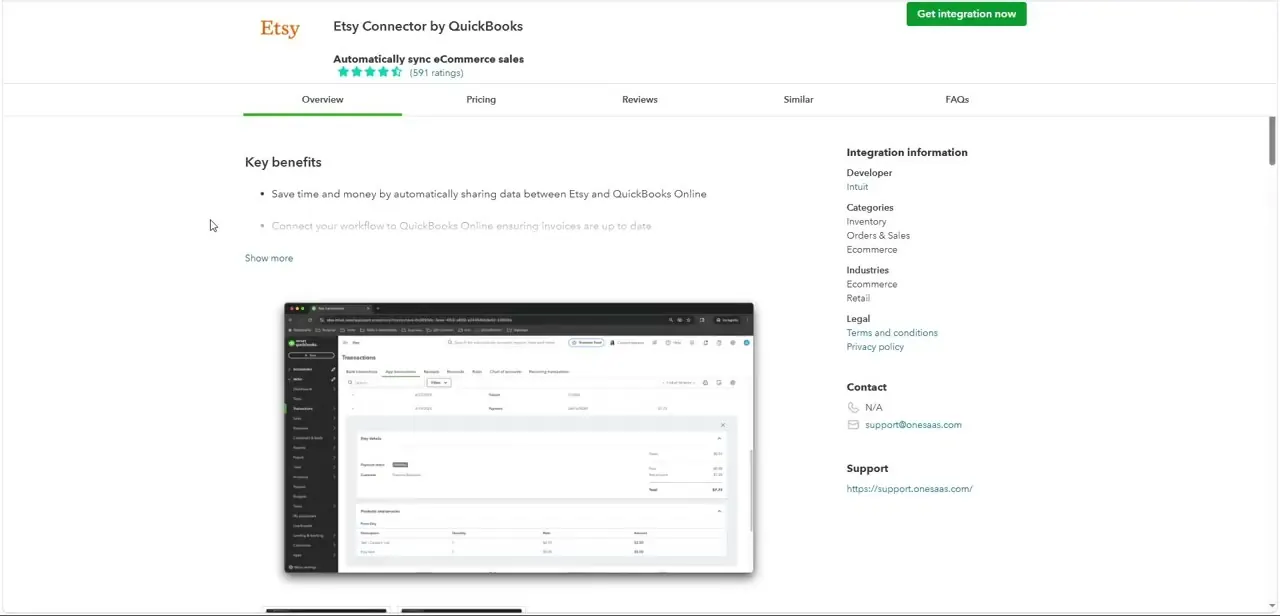
Search "Etsy" from Find integrations. Intuit's own materials list this app under two slightly different names, Etsy Connector by Intuit in some places and Etsy Connector by QuickBooks in others, so searching the shorter word avoids missing it. The Overview tab opens with three benefits up front: it shares data automatically between Etsy and QuickBooks Online, keeps invoices current without manual entry, and cuts the human error that comes from copying numbers by hand.
03Read what the connector actually automates
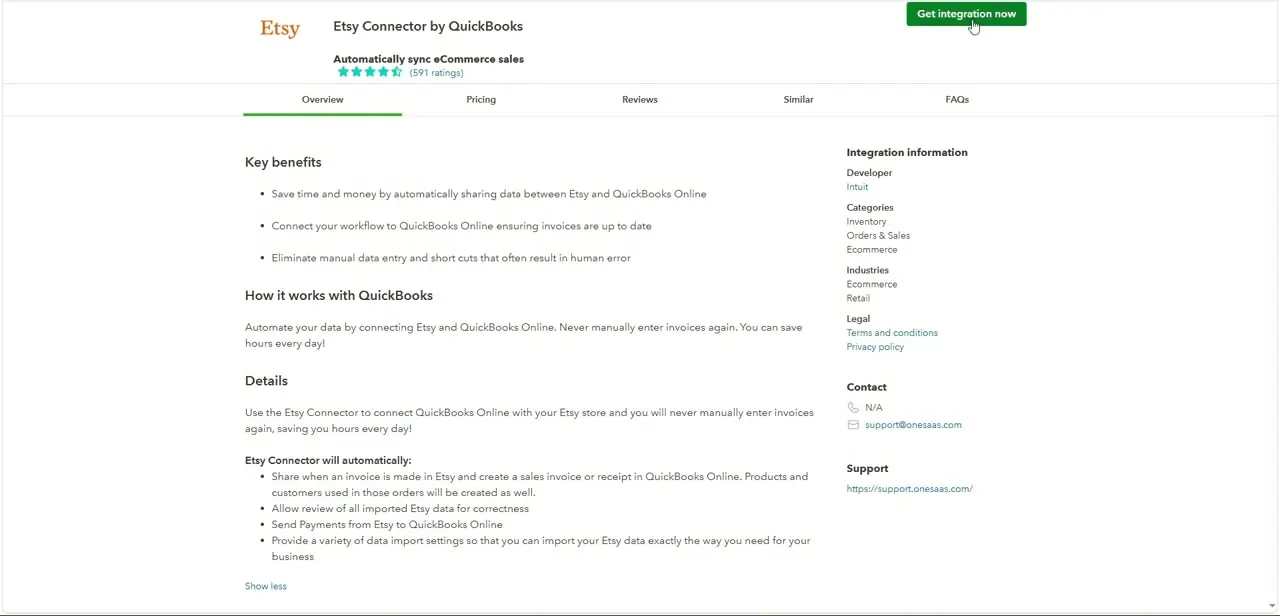
Scroll the same listing down to "How it works with QuickBooks" and "Details." The connector shares data whenever an invoice is made in Etsy, creating a matching sales invoice or receipt in QuickBooks Online, and it creates the associated products and customers along the same pass. It also sends payment records from Etsy through to QuickBooks and lets you review imported data before it's finalized.
04Click Get app now and authorize both accounts
The green "Get app now" button starts the install. Enter your Etsy username or email and password, then select Grant access to authorize Etsy to send your orders to QuickBooks. Before the connection finishes, the setup screen requires you to pick an Income account and an Expense account for the connector to post to; without both selected, install won't complete.
05Set import preferences and the historical range
Go through the connector's import settings and decide how Etsy fees should be categorized, and which QuickBooks accounts sales and shipping income should post to. You can also choose a historical import start date, pulling in up to a year of past Etsy orders rather than only new ones going forward. Getting the account mapping right here saves a cleanup pass later; miscategorized fees are one of the most common issues sellers hit after connecting an e-commerce platform to their books.
06Watch the App transactions tabs
Once an order is created in Etsy, it usually appears in QuickBooks within about four hours, though a sale only imports as a sales receipt once Etsy shows it as fully paid. The App transactions page tracks this in three tabs: Processing, for orders still coming through; Imported, for ones that landed successfully; and Excluded, for anything you've manually kept out.
Check a handful of early orders against these tabs to confirm customers and products mapped the way you expected, and revisit your Profit & Loss report periodically after that. To stop the sync later, go to Manage integrations, find the Etsy app card, and select Disconnect.
When it doesn't work
An order placed on Etsy hasn't shown up in QuickBooks
Why: New orders typically take up to about four hours to reach the Imported tab, and a sale only imports once Etsy marks it as fully paid
Fix: Wait for the sync window to pass, then check the Processing tab for anything still queued before assuming the connection is broken.
The install screen won't let you finish setup
Why: Etsy Connector requires an Income account and an Expense account to be selected before the connection activates
Fix: Choose or create those two accounts in the connector's settings, then continue.
The same customer shows up twice in QuickBooks
Why: The connector matches Etsy buyers to QuickBooks customers by name, so an existing duplicate in QuickBooks, or a slightly different name on a repeat order, creates a second record
Fix: Clean up duplicate customers in QuickBooks before connecting, and merge any duplicates the connector creates afterward.
Frequently asked questions
What data syncs between Etsy and QuickBooks Online?
The Etsy Connector creates a sales invoice or receipt in QuickBooks for every Etsy order, along with matching product and customer records, and it sends payment data from Etsy through to QuickBooks too.
Is the Etsy Connector a native QuickBooks feature or a separate app?
It's a separate app, built by Intuit and listed in QuickBooks Online's integrations panel, not something enabled from QuickBooks' default settings.
How long does it take for a new Etsy order to appear in QuickBooks?
Usually within about four hours of the order being created, and only once Etsy shows the order as fully paid.
Can I pull in past Etsy orders, or only new ones?
Both. During setup you can choose a historical import start date and bring in up to a year of past orders, not just orders placed after you connect.
What do I need set up in QuickBooks before connecting?
An Income account and an Expense account. The connector asks you to choose both before the install completes.
Sources and last check
Click path and screens come from a walkthrough recorded in 2025. The install flow, the required Income/Expense accounts, the one-year historical-import limit, the roughly four-hour sync timing, and the App transactions tabs were checked against Intuit's own QuickBooks support article in September 2026. That check also corrected the install button's name, from "Get integration now" to the connector's actual "Get app now."
About the author

Impran M N
I've been hooked on technology for as long as I can remember — especially the new tools and AI apps that seem to land every other week. Easy Tech Tuts is where I write up whatever I've just worked out: I do the task in the real product, record the screen, and turn it into the guide I wish I'd found first.